Discover great products




100% genuine official redemption code rights. Activate according to the redemption instructions after purchase. Specific rights are subject to the description of the selected version.
Product prices and member discounts are clearly displayed. You can verify current discounts before purchasing. Specific price protection rules are subject to the product activity and service descriptions.
If the redemption code cannot be used or benefits are not activated, please retain order information and contact the assistant for help. Virtual product redemption codes are non-refundable once issued.
Each personally reviewed experience helps you choose with confidence.
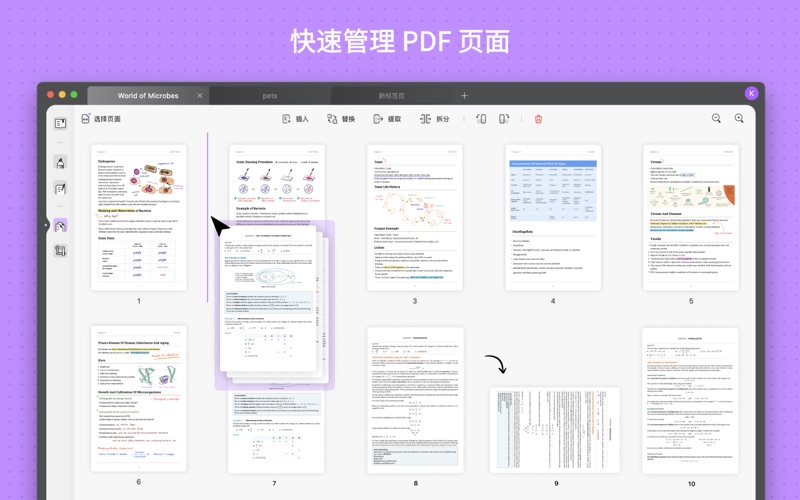
Mergeek Recommends: UPDF is a beautifully designed PDF editor that includes features such as reading, editing, converting, annotating, page management, document protection, and online sharing. It allows you to freely annotate and doodle on PDFs while effortlessly editing any content within them. Even when opening extremely large PDF documents, there is no lag. It supports all major platforms including Mac, Windows, iOS, and Android, significantly improving your work and study efficiency.
PDF Editing / PDF Annotation / Cross-Platform Support / Online Sharing / PDF Format Conversion
App Store 4.6 • 900+ ratings
Supported Platforms: iOS / Android / Mac / Windows
📱 💻 Buy Once, Permanent Access Across All Platforms
👉🏻 Go to the Mac App Store to download for free and explore
*********
🎁 Purchase UPDF Permanent Premium Edition now,and receive a complimentary aJoysoft - PDF Password Remover Tool, Permanent Premium Edition valued at 148 yuan
This tool supports decrypting PDF file passwords and removing restrictions on editing, copying, and printing PDF files.
*********
UPDF offers powerful editing capabilities, allowing you to replace, add, and delete any content in a PDF, greatly enhancing your document productivity.
In terms of text editing, UPDF provides functions to add, delete, modify font size, color, weight, and alignment. Besides editing existing text, you can also use UPDF to add new text.

Images in PDF documents can be added, deleted, replaced, cropped, and resized. You can also extract high-definition images directly to your desktop, freely adjust their position and orientation, and edit images more smoothly.

Quickly link text to other pages or webpages, and images within PDF documents can also have links added.

Supports adding watermarks in bulk.

Additionally, you can add page footers and batch-add backgrounds, among other features.
UPDF offers a rich variety of annotation tools, including highlighting, strikethrough, underline, wavy line, text comments, text boxes, text labels, pencils, shapes, stamps, etc., along with hundreds of personalized stickers. You often see people using UPDF to create exquisite notes and documents on various social media platforms.

UPDF provides a large number of personalized stickers, making your documents look better while also facilitating easier collection of your inspiration.

You can use the pencil and shape tools to manually draw what you want to mark, doodling freely.

We usually share finished PDFs with friends and colleagues via WeChat, email, etc. For small files, this is fine; however, exporting and sending a huge document can be quite stressful. With UPDF, we can easily share PDF files via links. Friends can open them online directly using the link, greatly improving work efficiency.

UPDF supports operation and usage on four major mainstream platforms: Mac, Windows, iOS, and Android, helping you use PDFs in various environments.


*********
🎁 Purchase UPDF Permanent Premium Edition now,and receive a complimentary aJoysoft - PDF Password Remover Tool, Permanent Premium Edition valued at 148 yuan
This tool supports decrypting PDF file passwords and removing restrictions on editing, copying, and printing PDF files.
*********
Product Creator
Real user experiences and discussions
No public reviews yet. We look forward to your experience.
View recent version features and experience improvements
- 支持缩略图多选页面操作。
- 修复部分用户反馈的问题,提升产品稳定性。
After installation, pressRedemption InstructionsActivate benefits.
View redemption methods and usage guide
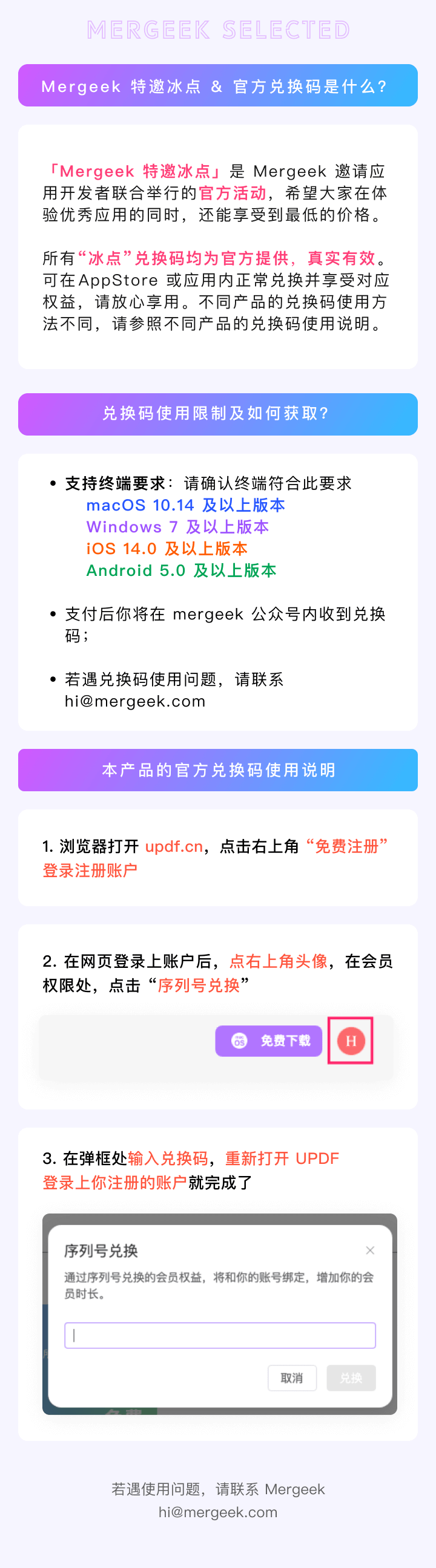
After payment, you can check your order in 「My Orders」 to view the redemption code and usage instructions.
If you encounter issues such as an unusable redemption code or inactive benefits, please keep your order information and contact our assistant.
Virtual product redemption codes are non-refundable once issued. Please confirm the applicable platform and version before purchasing.

Permanent Pro Version
PDF Chat, Edit, Convert & AI Tools
MERGEEK · SECURE CHECKOUT
UPDF Permanent Pro Version
You’ll complete payment on PayPal.
Find your redemption code in My Orders after payment.
Thank you for supporting genuine software. Your redemption code is ready.
View My OrdersRedemption code and usage instructions can be viewed in 「My Orders」
 Mergeek

Scan to contact Alisa
© Mergeek. All rights reserved. Built for the products. 京ICP备2021030996号 《隐私政策》