


 +100宝石


产品功能
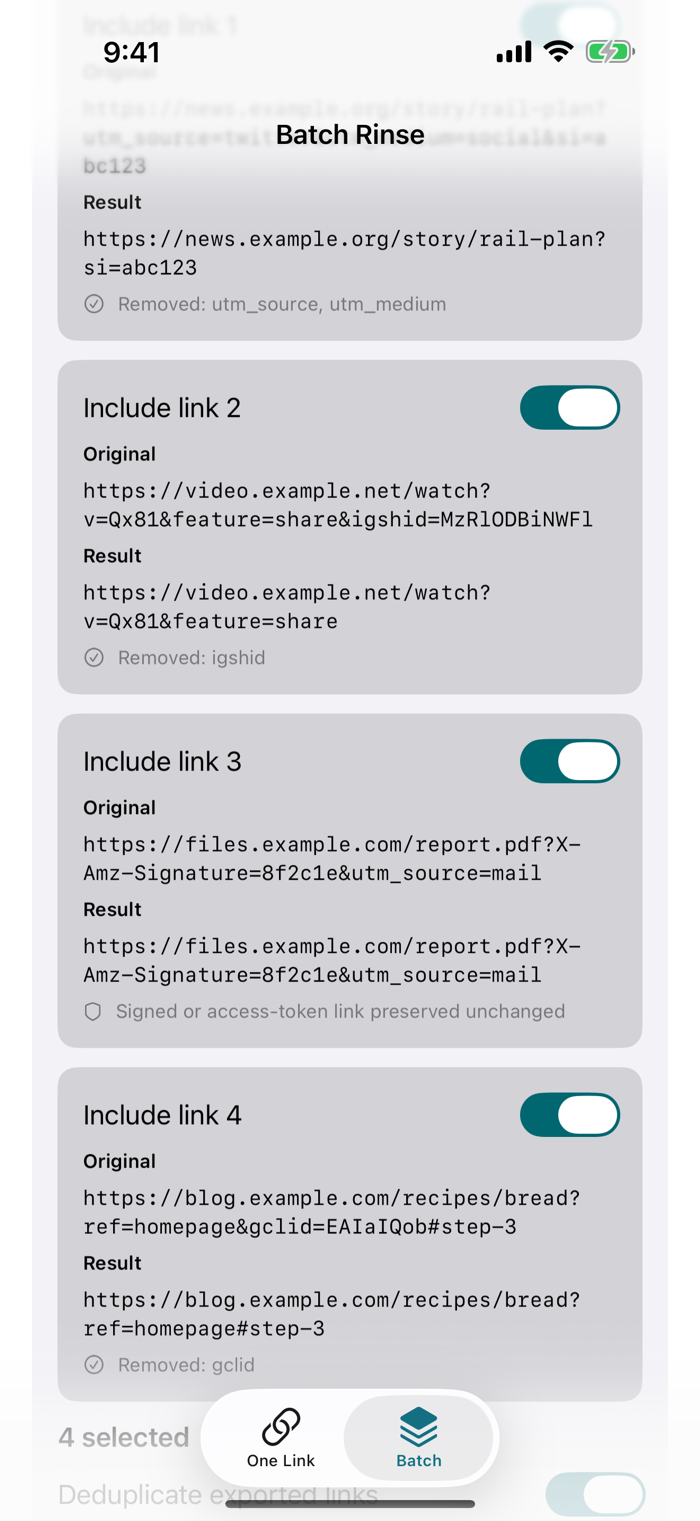
Linkrinse removes common tracking parameters from web links before you share them, one link at a time or up to 200 at once, while leaving the parts that make a link work alone.
ONE LINK
Paste or type a link and tap Inspect. Linkrinse shows the cleaned link and lists exactly which parameters it removed. Copy the clean link or share it.
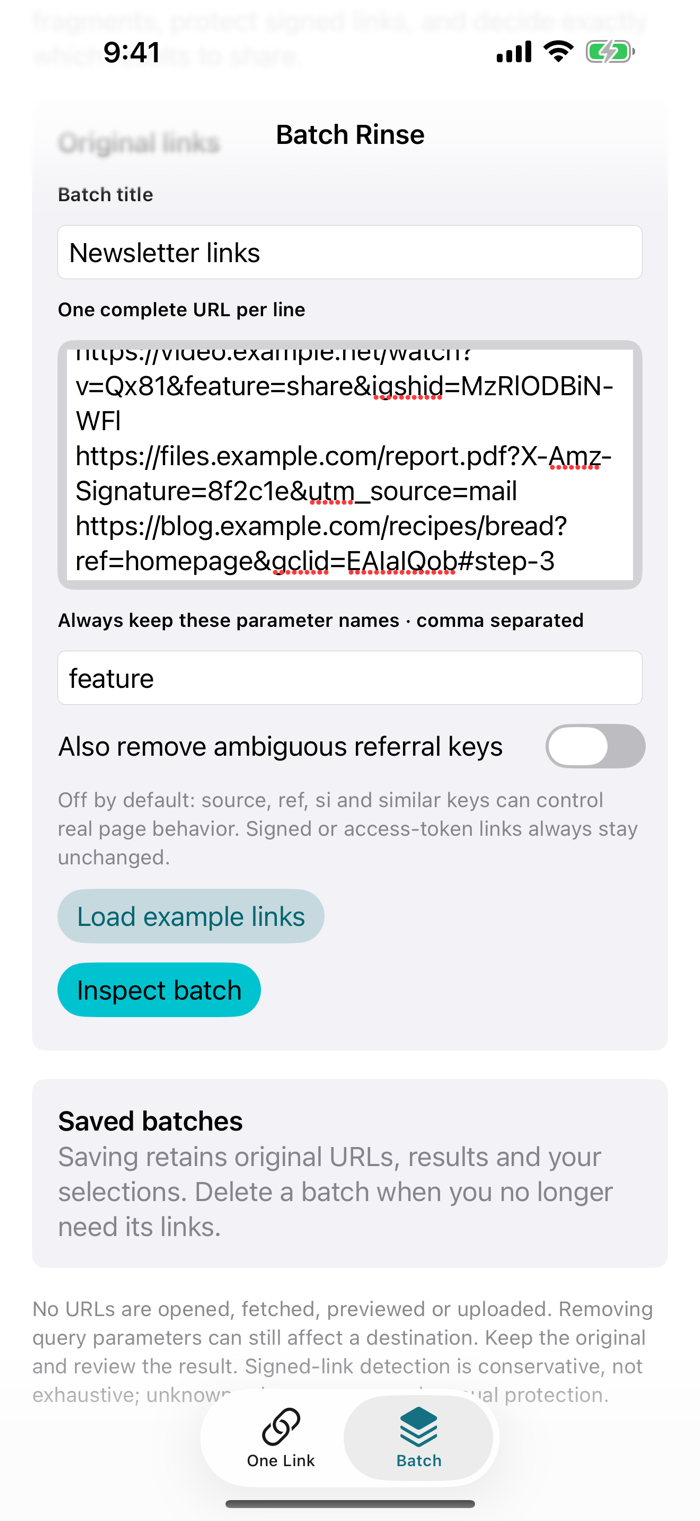
BATCH
- Paste up to 200 links, one per line, and give the batch a title.
- Name any parameters you always want kept, and choose whether to also remove ambiguous referral keys such as si, ref, source and campaign. That option is off by default because these keys can change what a page shows.
- Inspect the batch to see every original next to its result, with a note for each line: what was removed, why a link was left unchanged, or why a line was rejected.
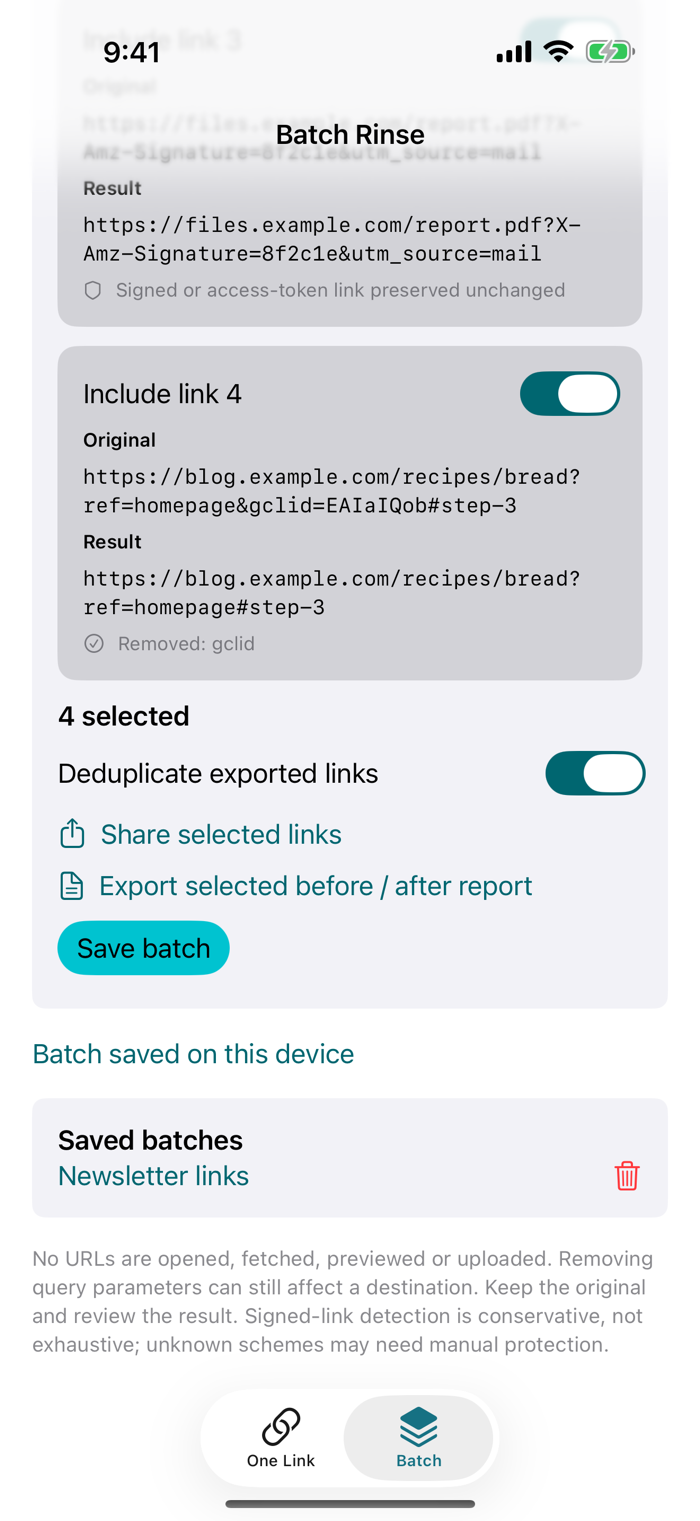
- Select the results you want, then share the selected links (with optional de-duplication) or export a before-and-after report.
- Save a batch on your device to reopen it later with the same settings and selections, and delete it when you no longer need it.
WHAT IS REMOVED
All utm_ parameters (utm_source, utm_medium, utm_campaign and the rest), fbclid, gclid, dclid, msclkid, mc_cid, mc_eid, igshid, vero_conv and vero_id. Ambiguous referral keys are removed only when you turn that option on in Batch.
WHAT IS KEPT
- Anchor fragments (#section), the order and exact encoding of the remaining parameters, and the link's http or https scheme
- Signed or access-token links, for example links with X-Amz-Signature, signature, token or key parameters, are left completely unchanged so download links keep working
- Links containing a user name or password are rejected instead of cleaned
PRIVACY
Links are processed on your device. Linkrinse never opens, fetches, previews or uploads them, and it reads the clipboard only when you tap Paste. No account, no ads and no analytics.
GOOD TO KNOW
Linkrinse works inside the app; it does not include a share extension or a Safari extension. It does not unwrap redirect links, convert AMP pages or remove affiliate codes. Removing parameters can occasionally change how a page behaves, so keep the original if in doubt.
分享「」体验,参与「」抽奖!
分享 1~3 张你对这个产品最满意的截图或效果图
分享「」体验,参与「」抽奖!
用你的故事点亮社区✨!你的真实体验,将会永久展示在 官方主页 📌,为其他朋友提供宝贵参考 💡。立即分享吧!🚀
请为产品评分
请选择问题回答,为大家提供宝贵参考
选择要回答的问题
温馨提示
你尚未上传产品截图。
上传截图可立即获得宝石积分奖励!
如果你赶时间,也可稍后修改评论,补上截图领取宝石。
温馨提醒
你尚未添加产品截图
⚠️ 不添加截图将降低抽奖权重

感谢参加,你已成功参加!
为了确保你能及时收到审核结果和领奖码通知

扫描二维码关注 Mergeek 公众号
在后台回复 「获奖通知」
完成上述操作,即可保障奖励发放成功






用户评价
立即分享产品体验
你的真实体验,为其他用户提供宝贵参考
💎 分享获得宝石
【分享体验 · 获得宝石 · 增加抽奖机会】
将你的产品体验分享给更多人,获得更多宝石奖励!
💎 宝石奖励
每当有用户点击你分享的体验链接并点赞"对我有用",你将获得:
🔗 如何分享
复制下方专属链接,分享到社交媒体、群聊或好友:
💡 小贴士
分享时可以添加你的个人推荐语,让更多人了解这款产品的优点!
示例分享文案:
"推荐一款我最近体验过的应用,界面设计很精美,功能也很实用。有兴趣的朋友可以看看我的详细体验评价~"
关注 Mergeek 公众号
领奖遇到问题?联系小门助手