产品功能

应用市场介绍

Watch Gear Calculator helps watchmakers diagnose issues in watch gear trains. It is ideally used in conjunction with a TimeGrapher with a trace function.
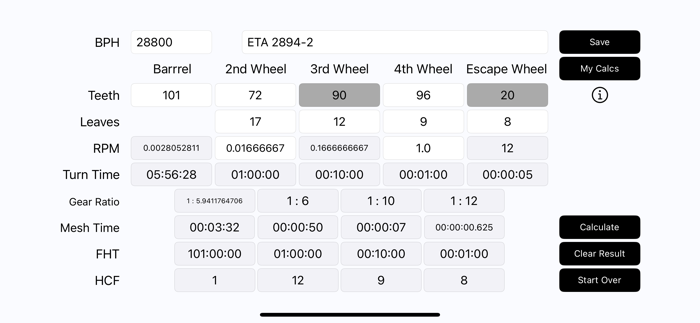
If a trace shows a significant change in amplitude at a regular frequency, Watch Gear Calculator will help you identify the likely cause. You input the number of teeth / leaves for each wheel and press calculate. You are presented with hh:mm:ss results for turn time, tooth passage and more for each wheel. Whichever result matches the frequency of issues seen on the trace will reveal where the problem is.
For example, perhaps your trace shows a reduction in amplitude every five minutes. This matches a 00:05:00 result for Barrel Mesh Time. Meaning the issue is caused by the meshing of the Barrel teeth with the Second Wheel pinion. It likely means the barrel is tilting and you need to re-bush the barrel bridge.
How to Use
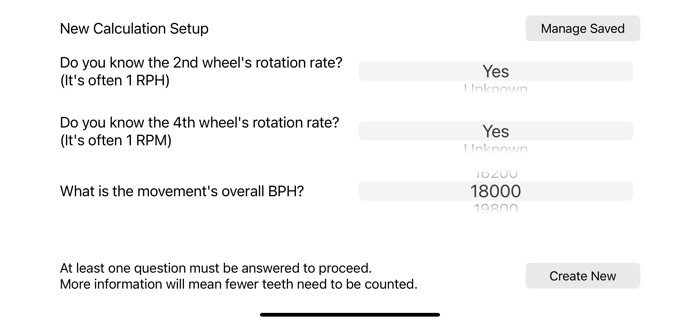
When the app opens or you reset it, you setup the calculation by providing basic information about the movement's BPH and RPMs of 2nd and 4th wheels if known. You must be able to answer at least 1 of 3 questions . If in doubt, providing just the movement's BPH is fine. Or, if you're not sure about the BPH but you know the 4th wheel rotates once per minute, that's fine too. The BPH will be calculated. More information will mean fewer teeth to count and help the calculator validate results.
Next you fill in all the white fields with tooth counts. Simply hit calculate when you have inputed everything. Missing or invalid fields will turn red.
Once you have calculated, you can make changes to any of your inputs. Doing so will clear off invalid calculations and you will have to hit calculate again to refresh the results.
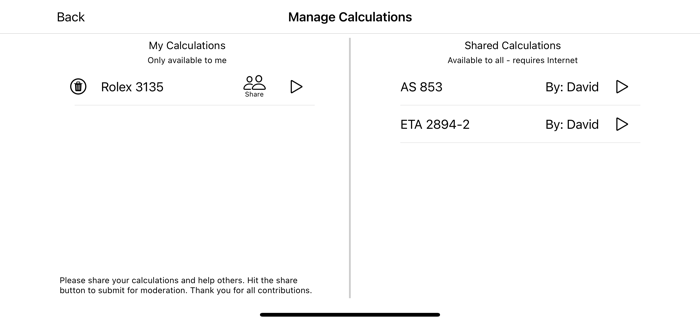
To save, enter the name of the movement and hit save. Hit My Calcs to see all your calculations and calculations that have been shared by other users. If you want to share your calculations with everyone, just hit share and follow the prompts.
How To Interpret Calculations

You will mostly be relying on Turn Time, Tooth Passage and Hunting Tooth Frequency to diagnose issues. These are all displayed in hours, minutes, seconds and milliseconds. Gear Ratio and RPM are also provided for completeness.
Turn Time - The time it takes for a wheel to complete a full turn. An abrupt drop in amplitude matching this frequency indicates a damaged tooth or pinion leaf. A gradual wave matching this frequency indicates a bent pivot or an out-of-true wheel.
Mesh Time - Also known as Tooth Passage. The time it takes for a given tooth to engage and disengage with a pinion leaf. If this shows on the trace, the problem is likely to be caused by incorrectly meshing teeth. This is very common between the Great Wheel and the Second Wheel and often indicates worn bushes causing the barrel to not be fully upright.
FHT - This is the "Hunting Tooth Frequency" of the wheel and its meshing pinion. This is an unusual calculation not well known in horology. It is commonly used in gear vibration analysis for cars. But it is extremely useful in watchmaking too. If both a tooth and a pinion leaf were damaged, this is the frequency at which they will make contact. This might be seen on a trace as a seemingly random drop in amplitude every so often. Or even a watch that stops for no obvious reason. If the time between stopping matches a hunting tooth frequency, then you have identified the cause.

HCF - This subject requires more explanation and we are limited by word-count on the App Store! Please visit the info page via the app to learn more about HCF.

收起

用户评价

立即分享产品体验

你的真实体验,为其他用户提供宝贵参考

宝石
评论可得 100 宝石
宝石随心兑换应用高级会员,每周更新 前往查看 >>
活动动态 0 人参加
查看更多评论