


 +100宝石


产品功能
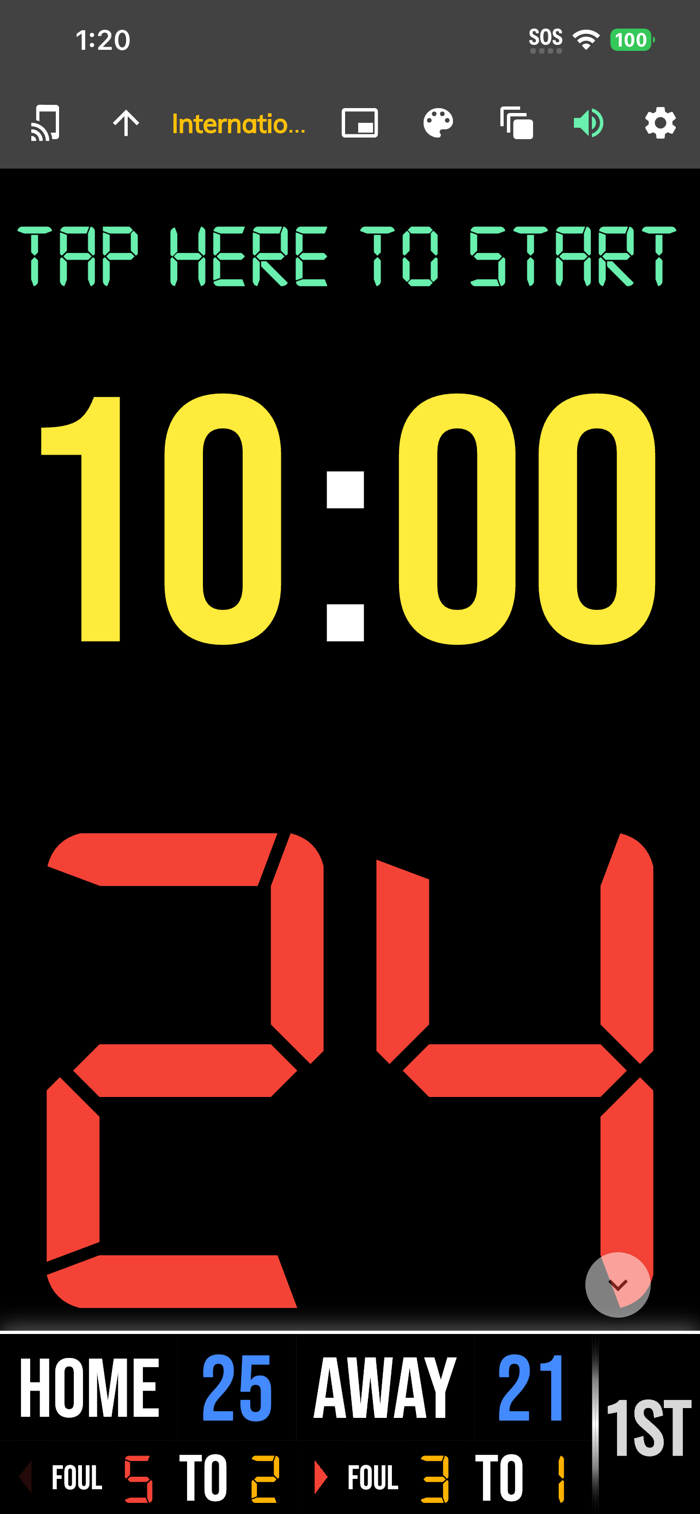
One of the cleanest shotclock apps on the market. The BT Shotclock app, developed by and for a basketball company that runs it's own basketball leagues, is the next best option to investing in an expensive professional grade shotclock. Shotclock and Scoreboard equipment which can cost you thousands is now available and affordable to everyone in the basketball community.
In-depth Tutorial: https://youtu.be/fopYwQPOZ2k
Use the shotclock by itself or download the free BT Controller app to remotely control the shotclock or multiple shotclocks simultaneously. Open the connect menu on the BT Controller app, the shotclock is automatically detected, hit the WiFi or Bluetooth button next to the shotclock name on the BT Controller app to connect.
BT Shotclock Features:
- Clean design, no ads
- Can use as a stand alone shotclock with intuitive direct tap and swipe controls
- Remotely control shotclock with WiFi or Bluetooth using free BT Controller App
- Convenient Presets (International, 3x3, US Pro, College, High School, and more...)
- Convenient timers: pregame timer, period timer, rest timer, timeout timer, overtime, etc.
- Fully customizable game in the settings
- Practice modes configured in settings is great for running practices
- Audio buzzers for shotclock violation, end of period, substitutions, etc.
- Warning beep near end of pregame, timeout, or rest times (customizable)
- Quick Start Documentation below
For the best experience, use the application on a large tablet, or hook your phone/tablet up to a large display or video projector. You'll feel like you have just bought a professional shotclock!
The BT Shotclock app was created by The Basketball Temple Company. The Basketball Temple Company focuses on high quality basketball academies, basketball leagues, and technologies that are used to support those academies and leagues. We open our technology to the public so everyone in the basketball community can experience the same technologies that we use within our institutions.
# Quick Start Documentation:
Exiting Game and Reseting Times:
- Click top right settings icon (if top bar is hidden, click top left hamburger icon to open top app bar)
- Scroll down and hit "Exit Game" button
Time Controls:
- Tap period timer to start/pause
- Tap pregame, timeout, rest timers to early transition to next stage
Shotclock Controls:
- Tap shotclock to reset/go
- Swipe shotclock up/down to reset/go to short shotclock
Connect and Remote Control:
- Start the BT Controller app on a different device
- In the BT Controller app, open the connect menu on the top left
- The Shotclock should automatically discovered
- Click on the Wifi/Bluetooth icon next to the Shotclock name to connect
- If unable to connect or having connection errors try one of the following:
1) please ensure all devices are on the same WiFi network
2) please ensure bluetooth is turned ON on all devices
3) lastly, try to restart the app on all devices
Time and Game Settings:
- Tap on top-right icon (or swipe right-to-left on the right edge) to open settings menu
- Edit and save the many settings available
Privacy Policy: https://www.basketballtemple.com/privacy
Terms of Use: https://www.apple.com/legal/internet-services/itunes/dev/stdeula/
分享「」体验,参与「」抽奖!
分享 1~3 张你对这个产品最满意的截图或效果图
分享「」体验,参与「」抽奖!
用你的故事点亮社区✨!你的真实体验,将会永久展示在 官方主页 📌,为其他朋友提供宝贵参考 💡。立即分享吧!🚀
请为产品评分
请选择问题回答,为大家提供宝贵参考
选择要回答的问题
温馨提示
你尚未上传产品截图。
上传截图可立即获得宝石积分奖励!
如果你赶时间,也可稍后修改评论,补上截图领取宝石。
温馨提醒
你尚未添加产品截图
⚠️ 不添加截图将降低抽奖权重

感谢参加,你已成功参加!
为了确保你能及时收到审核结果和领奖码通知

扫描二维码关注 Mergeek 公众号
在后台回复 「获奖通知」
完成上述操作,即可保障奖励发放成功





用户评价
立即分享产品体验
你的真实体验,为其他用户提供宝贵参考
💎 分享获得宝石
【分享体验 · 获得宝石 · 增加抽奖机会】
将你的产品体验分享给更多人,获得更多宝石奖励!
💎 宝石奖励
每当有用户点击你分享的体验链接并点赞"对我有用",你将获得:
🔗 如何分享
复制下方专属链接,分享到社交媒体、群聊或好友:
💡 小贴士
分享时可以添加你的个人推荐语,让更多人了解这款产品的优点!
示例分享文案:
"推荐一款我最近体验过的应用,界面设计很精美,功能也很实用。有兴趣的朋友可以看看我的详细体验评价~"
关注 Mergeek 公众号
领奖遇到问题?联系小门助手