Don't miss the latest: per-chapter covers, custom sort order, video & TMDB import, and batch rename with Regex.
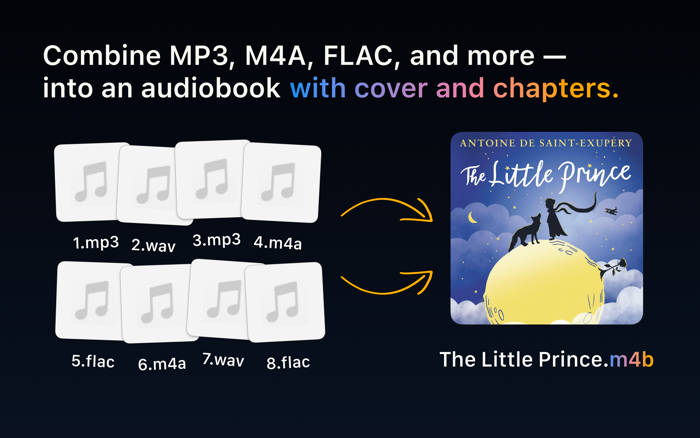
AudioBo turns audio files into real M4B audiobooks — with proper chapters, clean metadata, and reliable long-form playback.
MP3 files work well for music, but fall apart for audiobooks: no true chapter support, unreliable bookmarks, and inconsistent resume behavior. AudioBo builds real M4B audiobooks instead — the format designed specifically for long-form listening.
M4B supports chapters, bookmarks, and clean navigation in Apple Books, Music, CarPlay, and even classic iPods. AudioBo produces correctly structured M4B files — not repackaged audio that only looks like an audiobook.
---
WHO AUDIOBO IS FOR
For anyone who wants a proper M4B audiobook — without a PhD in terminal tools, codecs, or settings.
AudioBo handles the technical choices for you, aiming for the best possible quality without unnecessary file size bloat.
---
WHAT MAKES AUDIOBO DIFFERENT
- No arbitrary limits
Create audiobooks of any length — from short recordings to multi-hour projects — without forced splitting or awkward workarounds.
- No unnecessary re-encoding
If you only change metadata or artwork, AudioBo preserves the original audio stream — no quality loss, no wasted processing.
- Pull metadata from the web
Search Audible, Apple Books, MusicBrainz, Google Books, and TMDB (movies & TV) to fill in cover art, book info, and chapter names - all in one click.
- AI chapter cleanup, on-device
Tap "Enhance with AI" and Apple Intelligence instantly rewrites and fixes messy chapter titles.
- Correct M4B container & chapter standards
AudioBo writes proper M4B files with full support for QuickTime and Nero chapter formats — a clean, standards-compliant container that behaves correctly everywhere, not fragile hacks that only look right.
- Batch chapter cleanup
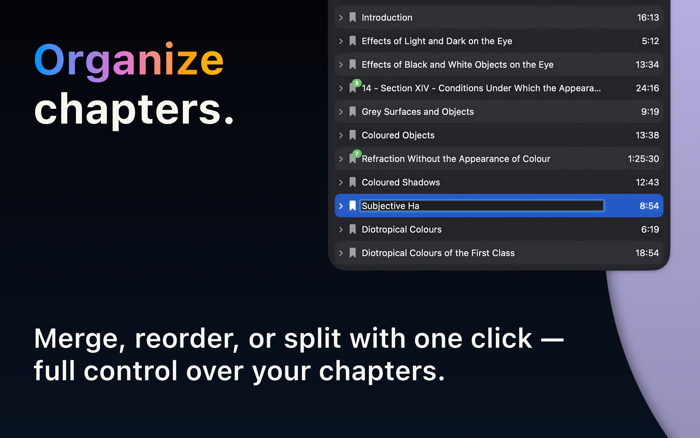
Clean up messy chapters in one go: normalize titles, fix ordering, remove junk entries, and make the chapter list consistent — without babysitting every book manually.
- Export beyond M4B (M4A & MP3 too)
Need compatibility over “perfect audiobook”? Export to M4A or MP3 for locked-down DAP players, vintage car stereos, and other non-Apple setups.
- Turn videos into audiobooks
Have a lecture, talk, or documentary as a video? Drop in a video file — MKV, MP4, MOV, AVI, and more — and AudioBo extracts the audio into a proper audiobook. When a video has several audio tracks, you pick the language you want.
- External chapters: CUE + simple chapter.txt
Bring your own chapters via external files (CUE and more), or define them yourself using a plain chapter.txt with a simple YouTube-style timestamp format — fast, readable, and easy to edit.
---
TECHNICAL DETAILS (FOR THE CURIOUS)
AudioBo works with the formats people actually have. You can bring in MP3, AAC (M4A), OGG, WAV, WMA, WV, APE, FLAC, Opus, or AIFF. You can also drop in a video file — MKV, MP4, MOV, AVI, and more — and AudioBo pulls out its audio track for you.
Audio encoding options:
- M4B/M4A in AAC-LC/HE-AAC/xHE-AAC, MP3
- Mono or stereo, based on your source
- Bitrates from 16 to 320 kbps
- Sample rates from 22.05 up to 96 kHz
Compatibility:
- Plays natively on Apple Books, Music, iOS, macOS, and classic iPods
- Works smoothly with Plex, BookPlayer, VLC, Audiobookshelf, and most audiobook apps
- Fully supported on Android and Windows through any modern audio player
- Export directly to Apple Books with proper chapters, artwork, and metadata
---
Learn more and download a demo at: orsolabs.dev/audiobo


 +100宝石

 分享
分享













用户评价
立即分享产品体验
你的真实体验,为其他用户提供宝贵参考
💎 分享获得宝石
【分享体验 · 获得宝石 · 增加抽奖机会】
将你的产品体验分享给更多人,获得更多宝石奖励!
💎 宝石奖励
每当有用户点击你分享的体验链接并点赞"对我有用",你将获得:
🔗 如何分享
复制下方专属链接,分享到社交媒体、群聊或好友:
💡 小贴士
分享时可以添加你的个人推荐语,让更多人了解这款产品的优点!
示例分享文案:
"推荐一款我最近体验过的应用,界面设计很精美,功能也很实用。有兴趣的朋友可以看看我的详细体验评价~"
关注 Mergeek 公众号
领奖遇到问题?联系小门助手