Play music on your phone, both melody and chords at the same time!
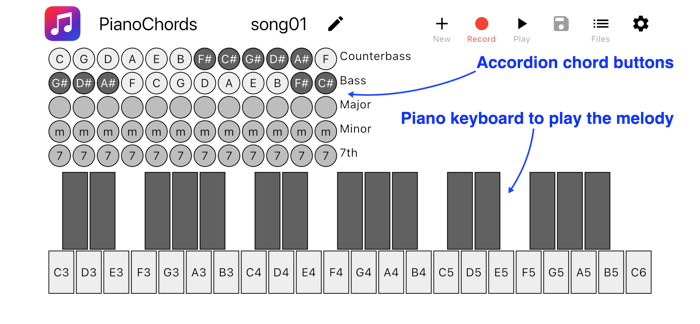
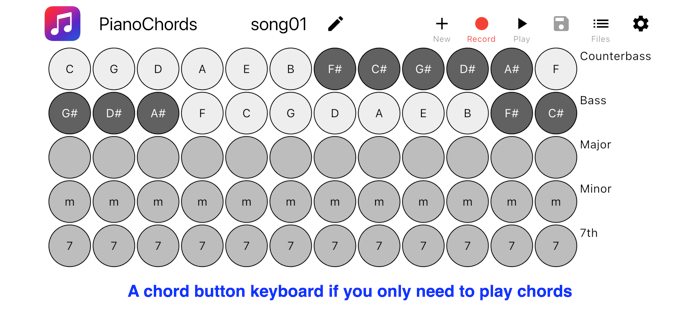
Among many piano apps in the store, this one makes it easy to play your melody with accordion chords. Use your right thumb to play the melody, and use your left thumb to play chords using the buttons conveniently located in the top left of the screen. Or convert it to the chord only keyboard by switching a toggle in settings!
I like being able to play a melody on my phone, and I could not find an app which makes it really easy, so I made my own. Play your melody on a large piano keyboard, designed not for being visually appealing, but for being usable when you play with your thumbs. Use the Stradella chord keyboard, inspired by accordion buttons, to add chords to your melody.
Five rows of accordion buttons are available: bass, counter bass, major chord, minor chord, and major seventh chord. Notes are arranged following the circle of fifth.
If you have never played accordion, you should try! The left hand section has several rows of buttons, each of which are arranged in the circle of fifth, which is called Stradella bass system. It takes just a few minutes to realize that this is extremely useful for playing chords, because related chords are located near each other: if you take C major, then F major is on the left, and G major on the right; if you take A minor, then D minor is on the left, and E major on the right.
Look at the provided demo melodies and you'll be playing your own musi...

 +100宝石


 分享
分享





























用户评价
立即分享产品体验
你的真实体验,为其他用户提供宝贵参考
💎 分享获得宝石
【分享体验 · 获得宝石 · 增加抽奖机会】
将你的产品体验分享给更多人,获得更多宝石奖励!
💎 宝石奖励
每当有用户点击你分享的体验链接并点赞"对我有用",你将获得:
🔗 如何分享
复制下方专属链接,分享到社交媒体、群聊或好友:
💡 小贴士
分享时可以添加你的个人推荐语,让更多人了解这款产品的优点!
示例分享文案:
"推荐一款我最近体验过的应用,界面设计很精美,功能也很实用。有兴趣的朋友可以看看我的详细体验评价~"
领取结果