


 +100宝石


产品功能
A periodic table for the Mac that stays out of the way until you want it — in a window, in the menu bar, and on the desktop.
THE TABLE
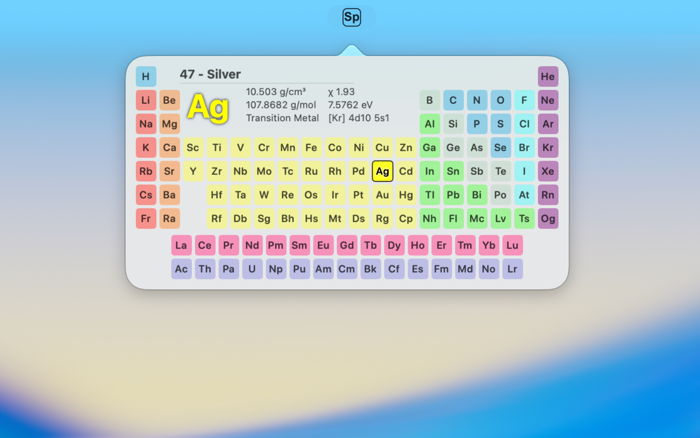
All 118 elements, laid out as a chemist would draw them, with the lanthanides and actinides in their strip beneath. Click an element and the panel in the middle of the table tells you about it.
COLOUR THE TABLE BY WHAT YOU ARE STUDYING
Category, melting point, boiling point, density, electronegativity or crystal structure.
CHOOSE WHAT YOU ARE TOLD AT A GLANCE
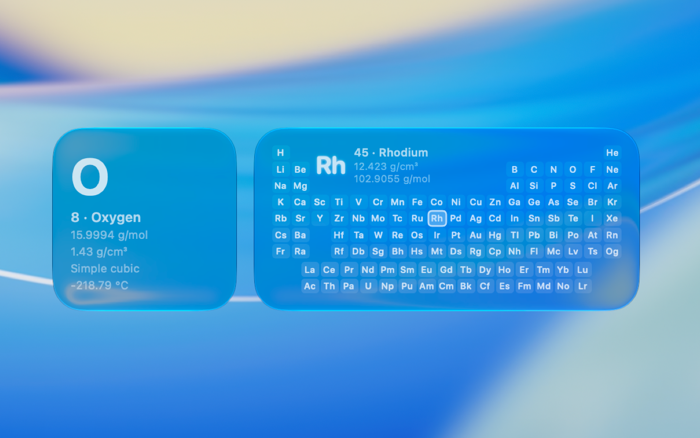
The readout in the middle of the table holds up to nine properties, in three columns of three, dragged into the places you want them from atomic weight, density, electron configuration, melting and boiling points, electronegativity, ionization energy, crystal structure and category. Where you put them is where they appear — in the window, in the menu bar, and in the widgets.
EVERYTHING ELSE, ONE CLICK AWAY
Clicking an element's symbol opens its full record:
• Atomic number, symbol, group, period, block, electrons per shell, appearance
• Melting and boiling points in kelvin, Celsius and Fahrenheit; density, and density when liquid; heat of fusion, heat of vaporization, molar heat capacity; triple and critical points; the vapour-pressure table
• Ionization energies, electronegativity, atomic, covalent and van der Waals radii
• Crystal structure, speed of sound, thermal expansion and conductivity, electrical resistivity, magnetic ordering and susceptibility, Young's, shear and bulk moduli, Poisson ratio, Mohs, Vickers and Brinell hardness, CAS number
• Who discovered it, who first isolated it, and where the name came from
• The Shannon–Prewitt ionic radii, charge state by charge state, with coordination number, geometry, spin, and both the crystal and ionic scales
The blocks can be reordered, so whichever of those you reach for most is the one at the top.
IN THE MENU BAR
The whole table drops from a menu bar icon and closes the moment you click away, like a menu should. It keeps its own selection, so looking something up mid-thought leaves the window you were working in exactly where it was — and clicking the element's symbol hands it to the app if you want to go further.
ON THE DESKTOP
Two widgets. The full table, whose tiles can be clicked to change the element without the app being launched at all. And a single element, pinned to one of your choosing or left to follow along, showing four properties you pick.
Element data is derived from Wikipedia and is available under CC BY-SA 4.0. Ionic radii are from R. D. Shannon, Acta Crystallographica A32, 751–767 (1976).
分享「」体验,参与「」抽奖!
分享 1~3 张你对这个产品最满意的截图或效果图
分享「」体验,参与「」抽奖!
用你的故事点亮社区✨!你的真实体验,将会永久展示在 官方主页 📌,为其他朋友提供宝贵参考 💡。立即分享吧!🚀
请为产品评分
请选择问题回答,为大家提供宝贵参考
选择要回答的问题
温馨提示
你尚未上传产品截图。
上传截图可立即获得宝石积分奖励!
如果你赶时间,也可稍后修改评论,补上截图领取宝石。
温馨提醒
你尚未添加产品截图
⚠️ 不添加截图将降低抽奖权重

感谢参加,你已成功参加!
为了确保你能及时收到审核结果和领奖码通知

扫描二维码关注 Mergeek 公众号
在后台回复 「获奖通知」
完成上述操作,即可保障奖励发放成功





用户评价
立即分享产品体验
你的真实体验,为其他用户提供宝贵参考
💎 分享获得宝石
【分享体验 · 获得宝石 · 增加抽奖机会】
将你的产品体验分享给更多人,获得更多宝石奖励!
💎 宝石奖励
每当有用户点击你分享的体验链接并点赞"对我有用",你将获得:
🔗 如何分享
复制下方专属链接,分享到社交媒体、群聊或好友:
💡 小贴士
分享时可以添加你的个人推荐语,让更多人了解这款产品的优点!
示例分享文案:
"推荐一款我最近体验过的应用,界面设计很精美,功能也很实用。有兴趣的朋友可以看看我的详细体验评价~"
关注 Mergeek 公众号
领奖遇到问题?联系小门助手