


 +100宝石



产品功能
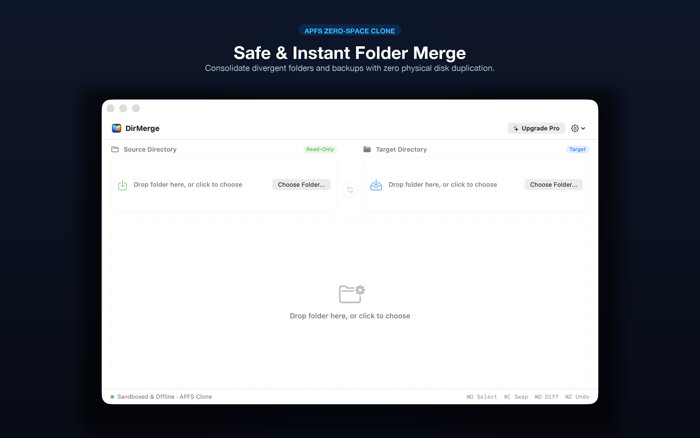
DirMerge is an elegant, native macOS utility created for photographers, developers, creators, and data hoarders who need to consolidate and align divergent folders across local SSDs and external hard drives without the fear of accidental overwrites.
Built from the ground up for macOS Sequoia and Sonoma, DirMerge leverages Apple's native APFS Copy-on-Write (CoW) technology to merge gigabytes of data in milliseconds while consuming ZERO additional bytes of disk storage.
--- WHY CHOOSE DIRMERGE? ---
* APFS ZERO-SPACE CLONING
Traditional copying duplicates raw data blocks, wasting disk space and wearing out SSDs. DirMerge calls Darwin's native copyfile() system API to create instant Copy-on-Write extents. A 50 GB photo shoot or project folder clones in milliseconds with 0 bytes extra storage.
* SAFE BY DEFAULT (STRICT READ-ONLY SOURCE)
Your Source directory is strictly locked as read-only. DirMerge will never delete, move, or modify any file in your reference folder.
* ONE-CLICK UNDO (Command-Z) WITH SNAPSHOT BACKUP
Before replacing any conflicting file in your Target directory, DirMerge archives a safe pre-merge snapshot in a rollback journal. Made a mistake? Press Command-Z to restore everything to its exact pre-merge state.
* EXTERNAL DRIVE PROTECTIVE SCANNING
DirMerge never spins up mechanical USB drives or triggers thermal throttling until you explicitly click Start. Perfect for cold storage, SD cards, and archival hard drives.
* 100% OFFLINE & PRIVACY-FIRST
Built in strict compliance with the official Apple App Sandbox. DirMerge requests ZERO network entitlements. It contains no tracking pixels, no analytics SDKs, and zero telemetry. Your files and filenames never leave your Mac.
* ONE-KEY DIRECTION SWAP
Need to synchronize changes in both directions? Press Command-[ to instantly swap Source and Target folders without navigating file pickers again.
* FEATHERWEIGHT NATIVE SPEED
Pure Swift 6 and SwiftUI. Starts in 0.08 seconds, weighs only 1.3 MB, and consumes less than 25 MB of RAM. Zero Electron or WebKit bloat.
--- HOW IT WORKS IN 3 SIMPLE STEPS ---
1. DROP FOLDERS: Select your reference source folder and target destination.
2. REVIEW DIFFERENCES: Click Start to view a clear categorization of New, Conflicting, and Identical files with live search.
3. SAFE MERGE: Click Merge to consolidate everything instantly with APFS zero-space speed. Undo anytime with Command-Z.
--- SUPPORTED STORAGE FORMATS ---
* APFS (Instant Zero-Space Copy-on-Write Cloning)
* HFS+ (Mac OS Extended)
* exFAT, FAT32, and NTFS (High-speed buffered streaming with snapshot protection)
--- TRANSPARENT PRICING ---
* Free Tier: Enjoy full APFS cloning features for up to 25 items per batch merge.
* Pro Lifetime License ($9.99 USD): Single in-app purchase unlocks unlimited batch processing on all your Macs permanently. No subscriptions.
分享「」体验,参与「」抽奖!
分享 1~3 张你对这个产品最满意的截图或效果图
分享「」体验,参与「」抽奖!
用你的故事点亮社区✨!你的真实体验,将会永久展示在 官方主页 📌,为其他朋友提供宝贵参考 💡。立即分享吧!🚀
请为产品评分
请选择问题回答,为大家提供宝贵参考
选择要回答的问题
温馨提示
你尚未上传产品截图。
上传截图可立即获得宝石积分奖励!
如果你赶时间,也可稍后修改评论,补上截图领取宝石。
温馨提醒
你尚未添加产品截图
⚠️ 不添加截图将降低抽奖权重

感谢参加,你已成功参加!
为了确保你能及时收到审核结果和领奖码通知

扫描二维码关注 Mergeek 公众号
在后台回复 「获奖通知」
完成上述操作,即可保障奖励发放成功





用户评价
立即分享产品体验
你的真实体验,为其他用户提供宝贵参考
💎 分享获得宝石
【分享体验 · 获得宝石 · 增加抽奖机会】
将你的产品体验分享给更多人,获得更多宝石奖励!
💎 宝石奖励
每当有用户点击你分享的体验链接并点赞"对我有用",你将获得:
🔗 如何分享
复制下方专属链接,分享到社交媒体、群聊或好友:
💡 小贴士
分享时可以添加你的个人推荐语,让更多人了解这款产品的优点!
示例分享文案:
"推荐一款我最近体验过的应用,界面设计很精美,功能也很实用。有兴趣的朋友可以看看我的详细体验评价~"
关注 Mergeek 公众号
领奖遇到问题?联系小门助手