


 +100宝石




产品功能
FocusEdge is a study lock for parents who hand their own iPhone to their child for homework. Turn on Study Mode and only the study apps and websites you choose will open. YouTube, reels, games, Instagram and WhatsApp stay locked until you enter your PIN.
Try it free for 7 days, with no card needed. After that, FocusEdge is a yearly subscription through the App Store.
STUDY MODE: ONE SWITCH, THEN HAND OVER THE PHONE
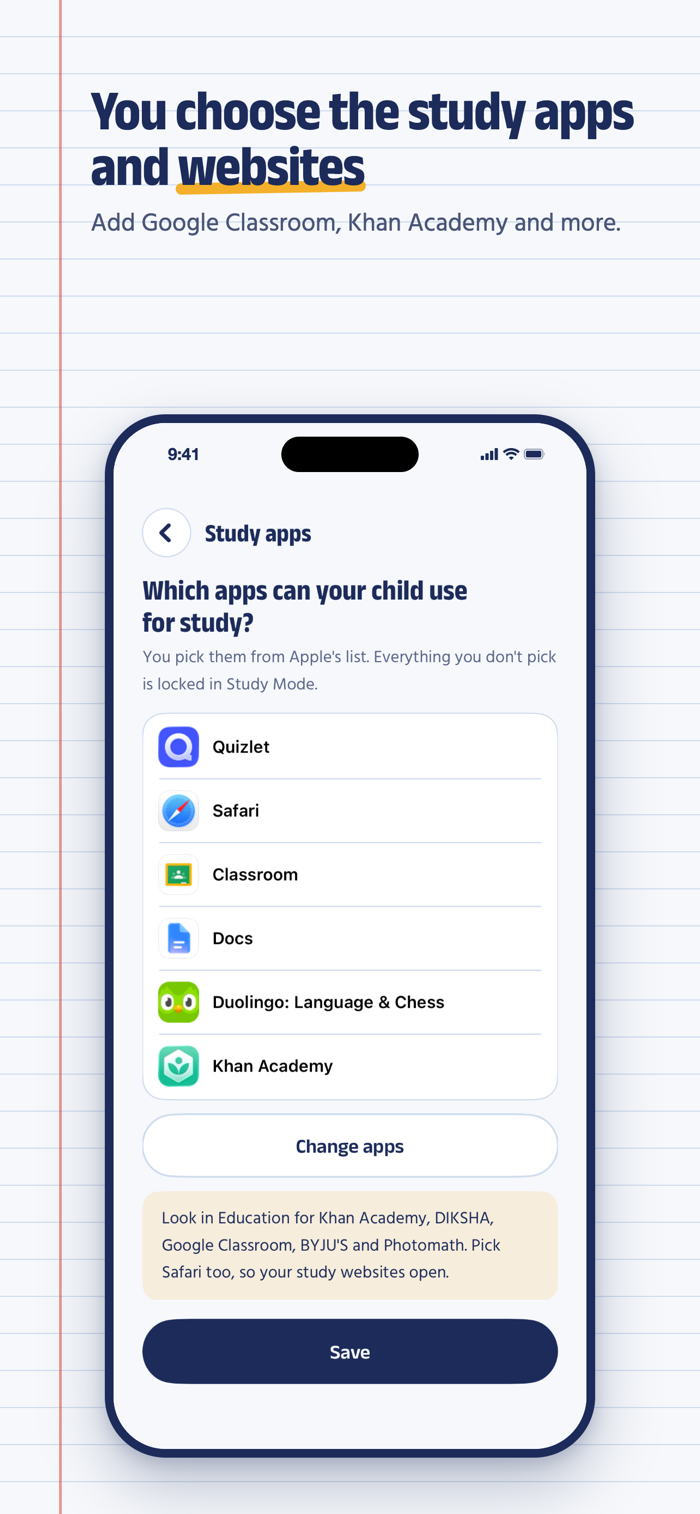
• Only the study apps you choose open, such as Google Classroom, Khan Academy, Duolingo or Photomath
• Only the study websites you choose open, such as Khan Academy, Wikipedia or your school's website
• YouTube, reels, games, Instagram, Facebook and other social media stay locked
• Set a timer for 1, 2 or 3 hours, or leave it on until you turn it off
NO GAME PURCHASES WHILE YOUR CHILD STUDIES
Your phone has your chats, photos and money on it. In Study Mode your messages, photos, banking and payment apps stay locked behind your 6-digit PIN. In-app purchases are off, no new apps can be installed, and no apps can be deleted.
ADULT AND OTHER UNSAFE WEBSITES STAY BLOCKED
Adult websites, and well-known gambling, betting and violent websites, stay blocked at all times in Safari and other browsers, even when Study Mode is off and the phone is picked up without asking. You can also block any website yourself.
ONLY YOU CAN TURN IT OFF
Study Mode turns off with your 6-digit PIN, or with Face ID if you switch that on. If someone turns off FocusEdge's Screen Time access, we email you.
SIMPLE PARENTAL CONTROL FOR A SHARED PHONE
FocusEdge goes on your own iPhone, the one your child borrows. It is one app on one phone: there is no second app to install on a child's phone and no child account to set up. It also works on a child's own iPhone when you hold the PIN.
SET UP IN A FEW MINUTES
1. Sign in with Apple, Google or your email
2. Allow Screen Time access
3. Choose the study apps and websites
4. Choose a 6-digit PIN
FORGOT YOUR PIN?
We email you a code to reset it.
YOUR PRIVACY
FocusEdge uses Apple's Screen Time to lock apps and block websites. Apple does not let FocusEdge see which apps or websites are opened, so that is never recorded or sent anywhere. FocusEdge does not read your messages, photos or anything inside an app.
SUBSCRIPTION
The first 7 days are free and need no payment method. To keep using Study Mode after that, subscribe to FocusEdge yearly, an auto-renewing subscription. Payment is charged to your Apple Account when you confirm the purchase, and the subscription renews each year unless you cancel at least 24 hours before the end of the period. Manage or cancel it in Settings › your name › Subscriptions.
Terms of use: https://focusedge.app/terms.html
Privacy policy: https://focusedge.app/privacy.html
FocusEdge is for parents and guardians aged 18 and over.
Questions: admin@qrcall.com.au
分享「」体验,参与「」抽奖!
分享 1~3 张你对这个产品最满意的截图或效果图
分享「」体验,参与「」抽奖!
用你的故事点亮社区✨!你的真实体验,将会永久展示在 官方主页 📌,为其他朋友提供宝贵参考 💡。立即分享吧!🚀
请为产品评分
请选择问题回答,为大家提供宝贵参考
选择要回答的问题
温馨提示
你尚未上传产品截图。
上传截图可立即获得宝石积分奖励!
如果你赶时间,也可稍后修改评论,补上截图领取宝石。
温馨提醒
你尚未添加产品截图
⚠️ 不添加截图将降低抽奖权重

感谢参加,你已成功参加!
为了确保你能及时收到审核结果和领奖码通知

扫描二维码关注 Mergeek 公众号
在后台回复 「获奖通知」
完成上述操作,即可保障奖励发放成功





用户评价
立即分享产品体验
你的真实体验,为其他用户提供宝贵参考
💎 分享获得宝石
【分享体验 · 获得宝石 · 增加抽奖机会】
将你的产品体验分享给更多人,获得更多宝石奖励!
💎 宝石奖励
每当有用户点击你分享的体验链接并点赞"对我有用",你将获得:
🔗 如何分享
复制下方专属链接,分享到社交媒体、群聊或好友:
💡 小贴士
分享时可以添加你的个人推荐语,让更多人了解这款产品的优点!
示例分享文案:
"推荐一款我最近体验过的应用,界面设计很精美,功能也很实用。有兴趣的朋友可以看看我的详细体验评价~"
关注 Mergeek 公众号
领奖遇到问题?联系小门助手