Your electronic agenda with keyboard writing or drawing with the mouse or touchpad.
Just make a sketch, with JotTheDate!
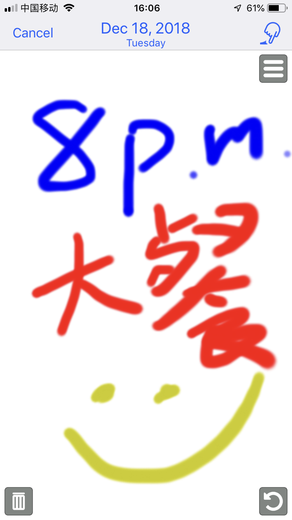
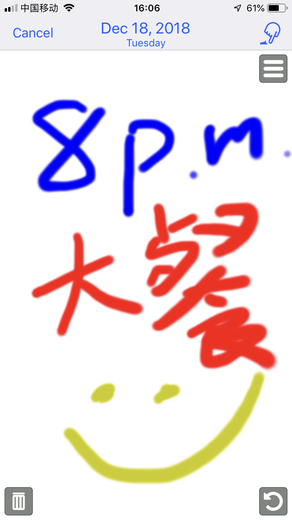
Handwrite your note as text or drawing, and JotTheDate will show it as an event in the calendar or as a reminder.
Whether it's a sketch or a text, this calendar app allows you to add your appointments as text with the keyboard or by drawing a sketch with the mouse or touchpad.
Sketch a heart for your anniversary dinner, a tie for your business meeting. Write down the phone number, the name of the club where your friends gathered, or the name of your child's playground.
UNIVERSAL
JotTheDate is compatible with iPhone, iPad, iPod touch, Apple Watch and Mac. You can use it on all your devices.
Using iCloud all events and sketches will be shared and automatically synced across all your iOS and Mac devices.
JotTheDate still works even without internet connection.
ENTERING EVENTS
Also on Mac you can edit drawings by tracing with the mouse or with the touchpad. Or enter text-only events with the keyboard.
INSERTION OF REMINDER
If you want to write yourself a simple note not to be included in the agenda, now you can do it with the Reminders view
INTEGRATION WITH THE CALENDAR AND REMINDER APP
All events and reminders are shared with other macOs and iOS Calendar diaries and are automatically loaded as soon as you launch JotTheDate.
DIFFERENT DISPLAY MODES
JotTheDate supports various standard views:
• Year
• Month
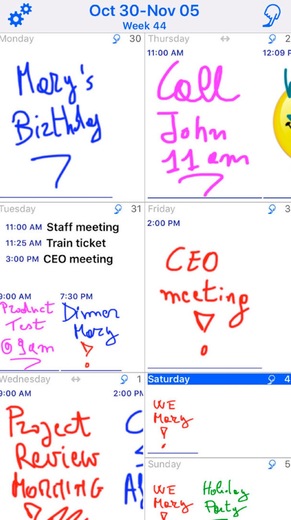
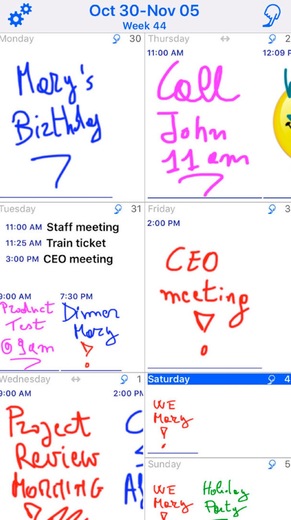
• Week
• Day
• List
• Month and List
• Reminder
WEEK VIEW
Very useful for an overall view of your work week and not. On Mac and iPad you have two week views of your choice. A traditional, grid, or in vertical format with the days all side by side.
REAL-TIME SYNCHRONIZATION
JotTheDate automatically syncs all your iOS and Mac devices.
Make a change on JotTheDate on any device: after a while you will find it synchronized on all the others.
OFFLINE OPERATION
You can create, edit and delete events even without an Internet connection. Changes are stored and synced with your iCloud account as soon as you come back online.
NOTICES
You will never forget appointments. JotTheDate allows you to set an alert for all events.
RECURRING EVENTS
You can set, view and edit recurring events.
NEW EVENT
It is possible for each event to define:
. Title
. Geographic location
. All day
. Start date and time
. End date and time
. Repetition: various options
. Travel time
. Calendar
. Invited
. Notice: various options
. Second notice: various options
. URL
. Note
CONFIGURATION OPTIONS
JotTheDate is ready and fully configured as standard on its first use.
However, the user has the possibility to choose between various configuration options, including:
. iCloud enabled
. options for Month, Week and Day view
. Sounds: for example the one of the JotTheDate page being browsed. They can be enabled or excluded.
. Now visible on settable events.
. New event: you can set all new events to be text only or drawings
. Welcome presentation
. Calendars:
- Default calendar
- Choice of calendar color
- Enabling to view or not the events related to that calendar
The free trial version of the app allows a limited number of hand-drawn sketches. This limitation can be excluded for a fee within the app by purchasing the Premium version, without limitations any longer, or with subscriptions of varying duration.
A single purchase becomes valid on all devices, iOS and Mac.

 +100宝石


 分享
分享










用户评价
立即分享产品体验
你的真实体验,为其他用户提供宝贵参考
💎 分享获得宝石
【分享体验 · 获得宝石 · 增加抽奖机会】
将你的产品体验分享给更多人,获得更多宝石奖励!
💎 宝石奖励
每当有用户点击你分享的体验链接并点赞"对我有用",你将获得:
🔗 如何分享
复制下方专属链接,分享到社交媒体、群聊或好友:
💡 小贴士
分享时可以添加你的个人推荐语,让更多人了解这款产品的优点!
示例分享文案:
"推荐一款我最近体验过的应用,界面设计很精美,功能也很实用。有兴趣的朋友可以看看我的详细体验评价~"
领取结果