Measure Bench connects a known-distance reference to a saved microscope image. Place endpoints, record calibrated lengths and export an annotated PNG or coordinate-rich CSV while preserving the original image.
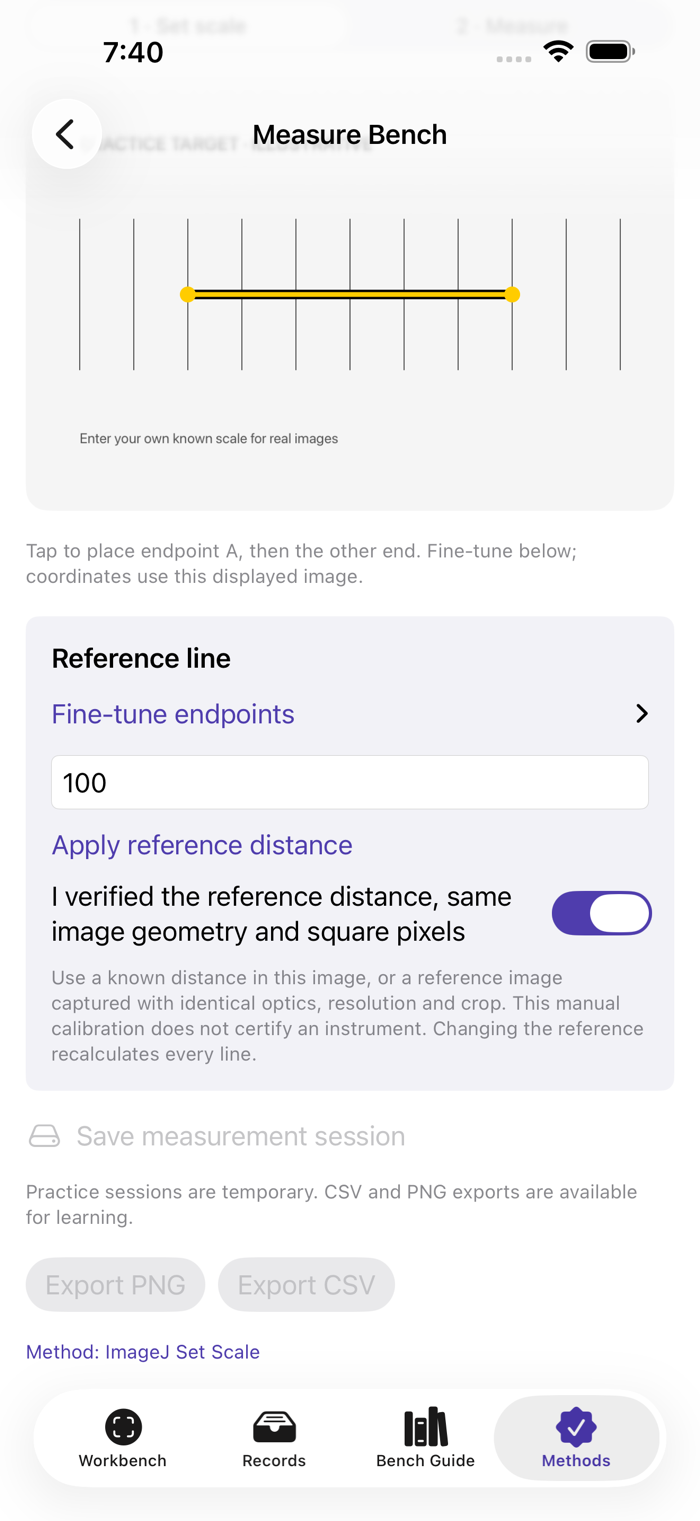
HOW TO USE THE UPGRADE 1. Open an image-backed record and choose Measure Bench. For a guided example, open Methods → Measure Bench · practice. 2. Place two reference endpoints and enter their known distance in micrometres. Confirm that the reference applies to this exact image. 3. Switch to Measure, place endpoints and add named measurements. Use the coordinate controls for precise adjustment. 4. Save measurements to the record. Export the annotated PNG or CSV with calibration and source fingerprint. Reopen the record to continue.
Keep specimen and slide lineage, optical setup, calibration notes, selected images, search, PDF/CSV record export and offline bench methods.
WHAT TO KNOW Calibration belongs to the exact normalized image, not just the objective or displayed zoom. Images are normalized to at most 2400 pixels on the longest side and measurement coordinates use that image. Up to 100 lines per record. Practice-grid values are illustrative. Measurements do not identify organisms, validate specimen preparation or provide clinical conclusions. Save before leaving a record; practice drafts are temporary.


 +100宝石

 分享
分享














用户评价
立即分享产品体验
你的真实体验,为其他用户提供宝贵参考
💎 分享获得宝石
【分享体验 · 获得宝石 · 增加抽奖机会】
将你的产品体验分享给更多人,获得更多宝石奖励!
💎 宝石奖励
每当有用户点击你分享的体验链接并点赞"对我有用",你将获得:
🔗 如何分享
复制下方专属链接,分享到社交媒体、群聊或好友:
💡 小贴士
分享时可以添加你的个人推荐语,让更多人了解这款产品的优点!
示例分享文案:
"推荐一款我最近体验过的应用,界面设计很精美,功能也很实用。有兴趣的朋友可以看看我的详细体验评价~"
关注 Mergeek 公众号
领奖遇到问题?联系小门助手