Plezy: Media Server Client

Plezy: Media Server Client

娱乐

创作者
Edvard Wikhall

Plezy 是一款支持 Plex、Jellyfin 和 Emby 的现代客户端,无需订阅即可连接多个服务器。它提供高质量播放体验,广泛支持 HEVC、AV1 等编码及 HDR,具备直接播放和可配置转码功能。应用集成多平台推荐源(如 Trakt、MyAnimeList),支持跨库搜索、资源匹配及通过 Seerr 请求内容。用户可直观查看分辨率、HDR 格式标签,享受带样式的 ASS/SSA 字幕及在线字幕搜索,并支持自动播放,实现高效媒体管理与离线访问。

COMMUNITY PERKSMergeek 社区专属福利
独家限免 NEW每天发现一份惊喜
PRODUCT SCREENS / 4

点击查看界面细节

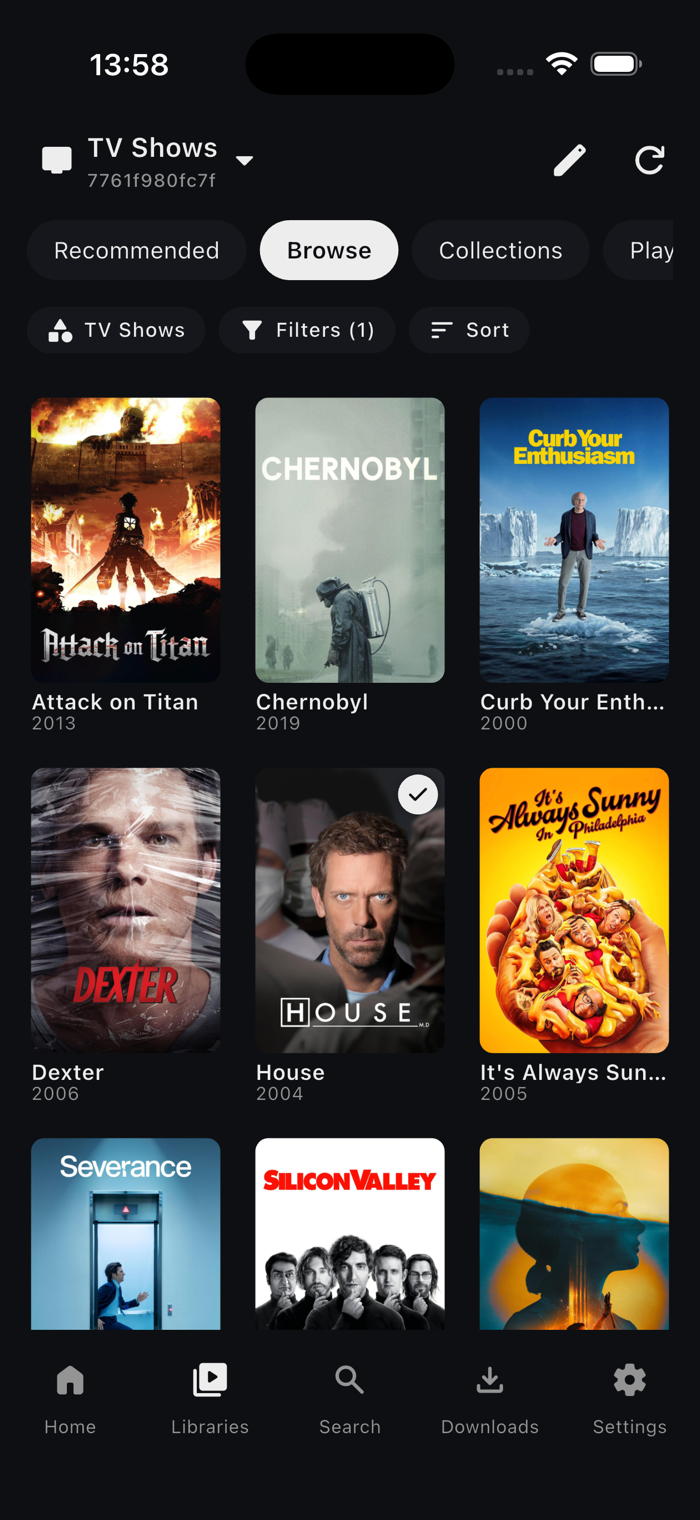
Plezy: Media Server Client 产品截图 1Plezy: Media Server Client 产品截图 2Plezy: Media Server Client 产品截图 3Plezy: Media Server Client 产品截图 4

Plezy is a modern client for Plex, Jellyfin, and Emby, built for high-quality playback, effortless discovery, and offline access. Connect multiple servers at once and enjoy your media in one clean, native app—no subscription required.

BROWSE & DISCOVER
- Browse libraries, collections, playlists, folders, extras, and personalized recommendations
- Search across every connected Plex, Jellyfin, and Emby server
- Explore trending, popular, watchlist, and recommendation rows from Plex Discover, Trakt, MyAnimeList, AniList, Simkl, and Seerr
- Match catalog titles back to your own libraries and request movies or shows through Seerr
- See resolution, HDR, Dolby Vision, and audio-format badges at a glance

PLAYBACK
- Wide codec support including HEVC, AV1, VP9, and more
- HDR playback, direct play, and configurable transcode quality
- Switch between media versions with detailed file and stream information
- Full ASS/SSA subtitles with styling controls and online subtitle search
- Auto-play the next episode with skip intro and skip credits
- Chapter navigation, thumbnail scrubbing, playback speed, audio sync, sleep timer, and video zoom
- Picture-in-Picture, loudness normalization, and stereo downmix with center-channel boost
- Resume progress and remembered audio/subtitle choices

MUSIC
- Browse artists, albums, and tracks with rich artwork
- Gapless playback with a reorderable queue, Play Next, and Add to Queue
- Synced lyrics, a persistent mini-player, and sleep timer
- Background playback with lock-screen and media controls
- Offline albums and tracks, plus selectable streaming quality

LIVE TV & DVR
- Browse and tune live channels with favorites and a full program guide
- See what's on, browse show schedules, and manage DVR recording rules
- Use Live TV across multiple supported servers

DOWNLOADS & OFFLINE
- Download movies, shows, albums, and tracks
- Pause or resume the background queue
- Create automatic download rules, including optional show specials
- Browse off…


版本

2.23.0

## New features

- Downloads group movies and shows by collection: a Collections grouping in the Movies and TV Shows tabs opens an offline collection screen
- Retry failed downloads in bulk from the Downloads app bar, or with Retry all on a show, season or album
- File Info opens from the player settings sheet for the playing item
- Disable Dolby Vision (Settings > Video Playback) plays the file's HDR10 or HLG layer instead on Apple TV
- Subtitle Position goes up to 150, so subtitles can move down into the black bars

## Playback

- Plex movies split across several files play as one item, including from downloads and in external players
- Resuming over a slow connection no longer fails after 30 seconds while the stream is still loading
- The audio track picker tells DTS-HD MA, DTS-HD HRA, DTS:X and other DTS variants apart from their DTS core
- Streams no longer stall at start on networks whose DNS never answers IPv6 lookups
- "Ends at" stays current while playback is paused
- The screen can sleep after pressing play at the end of an item

## Live TV

- Live TV and Watch from Start match the display to the channel's presented frame rate on Apple TV, including after a channel change, fixing judder and audio drift on interlaced channels

## Plex

- Smart playlists play from the tapped entry and continue through the playlist
- Playing a playlist or collection in order no longer shows a "Shuffle" loading dialog
- A stream stopped from the Plex dashboard stays stopped instead of restarting itself
- Switching Plex Home users no longer shows the previous user's rows on Home

## Jellyfin & Emby

- Emby search is fast again on large libraries and no longer fails with "Search could not reach any media server"
- Search finds items in home video and music video libraries
- Unaired placeholder episodes no longer appear in Recently Added, show downloads, sync rules or folder playback
- The Jellyfin dashboard keeps Plezy's now-playing and transcode info

## Servers & search

- One unresponsive server no longer holds back other servers' search results and libraries
- A server that takes more than 10 seconds to answer is waited on instead of being reported unreachable

## Explore & trackers

- Plex Discover titles, summaries and shelf names follow the app language
- Marking a show or season watched sends batched history writes to Simkl, Trakt and MDBList instead of one request per episode
- Simkl requests are paced and back off when Simkl asks
- Simkl sign-in uses Simkl's new device flow; Simkl settings offers Reconnect to move an existing sign-in over

## Downloads

- Download on Wi-Fi only starts downloads over a VPN and on Ethernet
- Watched episodes with a resume point are no longer deleted and re-downloaded on every launch

## UI

- Phone detail pages show IMDb, Rotten Tomatoes and TMDB ratings on their own row

## TV

- The library A-Z bar stays clear of the screen edge and of the focused card
- Down from the app bar moves into the grid after sorting or going back on View All, actor, collection, album, artist and playlist screens
- The show detail hero shows the focused episode's IMDb score

查看完整更新记录 ↗

你的真实体验,为其他用户提供宝贵参考,获得宝石奖励

REWARD MARKET100 宝石可兑换什么?

还没有公开评论,欢迎分享你的体验。

提交反馈

每一个想法,都让 Mergeek 更好一点。