*** Note ***
Although mKer can run as a stand-alone app, the recommended way to use it is as an AUv3 plugin from inside a suitable AU Host app that supports MIDI Processors such as AUM, Audiobus, Cubasis etc. Please also note that mKer is a MIDI app/plugin. That means that it does not produce sound itself - it needs to be connected to an audio source that can receive MIDI.
mKer is a versatile, multi-output MIDI step sequencer with an extensive range of features. These include:
- 8 MIDI outputs
- 64 Patterns
- 16 Lanes (aka tracks) per Pattern
- Independent number of Steps (1-32) and Step Size (1/64-256 beats) per Lane per Pattern
- Every step can play either a single note, an interval (2 notes) or a chord (3 or 4 notes)
- Lane Step parameters: Play Cycles, Skip Cycles, Play Offset Cycles, Pitch, Velocity, Probability, Offset (can be used for ‘swing’ like effects), Repeat (rachet) and Gate
- A flexible Editor that includes a step entry keyboard, parameter sliders and a variety of options and utilities designed for to make the workflow intuitive and fast
- 32 Clips with 1-8 Steps per Clip, 1-128 repeats per step (every clip step has one pattern)
- 3 Play Modes: Pattern, Clip, Sequence (all Clips)
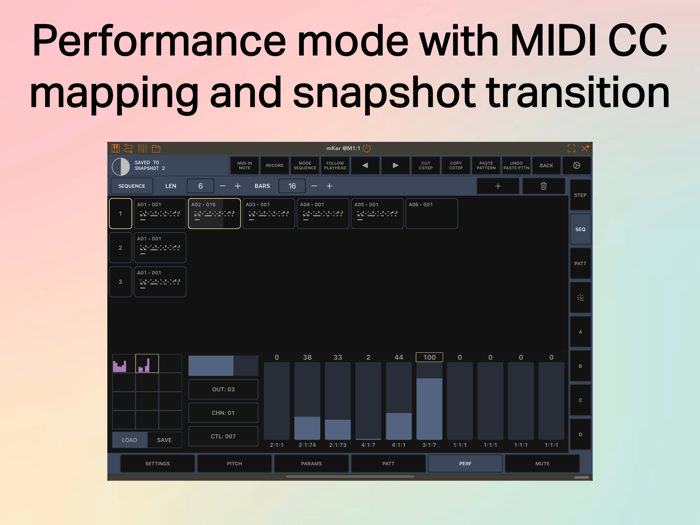
- A Performance tab with 10 fully assignable MIDI sliders, a 12-snapshot bank and morphing function between the snapshots...
- MIDI step input and real-time recording
- 12-track beat generator with six genres, density, intens...


 +100宝石


 分享
分享










用户评价
立即分享产品体验
你的真实体验,为其他用户提供宝贵参考
💎 分享获得宝石
【分享体验 · 获得宝石 · 增加抽奖机会】
将你的产品体验分享给更多人,获得更多宝石奖励!
💎 宝石奖励
每当有用户点击你分享的体验链接并点赞"对我有用",你将获得:
🔗 如何分享
复制下方专属链接,分享到社交媒体、群聊或好友:
💡 小贴士
分享时可以添加你的个人推荐语,让更多人了解这款产品的优点!
示例分享文案:
"推荐一款我最近体验过的应用,界面设计很精美,功能也很实用。有兴趣的朋友可以看看我的详细体验评价~"
关注 Mergeek 公众号
领奖遇到问题?联系小门助手