


 +100宝石







产品功能
Lume is a private FIRE tracker for iPhone and Mac. One-time purchase - no subscription, no ads, no tracking. Track your net worth, savings rate, and progress toward financial independence, see when you could get there, and keep everything stored on your own devices.
Most money apps want a monthly fee, a login to your bank, and your financial life on their servers. Lume takes the opposite approach: you pay once, own it forever, and your data stays on your iPhone. Sync with your Mac is there if you want it - and it is encrypted on your device first, so we cannot read what we store.
Your statements, read on your device
Download a statement from your bank and Lume works out the month from it - read on your iPhone, never uploaded, with no bank login.
• CSV, Excel (.xlsx), OFX and QFX, from any bank or broker - you map a file's columns once, and Lume remembers
• Open a statement straight from Files, Mail or your bank's app
• Each figure shows where it came from: the statement lines behind it, or the amount you typed
• Your broker's export fills in your trade log
The monthly close
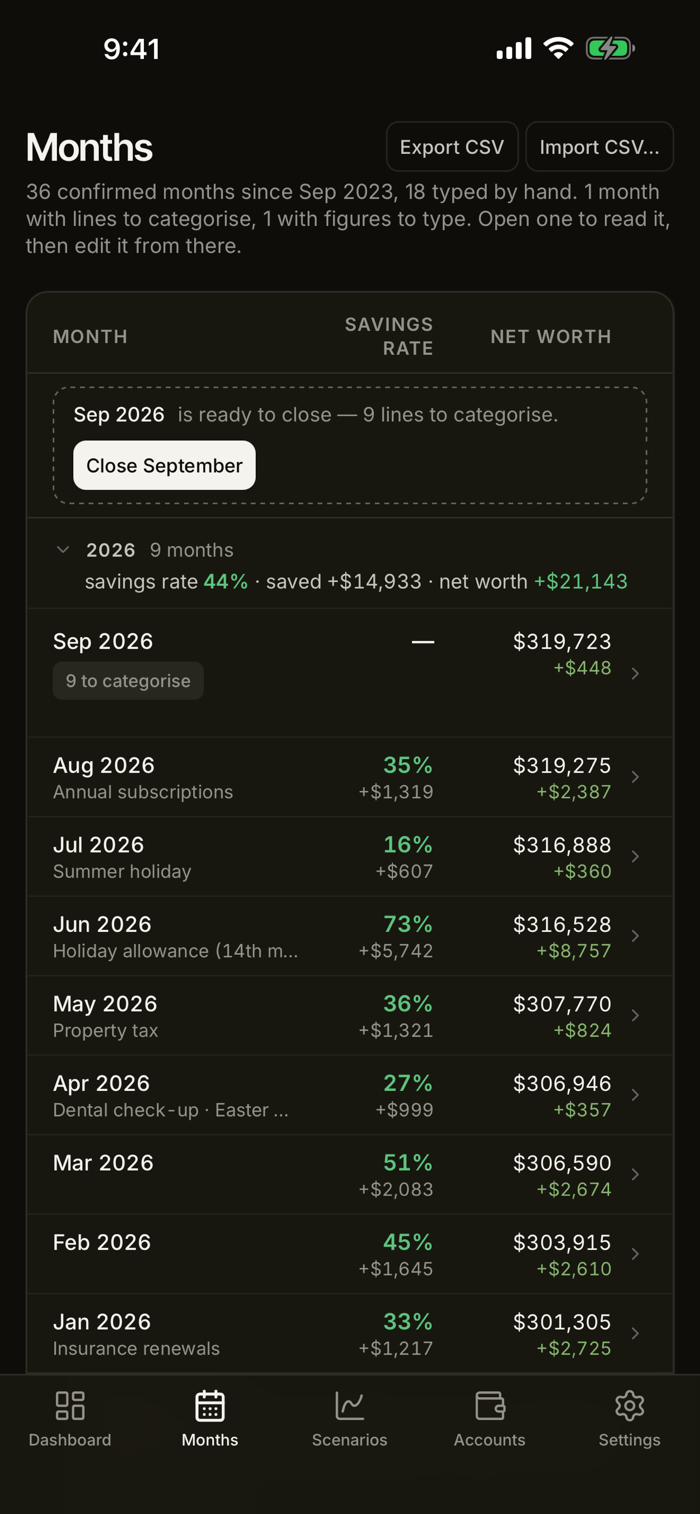
Once a month, Lume takes you through four steps: import the statements, categorise the lines - most arrive with Lume's guess from your rules - type what no statement gives, like cash or a pension, and confirm. Before you confirm, the last step shows how the month moves your FIRE dates.
Know exactly where you are
• A dashboard that leads with your net worth and how it is split, beside your FIRE milestones and the date and age you could reach each one
• Every account in one place, grouped by asset class - cash, stocks, crypto, property - with its balance and change since last month
• Spending and income by month against their 12-month average, with any category far from its usual flagged
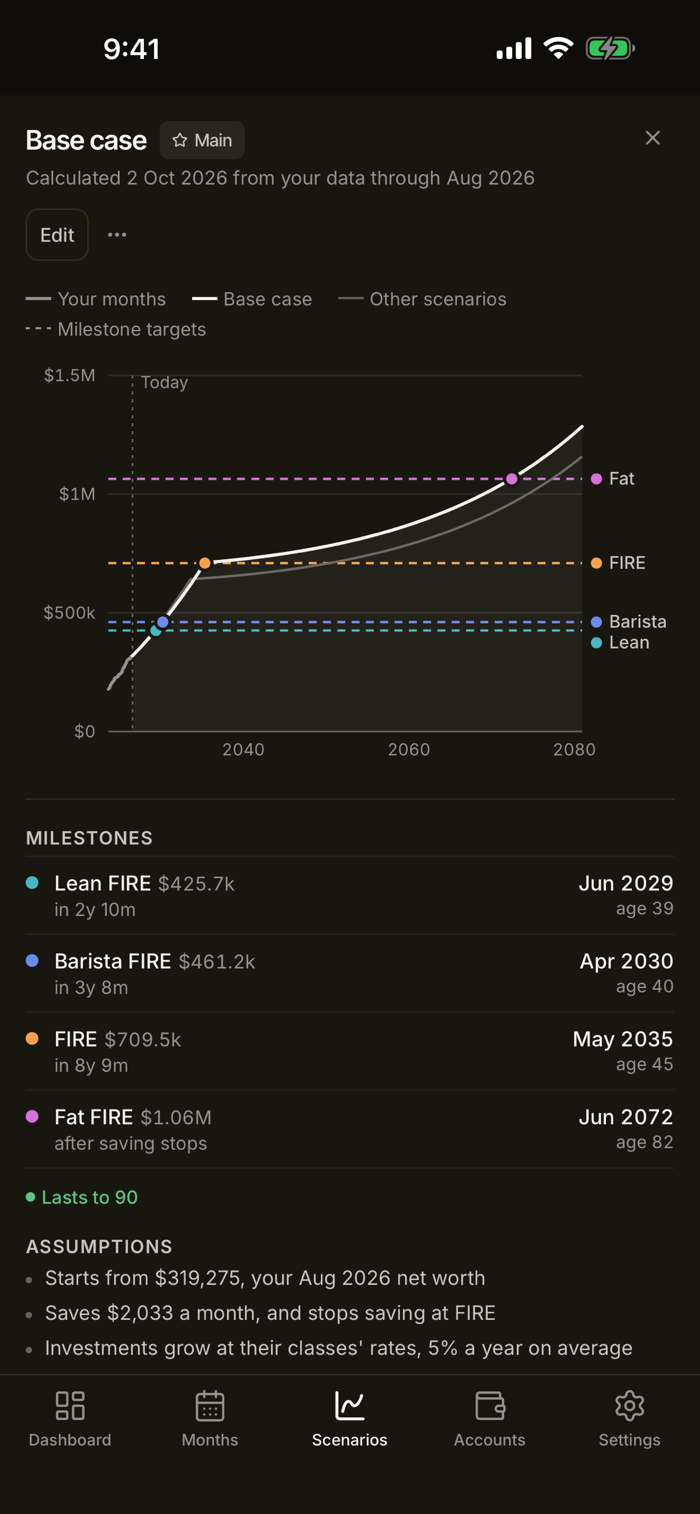
• FIRE progress toward your milestones - Lean, Barista, FIRE, Fat - at any safe withdrawal rate you choose
• Every month in one list, grouped by year with what you saved and how your net worth changed
• Investment holdings valued with live market prices for stocks and crypto
See when you could get there
Scenarios turn your own numbers into a timeline. Lume fills one in from your last 12 months of income and spending, your latest balances, and an expected return for each asset class - you only add the year you were born and when you would stop saving.
• The month and age you could reach each milestone, and whether the money lasts
• Compare what-ifs - spend less, stop saving at a set age, or keep saving throughout
• Scenarios update with every monthly close, keeping anything you changed by hand
Works on its own, or with your Mac Lume on iPhone is complete by itself - no Mac needed. Lume for Mac is included with the same purchase, and sync keeps both the same.
Optional sync we cannot read
Sync is off until you turn it on, and the app is complete without it. When you do turn it on, your data is encrypted on your iPhone before it is uploaded. What reaches our server is a block of ciphertext.
• End-to-end encrypted - we store your data, and we cannot open it
• A recovery code is your way back in if you forget your passphrase - and you can replace it from Settings
• Delete your account and the encrypted copy at any time, from inside the app
Private by design
• No account required - open the app and start tracking
• Optional Face ID lock, so Lume stays covered until you unlock it - even in the app switcher
• Your financial data lives on your iPhone, and is encrypted before it is ever uploaded
• No analytics, no crash reporting, no advertising identifiers, no third-party SDKs
• Works offline - market prices, ticker checks and sync are the only online features, and all are optional. Reading a statement needs no connection
Simple, honest pricing One-time purchase. No subscription, no recurring fees, ever. Buy it once and it's yours, on iPhone and Mac.
Download Lume and close your first month today.
分享「」体验,参与「」抽奖!
分享 1~3 张你对这个产品最满意的截图或效果图
分享「」体验,参与「」抽奖!
用你的故事点亮社区✨!你的真实体验,将会永久展示在 官方主页 📌,为其他朋友提供宝贵参考 💡。立即分享吧!🚀
请为产品评分
请选择问题回答,为大家提供宝贵参考
选择要回答的问题
温馨提示
你尚未上传产品截图。
上传截图可立即获得宝石积分奖励!
如果你赶时间,也可稍后修改评论,补上截图领取宝石。
温馨提醒
你尚未添加产品截图
⚠️ 不添加截图将降低抽奖权重

感谢参加,你已成功参加!
为了确保你能及时收到审核结果和领奖码通知

扫描二维码关注 Mergeek 公众号
在后台回复 「获奖通知」
完成上述操作,即可保障奖励发放成功





用户评价
立即分享产品体验
你的真实体验,为其他用户提供宝贵参考
💎 分享获得宝石
【分享体验 · 获得宝石 · 增加抽奖机会】
将你的产品体验分享给更多人,获得更多宝石奖励!
💎 宝石奖励
每当有用户点击你分享的体验链接并点赞"对我有用",你将获得:
🔗 如何分享
复制下方专属链接,分享到社交媒体、群聊或好友:
💡 小贴士
分享时可以添加你的个人推荐语,让更多人了解这款产品的优点!
示例分享文案:
"推荐一款我最近体验过的应用,界面设计很精美,功能也很实用。有兴趣的朋友可以看看我的详细体验评价~"
关注 Mergeek 公众号
领奖遇到问题?联系小门助手