



Plur Controller
音乐
- 创作者
- Andrey Danilovich
PLUR 不是合成器或音源,自身不产生音频,是专为 Elektron Digitakt II 打造的 MIDI 控制器,不与原始 Digitakt 及其他硬件、软件乐器兼容。连接 Digitakt II 到 iPad 经 MIDI 才能发声。它能快速生成多种音乐创意,如按 BASS 键可得符合自身调性、采样和鼓组的贝斯线,还有节奏、旋律等部分,按住节奏按钮可输出调音后的打击乐,能在短时间内产生多种音乐想法。

音乐
PLUR 不是合成器或音源,自身不产生音频,是专为 Elektron Digitakt II 打造的 MIDI 控制器,不与原始 Digitakt 及其他硬件、软件乐器兼容。连接 Digitakt II 到 iPad 经 MIDI 才能发声。它能快速生成多种音乐创意,如按 BASS 键可得符合自身调性、采样和鼓组的贝斯线,还有节奏、旋律等部分,按住节奏按钮可输出调音后的打击乐,能在短时间内产生多种音乐想法。
点击查看界面细节




PLEASE READ BEFORE BUYING
PLUR is not a synthesizer and it is not a sound source. It produces no audio of its own. It is a MIDI controller, built exclusively for the Elektron Digitakt II.
It does NOT work with the original Digitakt (the first model), with any other hardware, or with software instruments. Without a Digitakt II connected to your iPad over MIDI, there is nothing to hear.
If you own a Digitakt II, read on.
WHERE THE IDEAS COME FROM
Press BASS and a bassline lands, in your key, through your own samples, on your own kit. Press it again and you get another one. Twenty ideas take twenty seconds, and the ones that miss cost you nothing.
Four buttons, four kinds of part: a bassline that locks to the beat, a rhythm part with real groove in the placement, a melody line over the top, and a wide-net roll for when you just want to be surprised. Hold the rhythm button instead of tapping it and the hits come out tuned, a few semitones apart around your key. Everything stays inside your key and scale, so nothing lands out of tune.
Keep the one that grabbed you and carry on.
IT KEEPS MOVING WHILE YOU PLAY
MUTATE nudges a step or two and leaves the rest — the groove survives, the pattern moves. Turn on EVOLVE and it does that for you, in time, as gently or as hard as you set it: let it run while you play and the pattern drifts somewhere new without falling apart. Every generate and mutation is one tap of undo away.
THE MORPH PAD
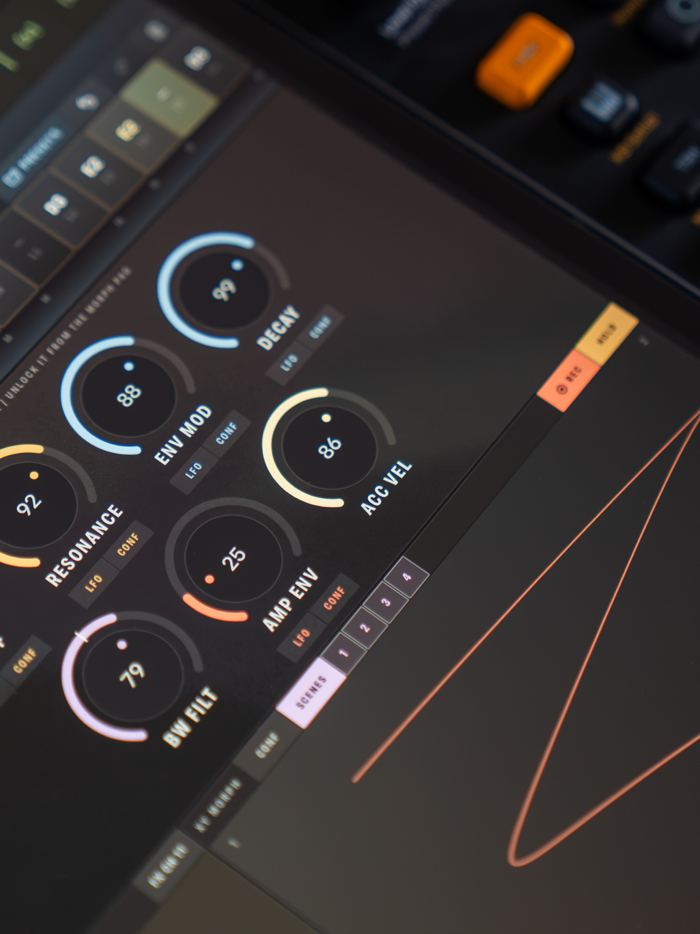
One finger, two axes, the whole filter voice moving at once — cutoff, resonance, env mod, decay and note length, live, with nothing to set up first. Switch the pad to SCENES and its four corners become four complete snapshots of the sound: drag between them and all four blend under your thumb. Lock any encoder out of the pad and it holds still while everything else morphs around it.
LOOP turns the pad into a motion recorder. Draw, jab at positions, lift and hold — it captures the actual movement of your hand and plays it back tempo…
还没有公开评论,欢迎分享你的体验。
Plur Controller
让使用你作品的人,认识背后的你。编辑确认身份后,将为你授予入驻开发者标识。
编辑将人工核实你的资料,如需补充信息会通过所填邮箱联系你。身份确认后,由编辑为你授予入驻标识。