smalltype – Markdown Notes

smalltype – Markdown Notes

效率

创作者
Herman Haidin

smalltype 是一款极简的 Markdown 笔记应用,支持快速记录长短不一的内容。所有笔记均保存为本地 .md 文件,可直接在 Files App、VS Code 或 Vim 中打开与编辑,确保数据完全由用户掌控。提供 iCloud Drive 与本地存储两种同步方案,用户可自由切换且随时调整。界面摒弃教程与设置页,点击“新建”即可输入;空笔记自动消失以维持整洁。Markdown 标记在编辑时温和可见,兼顾高效写作与隐私安全,完美适配 iPhone Duo。

COMMUNITY PERKSMergeek 社区专属福利
独家限免 NEW每天发现一份惊喜
PRODUCT SCREENS / 7

点击查看界面细节

smalltype – Markdown Notes 产品截图 1smalltype – Markdown Notes 产品截图 2smalltype – Markdown Notes 产品截图 3smalltype – Markdown Notes 产品截图 4smalltype – Markdown Notes 产品截图 5smalltype – Markdown Notes 产品截图 6smalltype – Markdown Notes 产品截图 7

简短的笔记,每天多次保存为真实文件夹中的纯 .md 文件。在 Mac 上的 VS Code、Vim 或任何编辑器中打开同一文件夹。平静、极简,并准备好用于 iPhone Duo。

smalltype 适用于你的笔记。那些小的、快速的、大的、未打磨的。这是一个快速、安静的打字地方。

## 开始
没有教程,没有设置界面。点击新建笔记并开始输入。留一个空的,它会安静地消失,所以你永远不会有一堆空白的未命名笔记。这就是整个应用。

## 属于你
每篇笔记都是一个真实的 .md 文件,就放在“文件”应用里。你可以随时打开、复制或以自己的方式备份它。删除一篇后,它仍会进入“最近删除”,就像其他任何文件一样:没有任何东西彻底消失。

## 同步或不同步
将笔记保存在 iCloud 驱动器上,以便在所有设备上都有它们。或者将它们保存在“我的 iPhone”上,完全本地化,永不离开你的设备。无论哪种方式,你都可以随时切换。

## 可见 Markdown
在输入时,Markdown 标记保持柔和可见。所见即所得,正是文件中的内容。键盘上方有一个栏位,为你输入标记,撤销和重做只需轻触即可。

## 整理
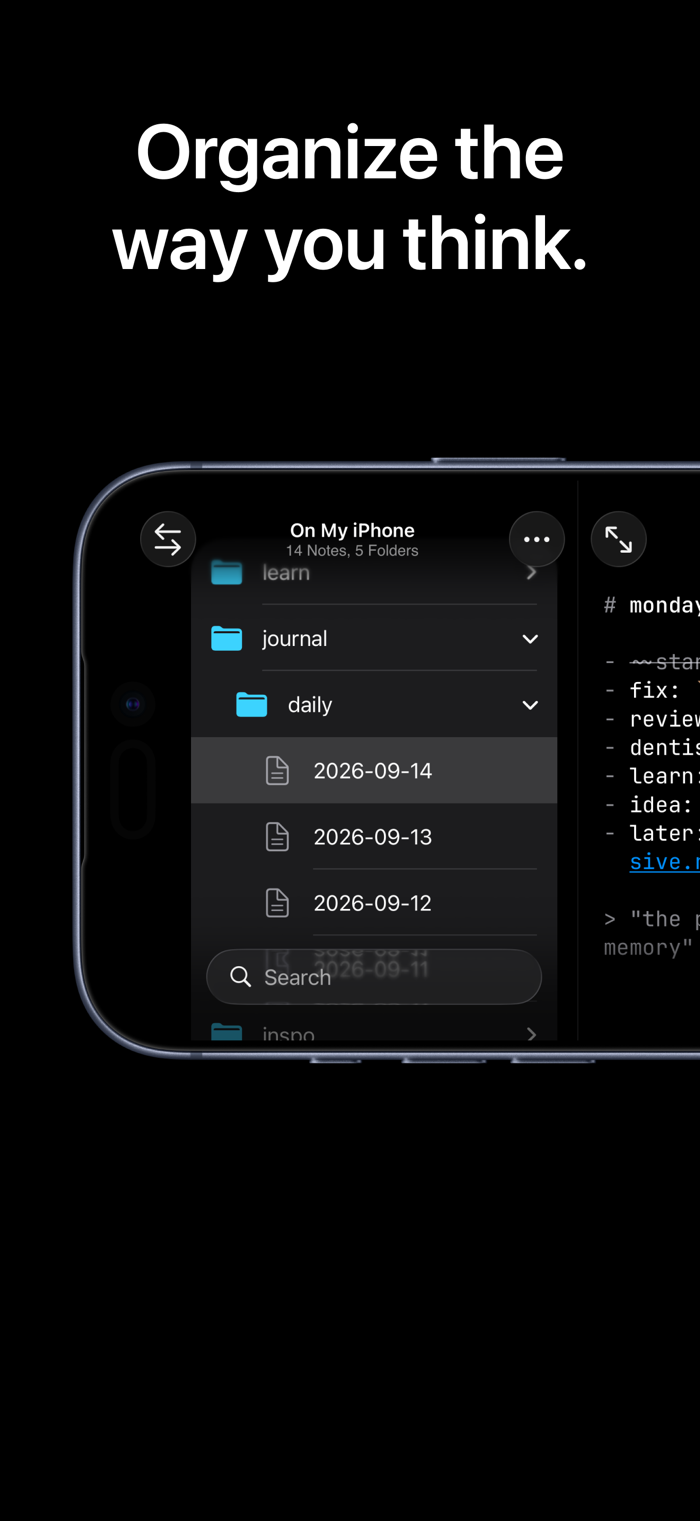
文件夹、搜索和快速笔记制作,全部来自一个屏幕。无需先进行设置。在文件夹名称中输入“daily”,其中的新笔记将以今天的日期作为名称。

## 无陷阱
无广告。无订阅。无追踪。从未有过账户。

Markdown 笔记。由你保管。

版本

1.2.1

## Fixes
- On iOS 27, the fade under the keyboard bar stopped short of the keyboard, and in landscape the fade under New Note was far too heavy. Both are gone: the note runs under the bar and shows through the keyboard.
- The keyboard bar keeps the same gap to the keyboard in portrait and landscape, and no longer drops onto it after Expand or Collapse.
- In landscape, "No Note Selected" sat above the middle of the note column after opening a folder or launching sideways. It is centered now.
- In landscape on iOS 27, an empty panel no longer slides in from the left edge.
- Long names stay on one line in the tree, in search results, and in the Move sheet, where the label of what you are moving no longer runs edge to edge.

查看完整更新记录 ↗

你的真实体验,为其他用户提供宝贵参考,获得宝石奖励

REWARD MARKET100 宝石可兑换什么?

还没有公开评论,欢迎分享你的体验。

提交反馈

每一个想法,都让 Mergeek 更好一点。