


 +100宝石



产品功能
Classly keeps your attendance, timetable and deadlines in one calm, private place — so you always know where you stand.
TODAY, AT A GLANCE
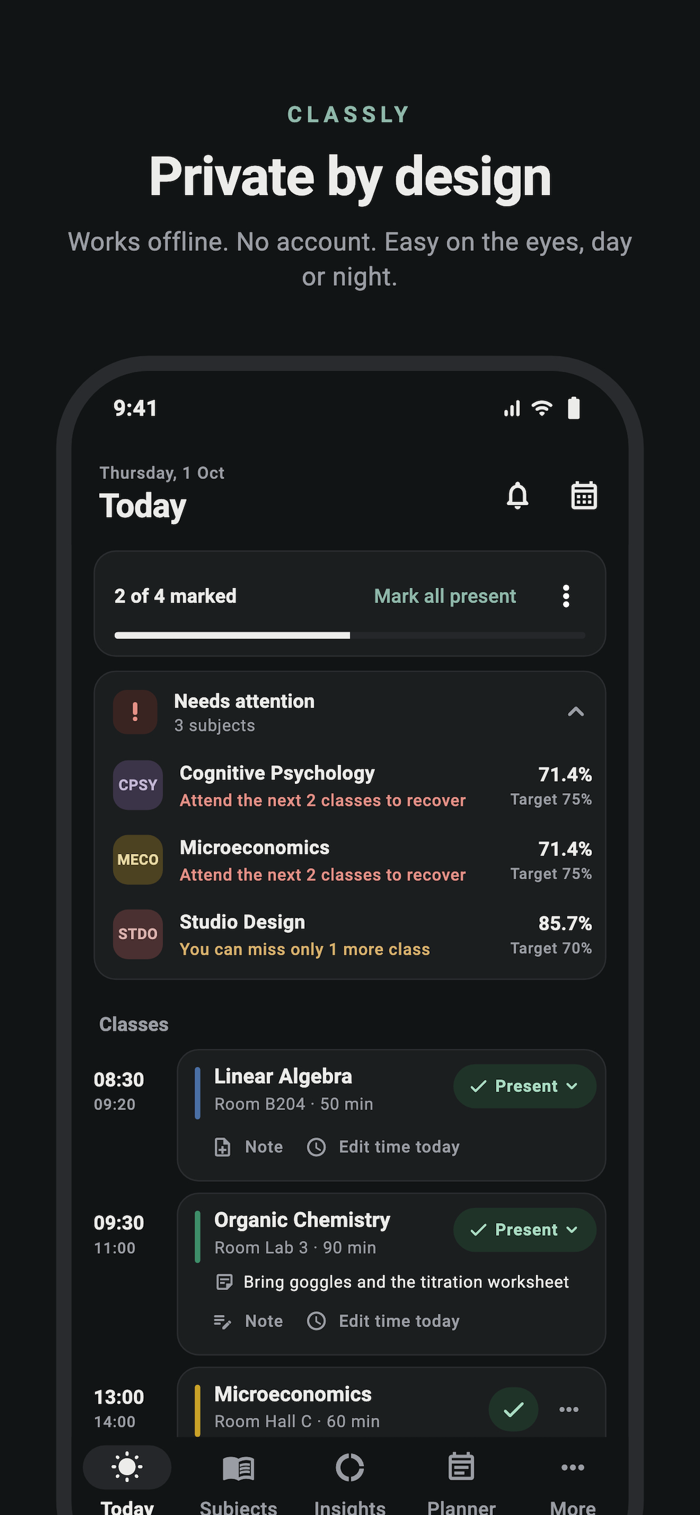
See today's classes as a timeline with times, rooms and notes. Mark a class present in one tap, or swipe to mark it. A progress card shows how much of the day is marked, and "Mark all present" finishes the day in a second.
KNOW WHERE YOU STAND
Insights shows every subject against its own target: how many classes you can still miss, or how many you need to attend to recover. The semester overview sums it up in one ring with your target, slack and classes left. Subjects that need attention surface on Today before it's too late.
A CALENDAR YOU CAN FIX
Every day is editable. Correct past classes, mark a class as cancelled, add an extra class, change one day's time, use another day's timetable, or mark an official holiday — attendance updates instantly.
EXAMS AND ASSIGNMENTS
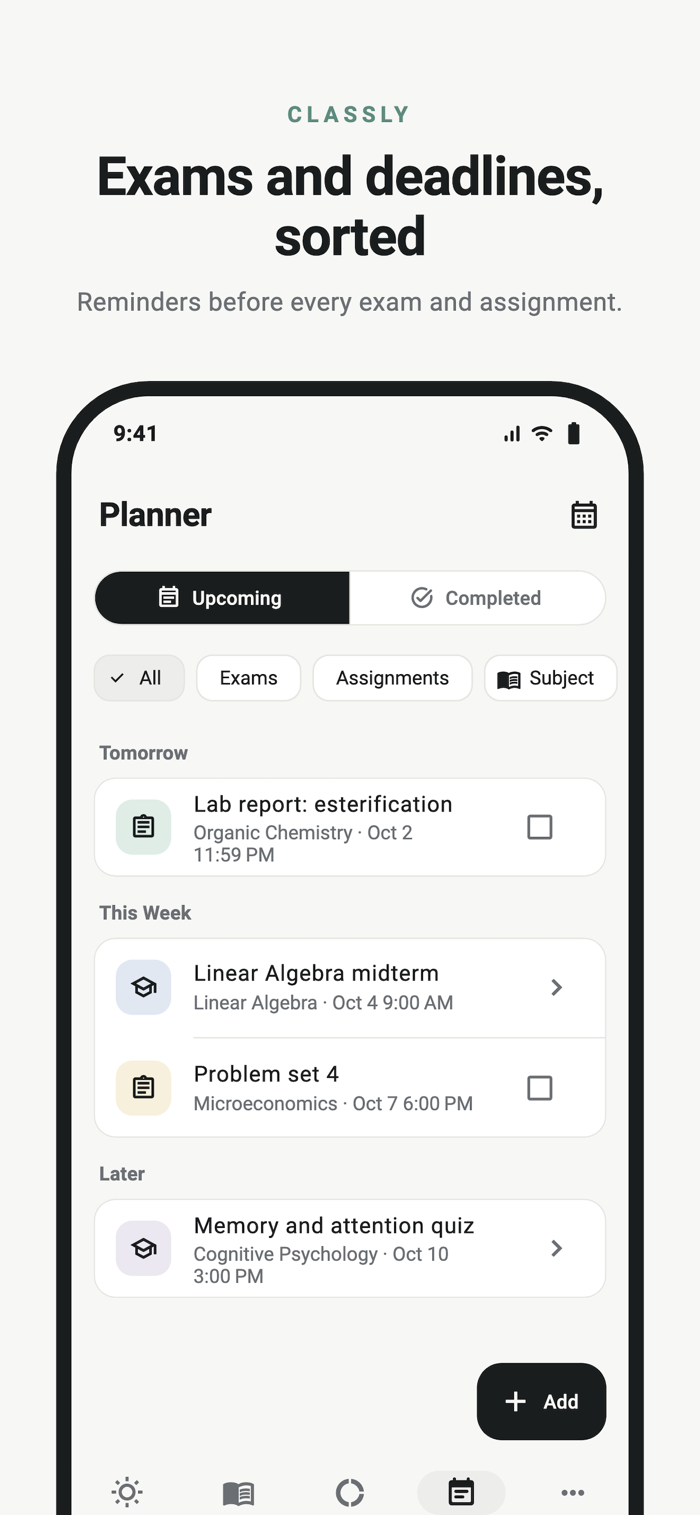
Keep exams and deadlines next to your timetable. Classly groups them into Overdue, Today, Tomorrow and This week, reminds you ahead of time, and lets you tick assignments off when they're done.
REMINDERS THAT FIT YOU
Get a reminder before each class and a prompt to mark attendance when it ends. Choose how early, or turn either off.
REPORTS
Weekly and monthly reports show your trend by day and per subject, with the next action for each class.
YOUR DATA STAYS YOURS
• Works offline. No account, no sign-up.
• Attendance, notes and timetable stay on your device.
• Classly does not use your location.
• Back up and restore your semester as a file whenever you like.
FREE TOOLS
Google Calendar Sync publishes your classes to a dedicated calendar, and the Home Screen widget shows today's classes at a glance. Both are free.
MORE
• Import your timetable from JSON or CSV, or export it as JSON, CSV or PDF
• Per-class notes
• Light, dark or system appearance
• 12- or 24-hour time
Classly began from an MIT-licensed open-source project and has been independently developed since. Details are in the app under More → Licenses & Attribution.
分享「」体验,参与「」抽奖!
分享 1~3 张你对这个产品最满意的截图或效果图
分享「」体验,参与「」抽奖!
用你的故事点亮社区✨!你的真实体验,将会永久展示在 官方主页 📌,为其他朋友提供宝贵参考 💡。立即分享吧!🚀
请为产品评分
请选择问题回答,为大家提供宝贵参考
选择要回答的问题
温馨提示
你尚未上传产品截图。
上传截图可立即获得宝石积分奖励!
如果你赶时间,也可稍后修改评论,补上截图领取宝石。
温馨提醒
你尚未添加产品截图
⚠️ 不添加截图将降低抽奖权重

感谢参加,你已成功参加!
为了确保你能及时收到审核结果和领奖码通知

扫描二维码关注 Mergeek 公众号
在后台回复 「获奖通知」
完成上述操作,即可保障奖励发放成功





用户评价
立即分享产品体验
你的真实体验,为其他用户提供宝贵参考
💎 分享获得宝石
【分享体验 · 获得宝石 · 增加抽奖机会】
将你的产品体验分享给更多人,获得更多宝石奖励!
💎 宝石奖励
每当有用户点击你分享的体验链接并点赞"对我有用",你将获得:
🔗 如何分享
复制下方专属链接,分享到社交媒体、群聊或好友:
💡 小贴士
分享时可以添加你的个人推荐语,让更多人了解这款产品的优点!
示例分享文案:
"推荐一款我最近体验过的应用,界面设计很精美,功能也很实用。有兴趣的朋友可以看看我的详细体验评价~"
关注 Mergeek 公众号
领奖遇到问题?联系小门助手