


 +100宝石





产品功能
Your Homey Pro. Your menu bar.
Turn on a light, adjust the heating, or run a flow without reaching for your phone. HomeBar puts your Homey Pro controls in your Mac's menu bar. Version 2 adds a full Mac app with room to explore every device, zone, and energy report.
QUICK CONTROL FROM THE MENU BAR
• Control lights, dimmers, thermostats, blinds, speakers, and locks.
• Keep favourite devices close and browse the rest by zone.
• Run flows and activate moods with a click.
• Check notifications, weather, energy use, and who is home.
NOW A FULL MAC APP
• See devices in a grid that adapts as you resize the window.
• Search, filter by device type, collapse zones, and jump to a room.
• Open device controls, live readings, information, and history without losing your place.
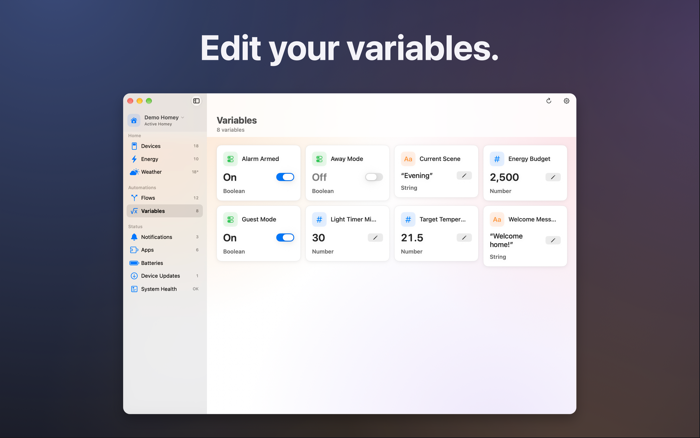
• Browse flows, edit variables, and read notifications in dedicated views.
• Switch between connected Homey Pro hubs from the sidebar.
ENERGY, BATTERIES, AND SYSTEM HEALTH
• Follow live consumption, generation, and grid usage with a device breakdown.
• Explore daily and monthly energy reports and electricity tariffs when available.
• Find low batteries and check replacement battery types reported by Homey Pro.
• Check CPU, memory, storage, and uptime.
• Spot crashed apps and apps with updates, and manage them from your Mac.
DESKTOP WIDGETS
Keep devices, flows, moods, energy, and presence on your desktop. Control supported lights and blinds through HomeBar with clear feedback when an action runs.
MAKE IT YOURS
Choose Paper, Aurora, Dusk, Ocean, or Glass backdrops. Adjust their intensity, card appearance, shadows, and text size. Give devices custom icons and configure the menu bar panel separately from the main window. HomeBar and its widgets support English and Dutch.
FREE AND PREMIUM
HomeBar includes five free actions per day. Premium adds unlimited actions, multiple Homey Pro hubs, device history, system health, and app management. Choose a monthly or yearly subscription, or a lifetime purchase. Existing installations retain their previously available history and management features.
REQUIREMENTS
• Homey Pro or Homey Pro Mini.
• macOS 14 Sonoma or later.
• Available controls and readings depend on your devices and Homey Pro setup. Some management features require a Local API Key.
Terms of Use (EULA): https://www.apple.com/legal/internet-services/itunes/dev/stdeula/
Privacy Policy: https://www.titansofindustry.be/apps/homebar/privacy
分享「」体验,参与「」抽奖!
分享 1~3 张你对这个产品最满意的截图或效果图
分享「」体验,参与「」抽奖!
用你的故事点亮社区✨!你的真实体验,将会永久展示在 官方主页 📌,为其他朋友提供宝贵参考 💡。立即分享吧!🚀
请为产品评分
请选择问题回答,为大家提供宝贵参考
选择要回答的问题
温馨提示
你尚未上传产品截图。
上传截图可立即获得宝石积分奖励!
如果你赶时间,也可稍后修改评论,补上截图领取宝石。
温馨提醒
你尚未添加产品截图
⚠️ 不添加截图将降低抽奖权重

感谢参加,你已成功参加!
为了确保你能及时收到审核结果和领奖码通知

扫描二维码关注 Mergeek 公众号
在后台回复 「获奖通知」
完成上述操作,即可保障奖励发放成功











用户评价
立即分享产品体验
你的真实体验,为其他用户提供宝贵参考
💎 分享获得宝石
【分享体验 · 获得宝石 · 增加抽奖机会】
将你的产品体验分享给更多人,获得更多宝石奖励!
💎 宝石奖励
每当有用户点击你分享的体验链接并点赞"对我有用",你将获得:
🔗 如何分享
复制下方专属链接,分享到社交媒体、群聊或好友:
💡 小贴士
分享时可以添加你的个人推荐语,让更多人了解这款产品的优点!
示例分享文案:
"推荐一款我最近体验过的应用,界面设计很精美,功能也很实用。有兴趣的朋友可以看看我的详细体验评价~"
关注 Mergeek 公众号
领奖遇到问题?联系小门助手