产品功能

应用市场介绍

Lucent: Bring the clipboard to the surface and efficiency is within reach.
We perform countless copy-and-paste operations every day, but the traditional clipboard can only remember the "last time". Lucent not only helps you remember all the history, but also makes managing the clipboard as natural as breathing through its unique "smart floating window" design.
No need to switch windows frequently. With just one shortcut key, your clipboard history is at your fingertips.
# Core Features
Invisible Recording, Automatic Recall
Silently record your clipboard history (text, pictures, links, etc.) in the background automatically. No longer worry about losing important information due to overwriting. If you want to retrieve the content you just copied, it's always there.
Smart Floating Window, Instant Activation
Designed for efficiency. Use a custom shortcut key to instantly activate the floating panel. It gently hovers above the current workspace, and disappears after use without disturbing.
Search and Filter, One-step Access
Supports keyword search and can be filtered by source application (Source App) and content type. No matter how much history there is, you can quickly locate the target content.
Tag Organization and Shortcut Key Direct Access
Supports creating multiple tags to group and manage content. You can also bind shortcut keys to specified tags to directly access the corresponding content collection, reducing repetitive operations.
Preview of Multiple Content Types
Supports preview of various content such as colors, links, pictures, locations, etc. No need to repeatedly paste and test. Just view and judge, and make more efficient selections.
Picture Format Conversion
Supports direct conversion of multiple formats such as WEBP, AVIF, PNG, GIF, JPEG, HEIC, etc. The process is simple and the processing is fast.
Video Format Conversion and Compression
Supports direct conversion of common formats such as MP4, WEBM, MKV, etc., and provides video compression capabilities for easy sharing and archiving.
Create GIF from Video
Supports selecting segments from a video, setting GIF parameters, and directly exporting as a GIF to quickly generate shareable animated images.
Integration with Third-party Services
Supports one-click call to TinyPNG for compression, or uploading pictures to ImgBB (you need to enter the API Key of the corresponding service).
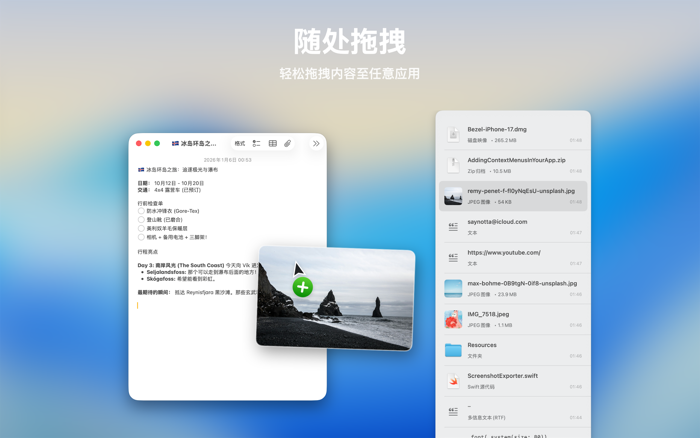
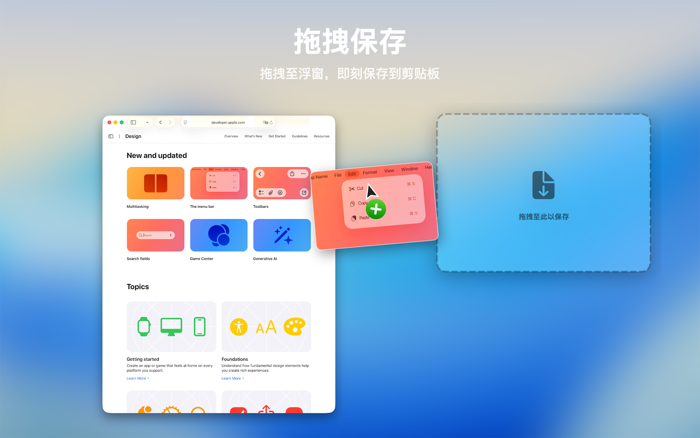
Intuitive Dragging, Smooth Interaction

收起

用户评价

立即分享产品体验

你的真实体验,为其他用户提供宝贵参考

宝石
评论可得 100 宝石
宝石随心兑换应用高级会员,每周更新 前往查看 >>
活动动态 0 人参加
查看更多评论