

Backups for iMovie
摄影与录像
- 创作者
- NP Associates
iMovie Backup Software可自动定时备份,保护iMovie创作。它基于五星评级的Final Cut Pro备份软件,能像Time Machine®之于iMovie®一样,对iMovie Libraries进行定时和手动快照。能在iMovie库损坏无法启动、编辑失误无法撤销时拯救用户,还可随时手动保存编辑内容并按计划间隔备份,让用户编辑iMovie时如穿凯夫拉救生衣般安心。
摄影与录像
iMovie Backup Software可自动定时备份,保护iMovie创作。它基于五星评级的Final Cut Pro备份软件,能像Time Machine®之于iMovie®一样,对iMovie Libraries进行定时和手动快照。能在iMovie库损坏无法启动、编辑失误无法撤销时拯救用户,还可随时手动保存编辑内容并按计划间隔备份,让用户编辑iMovie时如穿凯夫拉救生衣般安心。
点击查看界面细节

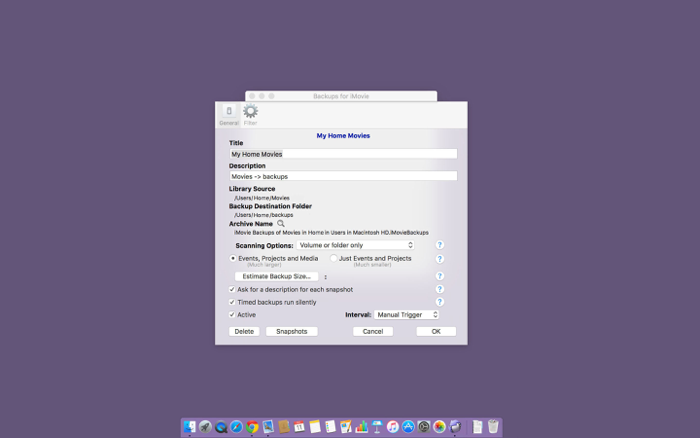
iMovie Backup Software: Protect your iMovie creations with automated timed backups. Install it before you need it!
Ever had an iMovie library corrupted so you can't even launch it? Ever gone down an editing path you didn't like and find you can't undo it? Backups for iMovie will rescue you from such situations.
Based on the 5 star rated Backups for Final Cut Pro, Backups for iMovie is like Time Machine® for iMovie®! It performs timed and manual snapshots of your iMovie Libraries.
“Life saver — 5 stars
The fact that iMovie doesn't even have a "Save" command, makes me queasy, so "Backups for iMovie” comes to the rescue with its "GO" button, letting me save my edits whenever the urge strikes me, as well as letting me backup at scheduled intervals. Now when I edit with iMovie, I feel like I'm wearing a Kevlar life preserver in an ocean full of digital debris and corruption, ready to sink me and all my hard work.” – miggsb
Rate Backups for iMovie to help make it a success. Contact support for suggestions, and improvements.
What can Backups for iMovie do?
• Reflecting the fast pace of video editing, Backups for iMovie creates incremental snapshots as often as every 2 minutes. The one hour backup interval of Time Machine can seem like an eternity if you lose your work.
• Making labeled snapshots during your editing lets you restore to key steps in your process—finished a rough cut, finished adding titles, ready to export. A description added to a snapshot, describing why you made it, is very handy!
• Lets you restore everything from a given snapshot or selected libraries, events or projects.
• Ignores iMovie’s sometimes very large work files. (These are automatically recreated.)
• Extensive logging. You can delete old snapshots.
• “Safe” snapshots. Only completed snapshots are retained. Available disk space is checked before the backup begins.
• “Safe” restores. If to a local drive, replaced files are placed in the Trash—they are never deleted.
• Continually adding new features.
• After a brief sojourn, it's back on the App Store!
• Verified to run under MacOS Sonoma and iMovie 10.4.
还没有公开评论,欢迎分享你的体验。