



 +100宝石





产品功能
Easily create a budget. Use Money Pro® to cut expenses!
Money Pro offers one-stop bill planning, budget management, and account tracking.
This app has an easy sync function, and the same version can be used on both iPhone and iPad. The Chinese version of the user manual can be very helpful to you.
Money Pro is the next-generation financial app (with over 2 million downloads globally).
Features
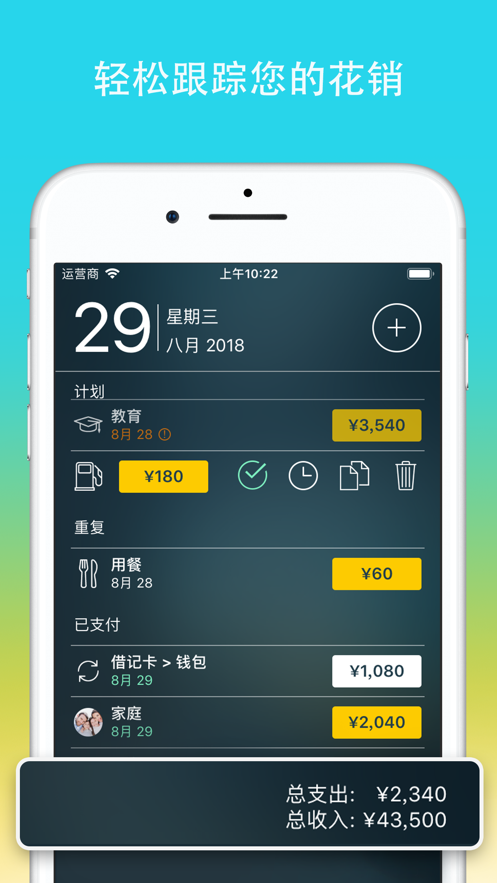
Calendar
- Mark the days when bills are due on the large calendar
- Set recurring bills with customizable periods
- Filter transactions by selecting dates in the calendar
Today's View
- Quickly view due bills
- Approve transactions quickly when they occur
- Money Pro can predict transactions not manually scheduled for the day
Bill Due Notifications
- A comprehensive reminder system can remind you of upcoming due bills
- Quick re-planning options can help you handle bills due (tomorrow, within 3 days, next week)
Budget
- Create budget entries for income and expenses and specify budget limits for each entry
- You can set different budget limits for each time period, which is very useful if you plan to cut expenses month by month
- Start adding each of your transactions and view how each category and the overall situation develop
- An intuitive indicator for monitoring budget overspending
- Select the categories to analyze and instantly view the generated budget trend charts
Budget Carry-Over
- You can set to carry over the budget surplus in the current time period to the next budget time period
- If you overspend in the previous period, budget carry-over can automatically limit your spending
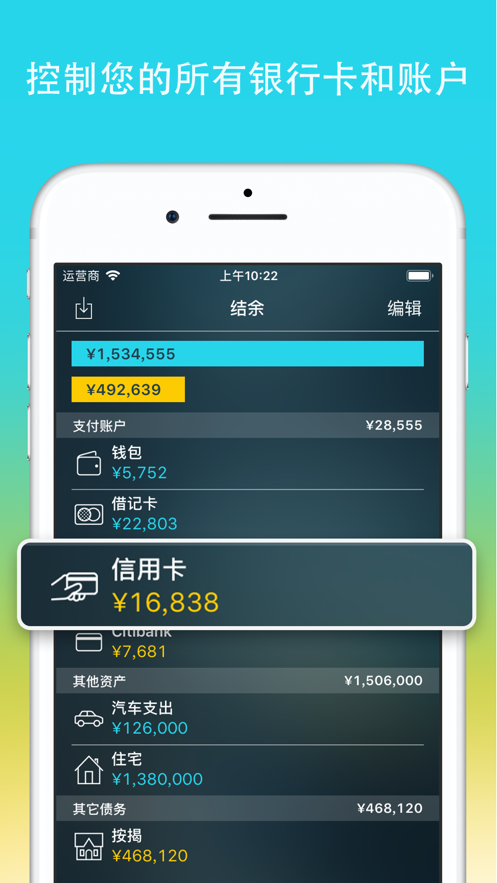
Check Register
- You can set up an unlimited number of accounts simultaneously (checking, savings, credit cards, etc.)
- Set transactions as recurring or one-time
- History of balance changes
- Additional fields for managing records, including payee, description, check number, classification (personal expenses/business trip expenses)
- Attachment of receipt photos
Account Reconciliation
- You can record transactions and settle (reconcile) them later
- Automatically calculate available balance and settled balance
Online Banking (GOLD Subscription)
- Connect to the bank and then download your data
Import Bank Statements
- Import transaction history to keep your accounts up-to-date at all times (supported files:.ofx,.csv)
- Money Pro can understand how you classify transactions and can predict which category the transactions to be imported belong to
Split Transactions
- You can split a transaction into multiple categories
- This function is very useful when you shop in a large mall and pay for multiple products at the same time
Calculator and Currency Converter
- Calculate amounts when planning a budget
- Quickly convert currencies when entering transactions
Search
- Search for transactions by amount, category, description, payee, etc.
Detailed Reports
- Income/Expenses
- Cash Flow
- Transactions
- Assets/Liabilities (Net Worth)
- Estimated Surplus
- Daily/Weekly/Monthly/Yearly Trend Charts
Many Customization Options
- Customize periods (weekly, bi-weekly, monthly, etc.) when creating budgets and bill plans
- Adjust the structure of income/expense categories and sub-categories as needed
- Customize accounts and categories using over 1500 built-in icons
- Create your own unique icons using photos
Money Pro Sync (PLUS or GOLD Subscription)
- Track expenses with other users on different devices* (sync across platforms and with family)
Backup Data
- Money Pro automatically backs up your data at all critical times
- You can also create backups manually
Multiple Profiles
- You can set up multiple profiles and separately track your personal and family finances
More
- Print and export to pdf, qif, csv formats
- Password protection
- Set and track financial goals (GOLD Subscription)
- View reports in augmented reality (GOLD Subscription)
- Support multiple currencies and automatically update exchange rates
- Money Pro uses iCloud to sync data between your devices (iPhone, iPad, Mac)
PLUS
- 1-month PLUS: $4.99
分享「」体验,参与「」抽奖!
分享 1~3 张你对这个产品最满意的截图或效果图
分享「」体验,参与「」抽奖!
用你的故事点亮社区✨!你的真实体验,将会永久展示在 官方主页 📌,为其他朋友提供宝贵参考 💡。立即分享吧!🚀
请为产品评分
请选择问题回答,为大家提供宝贵参考
选择要回答的问题
温馨提示
你尚未上传产品截图。
上传截图可立即获得宝石积分奖励!
如果你赶时间,也可稍后修改评论,补上截图领取宝石。
温馨提醒
你尚未添加产品截图
⚠️ 不添加截图将降低抽奖权重

感谢参加,你已成功参加!
为了确保你能及时收到审核结果和领奖码通知

扫描二维码关注 Mergeek 公众号
在后台回复 「获奖通知」
完成上述操作,即可保障奖励发放成功









用户评价
立即分享产品体验
你的真实体验,为其他用户提供宝贵参考
💎 分享获得宝石
【分享体验 · 获得宝石 · 增加抽奖机会】
将你的产品体验分享给更多人,获得更多宝石奖励!
💎 宝石奖励
每当有用户点击你分享的体验链接并点赞"对我有用",你将获得:
🔗 如何分享
复制下方专属链接,分享到社交媒体、群聊或好友:
💡 小贴士
分享时可以添加你的个人推荐语,让更多人了解这款产品的优点!
示例分享文案:
"推荐一款我最近体验过的应用,界面设计很精美,功能也很实用。有兴趣的朋友可以看看我的详细体验评价~"
关注 Mergeek 公众号
领奖遇到问题?联系小门助手