


 +100宝石


产品功能
Stop switching windows just to do the math.
Calcbar puts a fully functional calculator one click away — always waiting in your Mac menu bar, ready the moment you need it. No dock clutter. No app switching. No hunting through Spotlight. Just open, calculate, and get back to work.
Always there. Never in the way.
Calcbar lives quietly in your menu bar. Click the icon (or press your custom global keyboard shortcut) and the calculator appears instantly. Press Escape — or click anywhere else — and it disappears just as fast. It fits exactly where your workflow is, not somewhere you have to go find it.
Built for the calculations you actually do every day.
Whether you're splitting a bill, checking a project budget, converting a percentage, or running a quick sanity check on a number in a spreadsheet, Calcbar handles it without ceremony. Clean arithmetic. Clear display. No learning curve.
Core features:
- Menu bar access — always visible, never blocking your work
- Global keyboard shortcut — open Calcbar without reaching for the mouse
- Calculation history — review your recent results without re-entering numbers
- Clipboard copy — tap once to copy the result and paste it anywhere
- Keyboard-first input — type your calculation directly, no mouse required
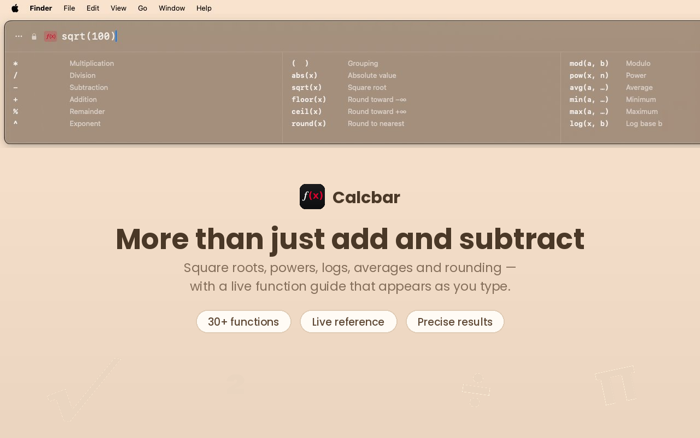
- Standard operations — addition, subtraction, multiplication, division, and percentage
- Clean, native macOS design — feels like it belongs on your Mac
One purchase. No subscriptions. No accounts.
Calcbar is a one-time purchase. Buy it once, use it forever. No recurring fees, no sign-in, no data collected. Just a fast, honest calculator that does exactly what you need.
Why menu bar?
The macOS menu bar is the fastest real estate on your screen. It's always visible, always accessible, and doesn't ask you to leave what you're doing. That's where a calculator should live — not buried in a dock, not requiring a window switch, not behind a keyboard shortcut that opens a full app you then have to minimise.
Calcbar is for the person who has a number to check right now and wants the answer in under three seconds.
Download Calcbar and keep your focus where it belongs — on your work, not on finding your calculator.
分享「」体验,参与「」抽奖!
分享 1~3 张你对这个产品最满意的截图或效果图
分享「」体验,参与「」抽奖!
用你的故事点亮社区✨!你的真实体验,将会永久展示在 官方主页 📌,为其他朋友提供宝贵参考 💡。立即分享吧!🚀
请为产品评分
请选择问题回答,为大家提供宝贵参考
选择要回答的问题
温馨提示
你尚未上传产品截图。
上传截图可立即获得宝石积分奖励!
如果你赶时间,也可稍后修改评论,补上截图领取宝石。
温馨提醒
你尚未添加产品截图
⚠️ 不添加截图将降低抽奖权重

感谢参加,你已成功参加!
为了确保你能及时收到审核结果和领奖码通知

扫描二维码关注 Mergeek 公众号
在后台回复 「获奖通知」
完成上述操作,即可保障奖励发放成功





用户评价
立即分享产品体验
你的真实体验,为其他用户提供宝贵参考
💎 分享获得宝石
【分享体验 · 获得宝石 · 增加抽奖机会】
将你的产品体验分享给更多人,获得更多宝石奖励!
💎 宝石奖励
每当有用户点击你分享的体验链接并点赞"对我有用",你将获得:
🔗 如何分享
复制下方专属链接,分享到社交媒体、群聊或好友:
💡 小贴士
分享时可以添加你的个人推荐语,让更多人了解这款产品的优点!
示例分享文案:
"推荐一款我最近体验过的应用,界面设计很精美,功能也很实用。有兴趣的朋友可以看看我的详细体验评价~"
关注 Mergeek 公众号
领奖遇到问题?联系小门助手