


 +100宝石



产品功能
Lede is the app you want when you double-click a Markdown file.
One file, one window. No sidebar, no folder tree, no library to import into. It opens the file where you keep it, shows it properly, and gives it back byte for byte.
THE SYNTAX DISAPPEARS
A heading reads as a heading and bold reads as bold, while the file underneath stays exactly what you typed. Lede hides the markers by what the line says, not by where your cursor is, so the text never reflows as you move through it. That last part is what the other live-preview editors get wrong.
THREE VIEWS, ONE MEASURE
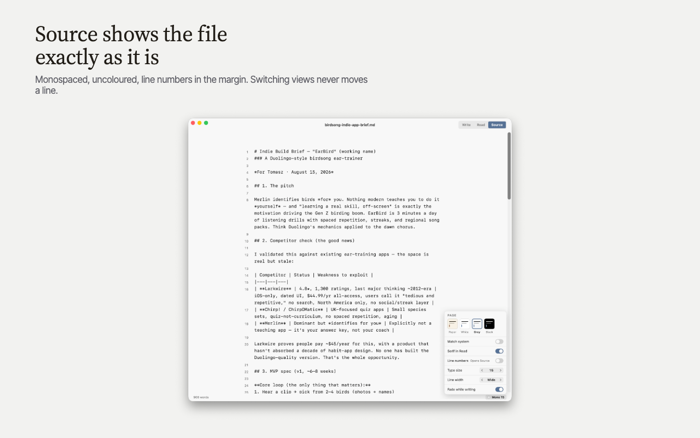
Write has a caret. Read renders the document properly, with tables, callouts and struck-through tasks. Source shows the file the way a text editor would: monospaced, uncoloured, with line numbers. Switching between them never moves a line.
A PAGE WORTH LOOKING AT
Four page colours — warm Paper, White, Grey and true Black for OLED displays — applied to the whole window rather than to a panel inside it. Each carries its own ink and its own accent, measured against that page. Seven type sizes, and a line length set in characters rather than pixels, so a larger size widens the measure instead of squeezing the words.
A SLASH MENU THAT TEACHES ITSELF OUT OF A JOB
Type / and pick a heading, a list, a table, a callout. It shows you the Markdown it is about to write, so after a few uses you type the syntax yourself and stop opening the menu.
MARKDOWN, PROPERLY
647 of 650 CommonMark examples and 666 of 672 GitHub Flavored Markdown examples, measured against the specifications' own test suites. Tables, footnotes, task lists, nested lists, code fences with highlighting.
IT GIVES YOUR FILE BACK UNCHANGED
Open and save, twice over, and the bytes are identical. Smart quotes and dashes are off and cannot be turned on, because rewriting your punctuation as you type breaks the one promise this app makes. If the file changes on disk while you have it open, Lede tells you and lets you choose.
NOTHING LEAVES YOUR MAC
No account, no server, no telemetry, no analytics. Lede checks once a day whether a newer version exists and that is the only thing it ever sends.
NATIVE, AND SMALL
Written in AppKit for the Mac. No Electron, no browser engine hidden inside, no JavaScript runtime. The whole app is about five megabytes and it opens immediately.
Lede is free. Not free with an upgrade, not free for now: there is nothing to buy and nothing to subscribe to.
From the makers of Skein.
分享「」体验,参与「」抽奖!
分享 1~3 张你对这个产品最满意的截图或效果图
分享「」体验,参与「」抽奖!
用你的故事点亮社区✨!你的真实体验,将会永久展示在 官方主页 📌,为其他朋友提供宝贵参考 💡。立即分享吧!🚀
请为产品评分
请选择问题回答,为大家提供宝贵参考
选择要回答的问题
温馨提示
你尚未上传产品截图。
上传截图可立即获得宝石积分奖励!
如果你赶时间,也可稍后修改评论,补上截图领取宝石。
温馨提醒
你尚未添加产品截图
⚠️ 不添加截图将降低抽奖权重

感谢参加,你已成功参加!
为了确保你能及时收到审核结果和领奖码通知

扫描二维码关注 Mergeek 公众号
在后台回复 「获奖通知」
完成上述操作,即可保障奖励发放成功





用户评价
立即分享产品体验
你的真实体验,为其他用户提供宝贵参考
💎 分享获得宝石
【分享体验 · 获得宝石 · 增加抽奖机会】
将你的产品体验分享给更多人,获得更多宝石奖励!
💎 宝石奖励
每当有用户点击你分享的体验链接并点赞"对我有用",你将获得:
🔗 如何分享
复制下方专属链接,分享到社交媒体、群聊或好友:
💡 小贴士
分享时可以添加你的个人推荐语,让更多人了解这款产品的优点!
示例分享文案:
"推荐一款我最近体验过的应用,界面设计很精美,功能也很实用。有兴趣的朋友可以看看我的详细体验评价~"
关注 Mergeek 公众号
领奖遇到问题?联系小门助手