


 +100宝石

产品功能
VoidLink is a project maintained and led by players in the Sunshine - Moonlight streaming community. After long - term development and iteration, it has been polished into a game streaming tool with powerful performance and rich functions.
Main Features
1. Customize Your Streaming Method and Experience
* Add frequently - used menu functions to "Favorites" and support dragging to adjust the order.
* Drag to adjust the width of the side - setting menu.
* "Streaming Toolbox" menu: Quickly call the local soft keyboard, send keyboard combinations, and switch the layout of screen display controls.
* Customization is supported for the settings menu, toolbox, soft - keyboard gesture triggers, etc., to create a personalized operation experience.
2. Powerful Video Performance
* The video bitrate can reach up to 500 Mbps, meeting the high - quality streaming requirements.
* Support for HDR and YUV 4:4:4 streaming (requires device hardware decoding support).
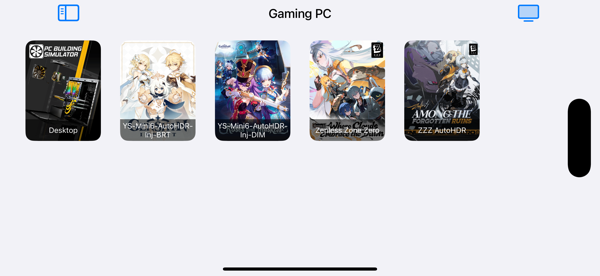
* Support for the PiP (Picture - in - Picture) mode, allowing continuous streaming in the background without interruption.
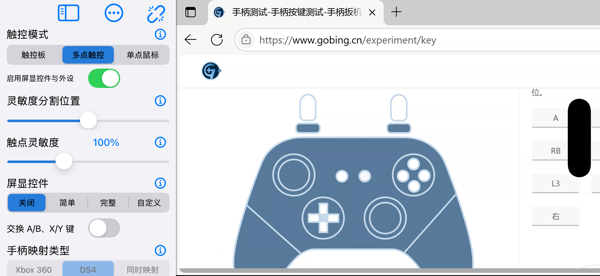
3. Powerful Touch Support
* Smooth and reliable multi - touch passthrough.
* The "Multi - touch Game Fine - tuning" function,首创 by this application, further optimizes the touch response in games.
* Provide mouse click, right - click, drag and other simulation modes, and the pointer movement sensitivity can be adjusted.
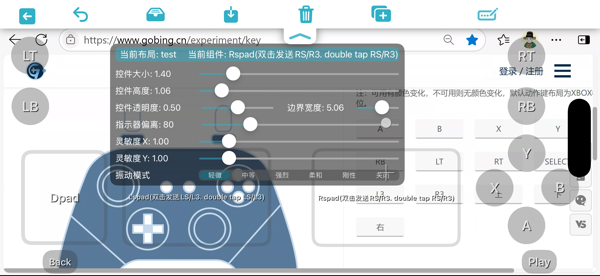
* A rich variety of screen - display control types: gamepad, keyboard keys, mouse controls, supporting mixed - type controls.
* Screen - display controls support visual and tactile feedback (requires a device - built - in vibration motor).
* The control parameter panel supports customizing and adjusting attributes such as control size, shape, border, transparency, sensitivity, label, etc.
* Support for importing and exporting control layouts to share your game operation configurations across devices.
4. Full Support for Portrait Mode
* The streaming content and controls can adapt to the portrait screen, with adaptive resolution and screen - display control layout.
5. External Gamepad Support
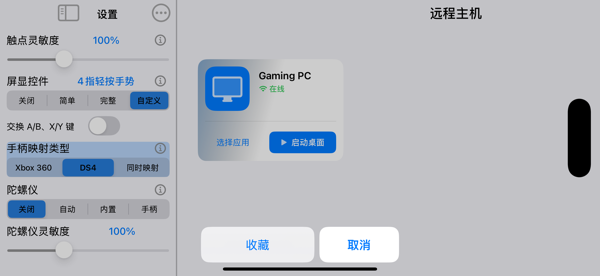
* The gamepad mapping type can be specified as Xbox360 or DS4, and it also applies to the screen - display gamepad.
* A gamepad can be connected at any time during the streaming process.
* Support for gyroscope mapping, allowing hot - switching between the built - in gyroscope and the gamepad gyroscope.
* The sensitivity adjustment function makes gyroscope operations more in line with personal habits.
6. External Display Support
* Support for the Stage Manager mode (can be full - screen), AirPlay mode (mirror the current device screen).
分享「」体验,参与「」抽奖!
分享 1~3 张你对这个产品最满意的截图或效果图
分享「」体验,参与「」抽奖!
用你的故事点亮社区✨!你的真实体验,将会永久展示在 官方主页 📌,为其他朋友提供宝贵参考 💡。立即分享吧!🚀
请为产品评分
请选择问题回答,为大家提供宝贵参考
选择要回答的问题
温馨提示
你尚未上传产品截图。
上传截图可立即获得宝石积分奖励!
如果你赶时间,也可稍后修改评论,补上截图领取宝石。
温馨提醒
你尚未添加产品截图
⚠️ 不添加截图将降低抽奖权重

感谢参加,你已成功参加!
为了确保你能及时收到审核结果和领奖码通知

扫描二维码关注 Mergeek 公众号
在后台回复 「获奖通知」
完成上述操作,即可保障奖励发放成功






用户评价
立即分享产品体验
你的真实体验,为其他用户提供宝贵参考
💎 分享获得宝石
【分享体验 · 获得宝石 · 增加抽奖机会】
将你的产品体验分享给更多人,获得更多宝石奖励!
💎 宝石奖励
每当有用户点击你分享的体验链接并点赞"对我有用",你将获得:
🔗 如何分享
复制下方专属链接,分享到社交媒体、群聊或好友:
💡 小贴士
分享时可以添加你的个人推荐语,让更多人了解这款产品的优点!
示例分享文案:
"推荐一款我最近体验过的应用,界面设计很精美,功能也很实用。有兴趣的朋友可以看看我的详细体验评价~"
关注 Mergeek 公众号
领奖遇到问题?联系小门助手