MovieSlate® 8

MovieSlate® 8

拍板, 记录, 报告

Creator
平台
iOS
摄影与录像APP

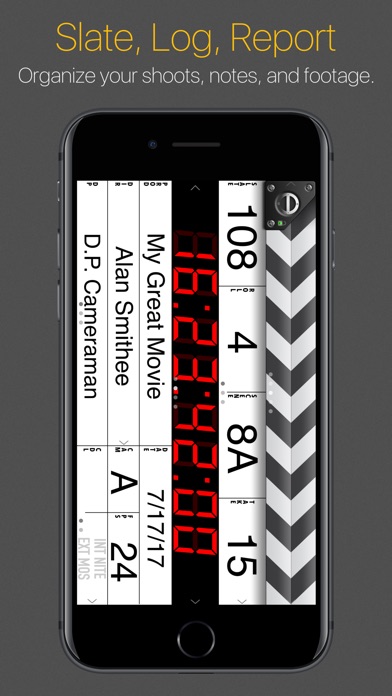
MovieSlate is a professional production tool that combines the functions of a digital tablet, clapper board, shooting log, and notepad for shooting movies, TV shows, etc. It can conveniently record shots and notes, saving time for shooting/editing and creating reports. Its core functions include: clicking on fields to edit production information, entering timecodes with an optimized keyboard, recording tablet data to the history during shooting, each shot can be circled, rated, noted, voice noted, photographed with a message, and it can also quickly search for shot information. History/annotations can be exported/emailed, and it supports multiple projects.
COMMUNITY PERKSMergeek 社区专属福利
独家限免 NEW每天发现一份惊喜
PRODUCT SCREENS / 5

点击查看界面细节

MovieSlate® 8 产品截图 1MovieSlate® 8 产品截图 2MovieSlate® 8 产品截图 3MovieSlate® 8 产品截图 4MovieSlate® 8 产品截图 5

SEE IT
Videos/Details at movie-slate.com.
AS SEEN IN APPLE’S iPAD TV ADS
“MovieSlate® is the the Rolls-Royce of slates” says HandHeldHollywood.com. A convenient, all-in-one digital slate, clapper board, shot log, and notepad is used for film, TV, documentaries, music videos, and interviews, this professional production tool is the easy way to log footage and take notes as you shoot— saving you valuable time later when capturing/editing footage, and creating reports. All at a mere fraction of a bulky digital clapperboard’s cost.
SLATE
Tap a field to edit production info. Choose info from default/custom snippets, contacts, or saved history. Enter new info with the keyboard. Use the optimized keypad to quickly enter numeric info like: roll, scene, take, timecode. Or swipe up/down on fields to increment/decrement numbers.
TIMECODE
Entering timecode is easy with our optimized keypad. Sync to clock time, or an iTunes song (Music Video mode). With optional PRO Features in-app purchase: LTC/WiFi sync with: compatible cameras, recorders, generators, Timecode Systems Hubs, wireless timecode slates; and other MovieSlate apps.
CLAPPER
To begin a shot: photograph the slate’s production info, then tap the clapper sticks. Sticks open & clap closed, creating an audible/visible marker. All slate data is logged to history. Optional credits animations briefly display each production field, full screen.
NOTES
For each shot, you can: circle a take; rate sound/picture quality; write multiple shot notes; record voice notes; take picture notes. Example: when shooting interviews, create notes to timecode-mark when a particular question was asked, or something remarkable was said. Enter notes using the microphone, camera, keyboard— or insert snippet phrases (such as “Interview”, “Question”, or “Tail Sticks”).
LOG HISTORY
Get fast, searchable access to shot info, without wading through hours of footage. For each shot: all production, GPS location, and timecode data is stored to the app’s Shot Log History…

版本

27.0

• 支持 OS 27。

• 支持 iPhone Duo。

• 大多数屏幕都经过重新设计,可在各种尺寸的设备上获得更好的体验。

• 设置、历史记录、聊天和音效部门现在在所有设备上都使用分栏视图。
在较窄的屏幕上,列表会以抽屉形式滑入。

• 在较大的窗口中,数字键盘会以弹出框形式显示。

• 片段/菜单屏幕已重新设计:
+ 现在支持以下布局:列表、按钮,以及新增的“键盘 + 建议”。
+ 在较大的窗口中以弹出框形式显示。

• 标签栏变更:
+ 所有设备上都可以隐藏标签栏;轻点一个标签,然后选择菜单项“隐藏标签栏”。
+ 隐藏标签栏后,右下角会出现一个“TABS”按钮。
+ 轻点“TABS”按钮,然后选择菜单项“显示标签栏”,即可重新显示标签栏。
+ 屏幕较矮时,标签栏会缩短并隐藏图标。
+ 在 iPhone Duo 上,右侧有时会出现一个圆形标签按钮。
+ 标签徽章(例如 REC 和 SONG)现在显示为图标,而不是文字。

• 帮助:
+ 更新了《用户指南》。
+ 《用户指南》中的章节现在显示在可折叠分区中。
+ 《用户指南》新增“导出 PDF”按钮(下载图标)。
+ 简化了“新增内容”屏幕。
+ 为部分按钮添加了图标,并修正了部分设备上的布局。

• 音效部门——移除了多余的备用布局。

• 场记板 > 聆听拍板声——修复了导致崩溃的问题。

• LTC 时间码——修复了将 24fps 与 23.97fps 混淆的问题。

• 历史记录 > 报告——修复了报告包含图像或音频时出现的问题。

• MSCloud > 接收共享数据——修复了导入 PDF 时容易造成混淆的问题。

• 聊天:
+ 现在可以向离线的接收者发送消息。
+ 接收者重新上线后,未发送的消息会自动发送。

• 脚本部门:
+ 项目设置中新增选项,可让“日”编号包含小数。
+ 页码、箭头、图层和视频按钮现已整合为统一的“页面工具栏”。
+ 长按页面箭头,可连续滚动浏览页面。
+ 启用设置后,脚本页码会显示在缩略图栏上方。
+ 脚本页码现在也会显示在缩略图网格屏幕上。
+ 标注——修复了部分超出页面的线条会跳动的问题。
+ 标注——改进了辅助线标题的位置。
+ 分解报告——新增排序选项。
+ 分解 > 排序——新增“按场景地点”和“按日/夜”选项。
+ 分解——新增对“纵向”脚本的支持
(即一个脚本 PDF 中包含多集的短篇系列)。
+ 导入 PDF 时,现在会自动建议使用 PDF 文件本身的名称。
+ 修复了建议的报告名称中集数重复的问题。
+ 修复了无法删除某些批注(例如标尺线)的问题。
+ 更新了 PDF 库(修复了多个崩溃问题)。

查看完整更新记录 ↗

你的真实体验,为其他用户提供宝贵参考,获得宝石奖励

REWARD MARKET100 宝石可兑换什么?

还没有公开评论,欢迎分享你的体验。

提交反馈

每一个想法,都让 Mergeek 更好一点。