


 +100宝石



产品功能
Your next meeting shouldn't have to beg for your attention.
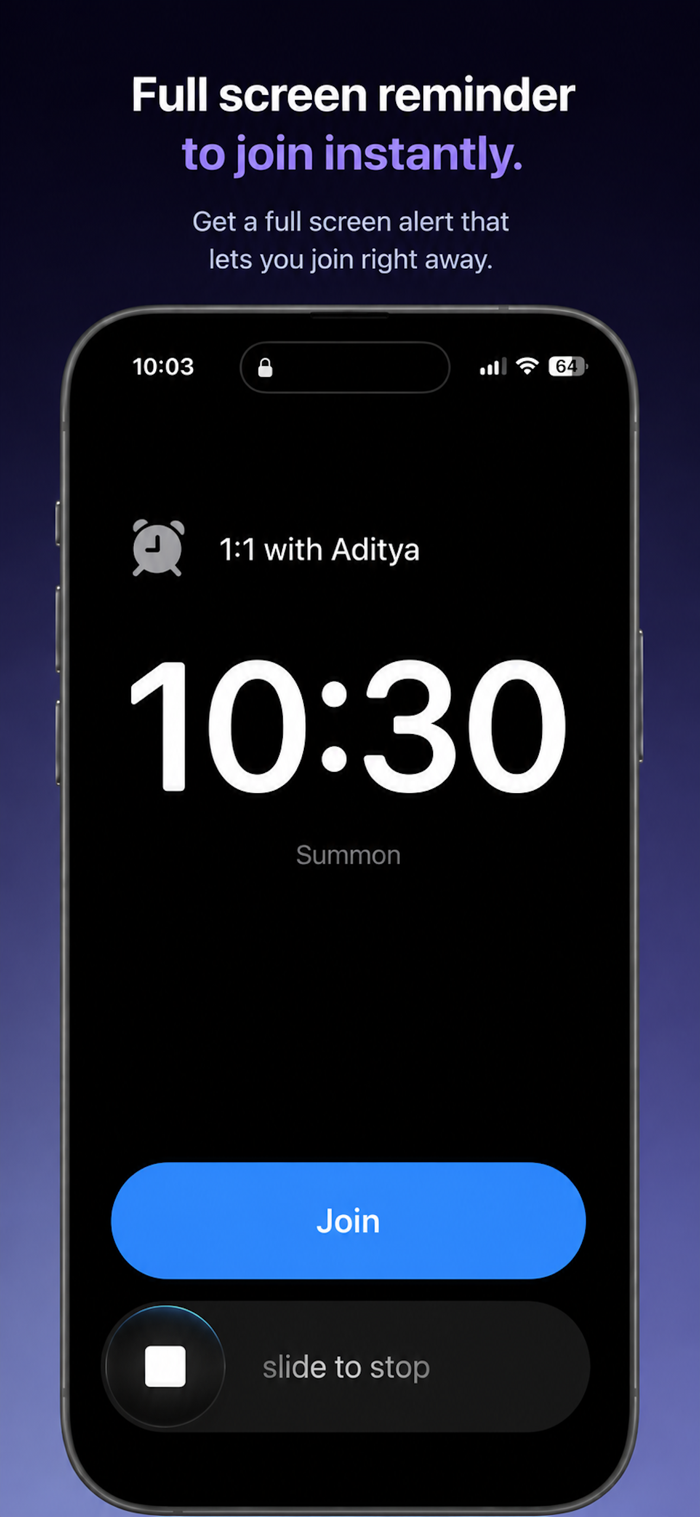
Summon rings a full-screen alarm right before your meeting starts — through Silent mode, through Focus — with the join link already detected and one button to get in.
Free to download. No nags, no timers, no locked alerts.
AN ALARM, NOT A NOTIFICATION
Banner notifications are built to be ignorable. Summon isn't. It schedules a real system alarm for your meeting, so it takes over the screen, rings at alarm volume even when your phone is silenced or a Focus is on, and counts down in the Dynamic Island. It stays up until you join or dismiss it.
ONE TAP AND YOU ARE IN
Zoom, Google Meet, Microsoft Teams, Webex, FaceTime, WhatsApp and many more links are detected automatically from your event's URL, location and notes. The alarm carries a Join button: tap it and the meeting opens. No hunting through the invite for the link while everyone waits.
THREE DAYS AT A GLANCE
The agenda shows today, tomorrow and the day after, with what is up next raised to the top. Tap any meeting for its notes, the dial-in code, the join link and whether an alarm is armed. Meetings with no join link can be hidden entirely.
ALARMS THAT RESPECT THE REST OF YOUR LIFE
- Ring 1, 2 or 5 minutes before the meeting starts
- Five tones to choose from, plus No Sound for a silent full-screen takeover
- Quiet Hours: a nightly window where alarms stay silent
- Pause alarms for a while and they resume automatically — anything ringing after the pause still rings
- Cancel a meeting in Calendar and Summon cancels its alarm, even in the background
YOUR CALENDAR NEVER LEAVES YOUR DEVICE
Summon reads your calendar through Apple EventKit entirely on-device, and schedules every alarm locally. Zero outbound network connections. Your schedule, your meetings, your attendees: none of it is transmitted. This is a verifiable promise, not a privacy policy paragraph.
SUMMON PRO, ONE-TIME
Unlimited alarms (vs 10 for FREE). One-time purchase. No subscription. Unlock iPhone and iPad on their own, or unlock every platform — including the Mac app — with a single purchase. Already own a single-platform unlock? An upgrade extends it everywhere without starting over.
Late to calls because your phone was face-down or on silent? This is the alarm that gets through.
Running back to back and losing the two minutes before every call hunting for the link? One tap, every time.
Experience time blindness or hyperfocus where standard notifications disappear entirely? A full-screen alarm is the intervention that works.
iPhone and iPad. iOS 26 or later required.
分享「」体验,参与「」抽奖!
分享 1~3 张你对这个产品最满意的截图或效果图
分享「」体验,参与「」抽奖!
用你的故事点亮社区✨!你的真实体验,将会永久展示在 官方主页 📌,为其他朋友提供宝贵参考 💡。立即分享吧!🚀
请为产品评分
请选择问题回答,为大家提供宝贵参考
选择要回答的问题
温馨提示
你尚未上传产品截图。
上传截图可立即获得宝石积分奖励!
如果你赶时间,也可稍后修改评论,补上截图领取宝石。
温馨提醒
你尚未添加产品截图
⚠️ 不添加截图将降低抽奖权重

感谢参加,你已成功参加!
为了确保你能及时收到审核结果和领奖码通知

扫描二维码关注 Mergeek 公众号
在后台回复 「获奖通知」
完成上述操作,即可保障奖励发放成功





用户评价
立即分享产品体验
你的真实体验,为其他用户提供宝贵参考
💎 分享获得宝石
【分享体验 · 获得宝石 · 增加抽奖机会】
将你的产品体验分享给更多人,获得更多宝石奖励!
💎 宝石奖励
每当有用户点击你分享的体验链接并点赞"对我有用",你将获得:
🔗 如何分享
复制下方专属链接,分享到社交媒体、群聊或好友:
💡 小贴士
分享时可以添加你的个人推荐语,让更多人了解这款产品的优点!
示例分享文案:
"推荐一款我最近体验过的应用,界面设计很精美,功能也很实用。有兴趣的朋友可以看看我的详细体验评价~"
关注 Mergeek 公众号
领奖遇到问题?联系小门助手