Vizref

Vizref

Graphics and Design

Creator
Studio Pixanoh Inc
Platforms
iOS
图形和设计参考APP

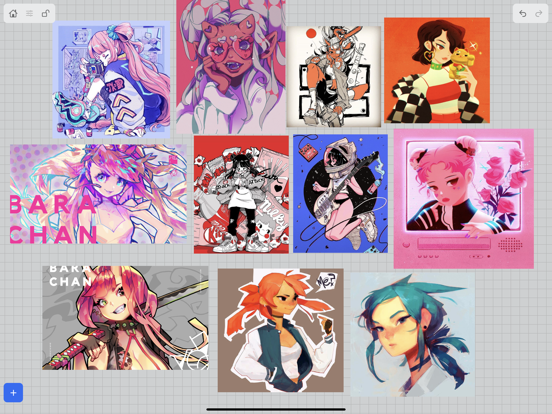
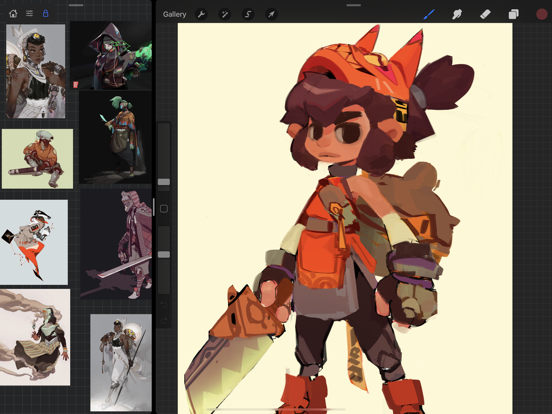
VizRef for iPad is the first mood board creation app designed by artists for artists, specifically crafted for animators and visual artists. It leverages the iPad's iOS multitasking capabilities to serve as the perfect companion for drawing and animation apps such as Procreate, Adobe Fresco, and Clip Studio Paint. It supports batch importing of images and GIFs from various sources including web pages, cloud storage, photos, and screenshots, with easy drag-and-drop onto the canvas. The app helps users organize hidden layers that are difficult to locate, manage inspiration on the go, and build visual reference boards.
COMMUNITY PERKSMergeek community perks
Exclusive giveaways NEWDiscover a new surprise every day
PRODUCT SCREENS / 4

Click to explore the interface

Vizref screenshot 1Vizref screenshot 2Vizref screenshot 3Vizref screenshot 4

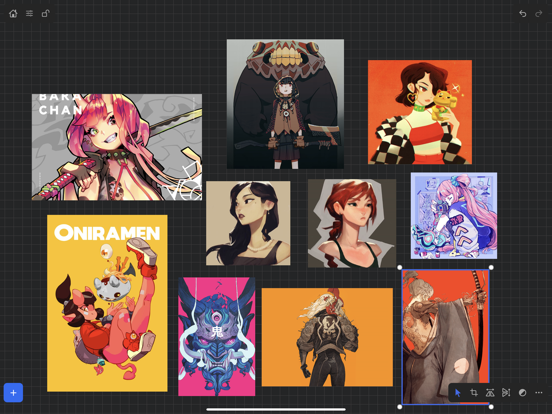
VizRef enables creatives to finally take their inspiration anywhere. It becomes the perfect companion app for Procreate® or paired with your favorite drawing/animation application with Split View on iPad. Clear up your hard to find hidden layers in your drawing app and easily organize your inspiration on the go. Make visual reference boards with any images or gifs from web browsers, cloud storage, photos, screen captures and more. The first mood board creation app made by artists for artists, that brings comprehensive referencing tools to animators and visual artists/en. We are dedicated to bringing creatives what they need most in being inspired everywhere they go.

HIGHLIGHTS
-Perfect companion app paired with Procreate® Adobe Fresco ® Clip Studio Paint® Infinite Painter® etc. with Split View on iPad
-Supports many image types including GIF
-Drag and drop from web
-Batch Import from Photos app
-Batch Export images from boards to cloud storage using Files app
- *Multi-Select and auto pack images for a quicker workflow *
-Import High-Resolution images with HD toggle
_*Focus on whats importing with Focus mode. ( rotate imageboard )
-Batch Import from iCloud, Dropbox, Google Drive with split-screen
-Quick and responsive visual reference board experience
-Easy to use/ minimal UI
-Light mode and Dark mode
-Set thumbnails for reference boards to visually organize your inspiration

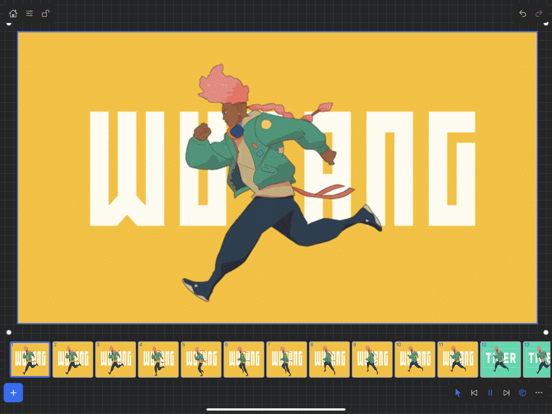
ANIMATED GIF SUPPORT
-Reference your favorite animated gifs
-Pause animation and play frame by frame to better understand referenced animations
-Advanced animation timeline gives you an interactive visual breakdown of all frames

EASY TO USE REFERENCE TOOLS
-Crop images to optimize screen space and view more references
-Greyscale toggle for images for value reference
-Flip horizontally and vertically
-Rotate Images
-Copy-paste images into other apps

Artwork and animation credits

@_Artazi
@_baomii
@_Deadslug_
@amnesiapancake
@barachan
@belgeist
@criisalys
@ergo.josh
@evan_monteiro
@gloomwasta…

Help others with your real experience and earn gems

REWARD MARKETWhat can 100 gems get you?

No public reviews yet. Share your experience.

提交反馈

每一个想法,都让 Mergeek 更好一点。