
一划清

一划清

Quickly organize your phone photo album by swiping

Creator
梅 李

A single stroke makes iPhone photo album sorting faster and easier. Swipe left or right to switch photos, swipe up to add to the deletion list, support for withdrawing marks, previewing photos to be deleted and restoring. Double-tap to view large images, pinch and drag with two fingers to view details, and also view Live Photos, synchronize to "Favorites" at one click, support multiple browsing methods and photo access. No account required, no ads, no use of third-party statistical tools, photos are only processed on the device, and the final deletion is confirmed by iOS. After confirmation, they enter "Recently Deleted" and can be restored.

COMMUNITY PERKSMergeek 社区专属福利
独家限免 NEW每天发现一份惊喜
PRODUCT SCREENS / 7

点击查看界面细节

一划清 产品截图 1一划清 产品截图 2一划清 产品截图 3一划清 产品截图 4一划清 产品截图 5一划清 产品截图 6一划清 产品截图 7

"One Swipe" focuses on only one thing: making it faster and easier to organize your iPhone photo album.

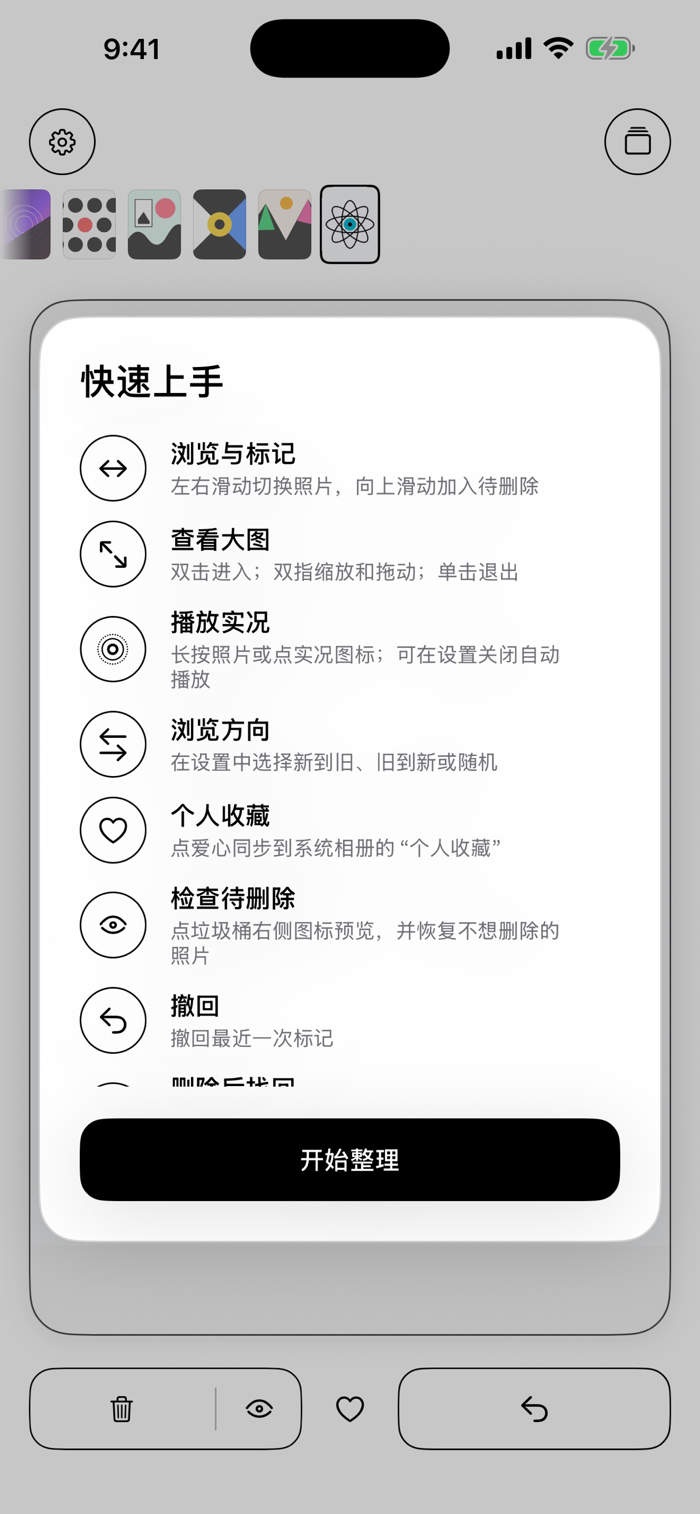
Swipe left and right to view photos back and forth, and swipe up to add the current photo to the deletion list. After selection, confirm deletion all at once.

Main features:

• Swipe left and right to switch photos, swipe up to add to deletion
• Undo the last mark and return to the corresponding photo
• Preview all photos to be deleted and restore items you don't want to delete at any time
• Double-tap to enter the large picture, pinch to zoom and drag to view long screenshots and details
• View Live Photos and turn off auto-play
• Sync to "Favorites" in the system photo album with one click
• Quickly locate any photo in the overview
• Support three browsing modes: new to old, old to new, and random
• Support full or limited photo access
• Finally confirm deletion of all selected photos at once

Photos are only processed on your device and will not be uploaded. "One Swipe" doesn't require an account, contains no ads, and doesn't use third-party statistical tools.

Final deletion is confirmed by the iOS display system window. After confirmation, photos will enter "Recently Deleted" in the system photo album and can be restored within the system retention period.

版本

2.4

• 新用户每天可免费删除 30 张照片,解锁 PRO 后无限删除
• 已经在用的老用户,删除照片永久免费
• 相册筛选里的“未分类的图片”简化为“未分类”
• 细节优化

查看完整更新记录 ↗

你的真实体验,为其他用户提供宝贵参考,获得宝石奖励

REWARD MARKET100 宝石可兑换什么?

还没有公开评论,欢迎分享你的体验。

提交反馈

每一个想法,都让 Mergeek 更好一点。
