JotTheDate

JotTheDate

Efficiency

Creator
Stefano Tosi
平台
iOS
效率工具APP

JotTheDate is a calendar app that supports hand-drawn input, allowing users to add events and reminders by sketching, doodling, or handwriting on the screen with their finger. It is compatible with iOS and Mac systems, offers multiple views such as day, week, month, and year, and integrates seamlessly with existing calendars, automatically syncing events to iCloud. Users can customize colors and stroke sizes, set up recurring reminders, location-based alerts, and URLs, and it works even when offline. There's no need to force typing—just simple drawing lets you quickly log appointments, notes, or travel times, combining creative expression with efficient management and enabling seamless data sharing across devices.

COMMUNITY PERKSMergeek 社区专属福利
独家限免 NEW每天发现一份惊喜
PRODUCT SCREENS / 6

点击查看界面细节

JotTheDate 产品截图 1JotTheDate 产品截图 2JotTheDate 产品截图 3JotTheDate 产品截图 4JotTheDate 产品截图 5JotTheDate 产品截图 6

JotTheDate: your great freehand Calendar !

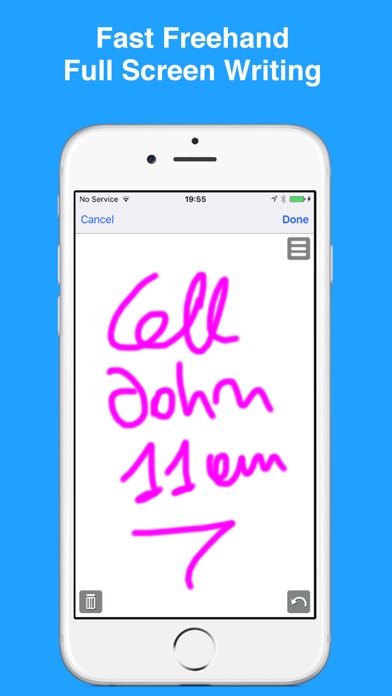
Why type your calendar events? Just draw with JotTheDate.
Handwrite your note as text or sketch, and JotTheDate will show the event or reminder in the Calendar.

Whether it’s a scribble, a sketch, or a smiley, this calendar app lets you add your events by drawing them with a finger on the screen.
You can add appointment reminders, notes, travel time, and more. So, you can be creative and sketch your way to your next event, choosing your color and brush size. Just draw or write your event with your finger. Sketch a heart for your anniversary dinner, a necktie for your business meeting, or a book for your college class. Can’t draw? Jot down your pet’s name for their vet appointment, the name of the club where you are meeting your friends, or the name of the park for your kid’s play date.
You can also give the event a name if you like for viewing in other calendar apps. Add the basics you need like the location and start and end times. You can have it repeat, invite others, and set up two different alerts.
Your events can also be All Day, contain notes and a URL, and be added to a specific calendar if you have more than one.
The app also works without an Internet connection.

• UNIVERSAL APP
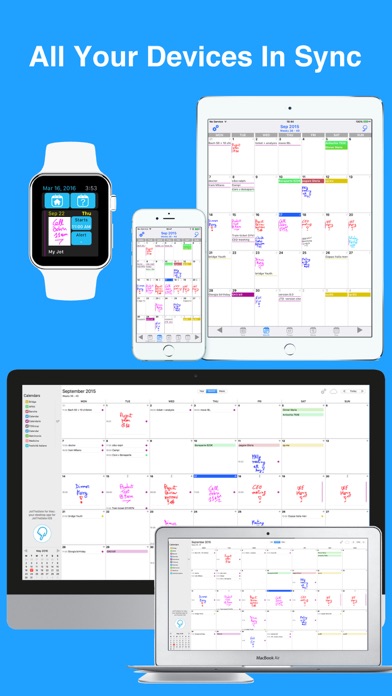
JotTheDate is compatible with iPhone, iPad and Mac. Once downloaded with your Apple account, you can use it on all your devices.
Using your iCloud account all events, reminders and sketches will be automatically shared and synced in all your devices.

• HANDWRITTEN EVENTS
You will not be forced to use the iPhone or iPad keypad to enter an event: just draw with JotTheDate!

• HANDWRITTEN REMINDERS
If you simply wish to draw or type a quick note as a reminder, you can do it with the Reminders view.

• INTEGRATION WITH THE iOS CALENDAR APP
All events and reminders are shared with any other iOS and macOS Calendar app and existing events and reminders are automatically loaded: just launch JotTheDate !
JotTheDate fully integrates with all exis…


版本

20.0.1

In 20.0.1:
• Fixed an issue where the event editor could stay on screen, unresponsive, after deleting an event. A small button in the editor now lets you close it if that happens.
• Text-only events: a new hand button in the editor lets you add a Jot to the event. The prompt no longer appears every time you open one.
• Cancelling a new Jot no longer leaves an empty Jot on the event.

In 20.0:
• The drawing engine has been rebuilt with Apple PencilKit.
• The interface has been refreshed for iOS and Mac.
• Choose where to store your Jots: in iCloud to sync them across your devices signed in to the same Apple Account, or locally on this device. The archives remain separate; switching between them does not transfer existing Jots.
• See your day at a glance with the new home screen widget.
• Create a limited number of drawn Jots for free. Text-only events and reminders remain unlimited.
• Remove the Jot limit with Premium, a one-time purchase for lifetime access, or choose a monthly, quarterly, or annual auto-renewing subscription.
• Get started with the new Quick Start guide.
• Enjoy improved Reminders list handling and reliability.

查看完整更新记录 ↗

你的真实体验,为其他用户提供宝贵参考,获得宝石奖励

REWARD MARKET100 宝石可兑换什么?

还没有公开评论,欢迎分享你的体验。

提交反馈

每一个想法,都让 Mergeek 更好一点。