PhotonCam

PhotonCam

Remove sharpening, HDR, depth of field editing, LUT import, batch editing

Creator
伟超 邓
Platforms
iOS
摄影与录像图形与设计APP

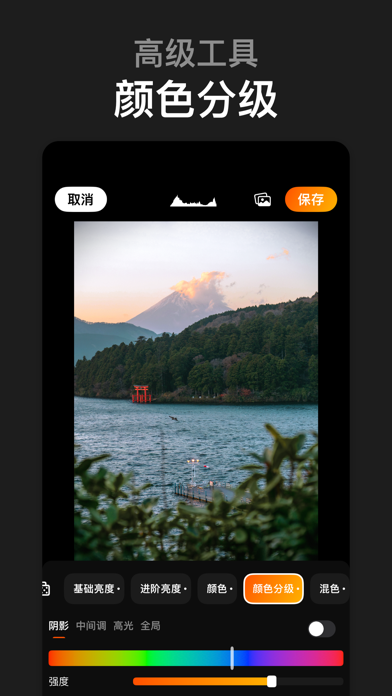
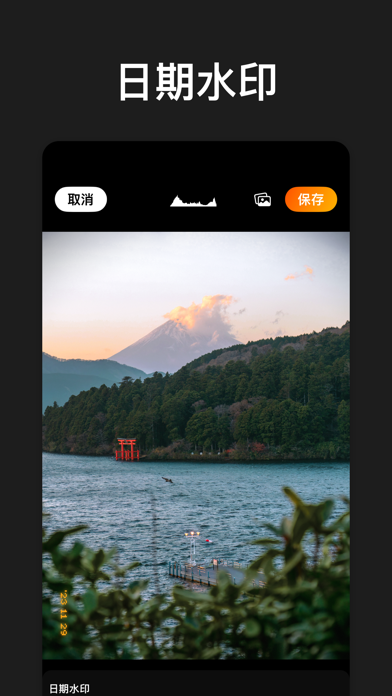
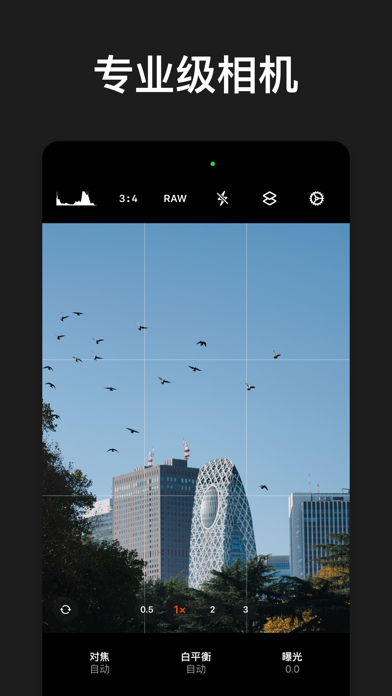
PhotonCam brings a professional photo-taking and editing experience to users. Shoot in ProRAW with 4800 megapixels on the Pro iPhone, with manual parameter adjustments. When RAW is enabled, both RAW and HEIF photos are saved simultaneously, and editing automatically uses the RAW files. Create, export, share, and re-import custom filters. Advanced professional editing tools are provided, supporting Cube files edited in desktop software as filters, and adding date watermarks to HEIF/JPEG photos. New users get a 3-day free trial; trial-mode saved photos have watermarks, but no watermarks after purchase.
COMMUNITY PERKSMergeek community perks
Exclusive giveaways NEWDiscover a new surprise every day
PRODUCT SCREENS / 7

Click to explore the interface

PhotonCam screenshot 1PhotonCam screenshot 2PhotonCam screenshot 3PhotonCam screenshot 4PhotonCam screenshot 5PhotonCam screenshot 6PhotonCam screenshot 7

PhotonCam delivers a professional-grade photography and photo editing experience.

- On your iPhone, use RAW to capture straight-out-of-camera photos without excessive processing. You can also manually adjust parameters such as focal length and color temperature/tint to precisely capture what you want. The app is optimized for various shooting positions on the iPhone Duo.
- Supports capturing and saving HDR photos to attract more attention on platforms like Xiaohongshu / Instagram / Threads. You can also simulate an HDR effect on SDR photos.
- Supports capturing photos with photographic styles on older iPhone models, which can then be directly edited using the system Photos app's style tools.
- Full editing capabilities: Refine your photos using professional features such as curves, color grading, precise brightness adjustments, color calibration, perspective adjustment/cropping—and batch-process multiple photos via bulk paste.
- In addition to built-in filters, you can create your own custom filters: Combine multiple tools provided by the app to craft unique personal filters, usable in both the camera interface and image editor.
- Supports batch importing LUTs to create your filters. The app uniquely supports importing LUTs designed for video LOG formats—PhotonCam automatically performs the necessary conversion to adapt them for photos.
- Add borders to your captured or edited photos to personalize and distinguish each image. Design unique borders by configuring various styles. Explore the Border Workshop to start designing your own borders.
- Use Portrait mode to capture and re-edit portrait photos; you can also simulate a portrait depth-of-field effect on non-portrait images.
- Supports adding film-style date watermarks to saved photos.

You can try the full features of the app without any paid subscription. Photos saved in trial mode will have a watermark. After purchasing a subscription or the permanent version, subsequently saved photos will not include a wat…

Version

2.2.0

感谢使用 PhotonCam。此版本终于为 iPhone Duo 带来了相机功能并针对每个屏幕进行了适配:

- 在内屏上会采用左右/上下布局;当横向使用时,你还可以切换相机预览和控件的布局来适应你的握持手势。使用 iPhone Duo 内屏时,现在还会有倒计时功能。
- 在外屏上,会使用紧凑的布局。

此外,还改进了辅助线,并优化了其他体验。

Full changelog ↗

Help others with your real experience and earn gems

REWARD MARKETWhat can 100 gems get you?

No public reviews yet. Share your experience.

提交反馈

每一个想法,都让 Mergeek 更好一点。