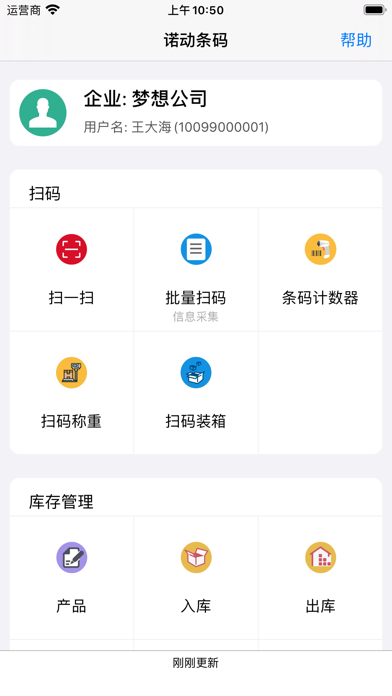
Power Barcode is a barcode scanner and QR code scanner with extremely fast recognition speed. It supports batch scanning of barcodes and copying or exporting, and also has features such as barcode scanning with weighing (connecting to a Bluetooth scale), barcode scanning for packing, inventory management, sales invoicing, cash register, etc. The crosshair can accurately locate the barcode or QR code to be scanned in the case of multiple barcodes, preventing mis-scanning. Power Barcode is not just a scanner; it is a fully functional barcode management system that stores and manages all scanned barcodes, allowing you to easily search and backup. Cloud data backup securely stores your data in the cloud. One account supports multiple mobile phones to log in, and the scan records are automatically summarized, keeping all device data synchronized. At the same time, you can also use it to generate barcodes and QR codes and save them as pictures, making it a powerful barcode generator and QR code generator. Power Barcode makes your barcode scanning experience easy and pleasant.
Batch scanning and information entry: You can add remarks to each barcode and enter other information, such as express delivery numbers, customer names, product attributes, loading lists, part lists, etc.
Barcode scanning with weighing: Connect to a Bluetooth scale and bind weight information to each express delivery after scanning.
Barcode scanning for packing: First scan the box barcode, and then scan the barcodes of the items inside the box.
The inventory management function allows you to manage the inventory quantities of goods at multiple locations. Generate record sheets for each inbound, outbound, inventory count, etc. operation, which can be printed, archived, and searched.
The barcode library management function allows you to manage all product barcode information, product information, and prices, and quickly query the inventory quantity.
The mobile cash register function allows you to quickly issue invoices and even replace the cash register in a supermarket.
The barcode and QR code generator can save the generated pictures to the album or export them to WeChat, email, computer, etc.
The self-adhesive label printing function allows you to use an ordinary printer to print barcodes or QR codes on A4 self-adhesive paper. There is no need to purchase a dedicated barcode printer.
Enterprise customization services can customize and develop barcode applications according to your needs, such as logistics tracking, product traceability, production management, shipping management, part traceability, anti-counterfeiting query, etc.
[Supported barcode types]
• QR code
• Code 128
• EAN-8
• EAN-13
• UPC-E
• Aztec
• PDF 417
• ITF-14
• Data Matrix
• Interleaved 2 of 5
• Code 93
• Code 39
[Applications]
Power Barcode turns the mobile phone into a smart barcode scanner, allowing you to complete various applications through barcode scanning anytime, anywhere, improving work efficiency.
* Shopkeepers and supermarket owners use it to manage purchases, sales, and inventory counts.
* Manufacturing enterprises use it to manage production, inventory, product traceability, and logistics tracking.
* Agricultural and food enterprises use it to manage the traceability of green products.
* Salespersons on the go use it to manage supermarket goods distribution, exchanges, and collections.
* Micro-business entrepreneurs use it to manage orders and shipments.
* Small business owners use Power Barcode to achieve the informatization of their companies.
It is the proudest and most honorable thing for Nuodong Company to serve these hardworking laborers.
[Contact information]
Company: Qingdao Nuodong
WeChat ID: QingdaoNuodong
Phone: 176-8643-0767
Email: support@numob.com
QQ: 20934813
[Subscriptions and prices]
Power Barcode has a free version that includes many commonly used basic functions. There are 3 subscription versions that provide more advanced functions such as data cloud backup, team collaboration, and application customization.
Payment will be deducted from the iTunes account when the purchase is confirmed. The subscription will automatically renew unless you close the auto-renew at least 24 hours before the end of the current period. The account will be charged the renewal fee within 24 hours before the end of the current period, and the renewal fee will be determined.
Subscriptions can be managed by the user, and auto-renew can be turned off by going to the user's account settings after purchase. Any unused part of the free trial period (if provided) will be forfeited when the user purchases the subscription to this publication (if applicable).
If you turn off auto-renew, you can still retain all your data and materials.


 +100宝石


 分享
分享













用户评价
立即分享产品体验
你的真实体验,为其他用户提供宝贵参考
💎 分享获得宝石
【分享体验 · 获得宝石 · 增加抽奖机会】
将你的产品体验分享给更多人,获得更多宝石奖励!
💎 宝石奖励
每当有用户点击你分享的体验链接并点赞"对我有用",你将获得:
🔗 如何分享
复制下方专属链接,分享到社交媒体、群聊或好友:
💡 小贴士
分享时可以添加你的个人推荐语,让更多人了解这款产品的优点!
示例分享文案:
"推荐一款我最近体验过的应用,界面设计很精美,功能也很实用。有兴趣的朋友可以看看我的详细体验评价~"
关注 Mergeek 公众号
领奖遇到问题?联系小门助手