产品功能

应用市场介绍

# Secrets of Time Management for Successful People #
Now experience the ultimate time management tool - DOT TIMER!
Having trouble with time management? Being distracted by your smartphone when you need to focus? Let DOT TIMER handle business organization and study time recording!

## Flip Timer
Flip your phone and the timer starts, boosting your concentration!
Break free from phone addiction!
Get donation coins for every 10 minutes of focused attention.

## Schedule
A unique schedule that allows you to easily compare your set plans with actual records at a glance!
A schedule made in 10-minute increments to maximize time utilization.

## Diverse Statistical Tables
Not just recording! Analyze your focused attention time in detail through various charts!
Clearly identify areas for improvement with daily, annual, cumulative, weekday, hourly statistics, and plan ranking tables.

## Donation Program
Donate your accumulated coins to provide notebook gifts for underprivileged students!
A real-time changing donation ranking.

## Three Lines a Day
How was your day today? Share it in a three-line diary.
Motivate each other with friends from all over the world.

## Group study With
Try recording in real-time with friends!
Multiple themes like classrooms, libraries, offices, gyms, etc. Group member statistics.

## Advanced Features
Check out the continuously upgraded advanced features.
Manage your time more effectively with features developed by time management experts.
* Note *
- The initial startup speed of this application has been improved.
- Attention - There is an issue that Apple cannot be logged in on the Chinese mainland, so please use email login for social login. Thank you.
Report translation errors -> skyktc75@gmail.com
First, you need to click on the "To-Do List" and create categories to use this application.
If you can't use the timer, follow these instructions.
Open the App - Go to Settings - Activate/Disable Proximity sensors - Return to the app's main screen - Select your plan - Flip your phone
Your review can be very helpful to your developer. Thank you.
How to Use Dote Timer on Apple Watch
1. Add a to-do item in the Dote Timer application.
2. Open the Dote Timer Apple Watch application and press the "Select Task" button to choose a task.
3. Press the start button to start recording.
4. After recording, press the STOP key to save and end the recording.
Note:
1. Apple Watch must be connected to an iPhone.
2. Dote Timer must be installed on the iPhone.
* Notice *
If you cannot use the timer, please follow this instruction.
ㄴ Open App - Go on Settings - Activate Disable Proximity sensors - Go back to main screen of App - Select your plan - Flip your phone
Your review can help a lot for your developer. Thank you.
When people focus on one thing,
they encounter countless distractions,
and the biggest distraction is the smartphone.
One must focus on learning,
but unconsciously keep looking at the phone or
clearly plan to study for five hours,
but actually study for less than an hour.
Now start trying dote timer.
First, introduce the special features of dote timer.
First, dote timer must be inverted to start.
Touching the phone will automatically stop the timer,
so you can naturally focus on learning or working.
Second, compare the schedule I made with
the record of actual focused implementation.
Set D-DAY in your goal plan,
and make plans according to importance as A, B, C.
Record the actual focused time,
and compare it with the previously made plan.
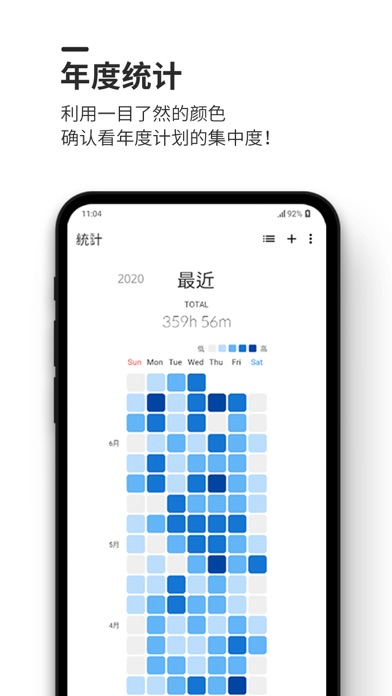
Third, the longer the focused time, the darker the displayed color.
Therefore, days with high concentration of energy
can be easily recognized at a glance.
Especially, the colors of the days when I was particularly focused and
less focused throughout the year are different,
comparing myself yesterday and today,
you can have a more efficient day.
Fourth, use the timer to accumulate coins and
participate in donations.
The time I focused can be converted into coins,
collect a certain number of coins
and donate dote planners and notebooks to disadvantaged students.
At the same time, the donated coins will be shown in the ranking,
competing with others and boosting morale.
A timer with a simple design that can be decorated as needed according to your own needs,
A timer that allows you to participate in donations only by focusing hard,
A highly efficient time management APP that can perfectly allocate time.
Please download dote timer immediately.
App Update Notes
https://doti.kr/%ec%97%85%

收起

用户评价

立即分享产品体验

你的真实体验,为其他用户提供宝贵参考

宝石
评论可得 100 宝石
宝石随心兑换应用高级会员,每周更新 前往查看 >>
活动动态 0 人参加
查看更多评论