iWuBi, a tool App designed specifically for五笔 learners and daily character lookup users. It has been completely refreshed on its eighth anniversary, rebuilt with SwiftUI, being faster, smoother, and more beautiful.
【Three Edition Dictionaries, All-in-One】
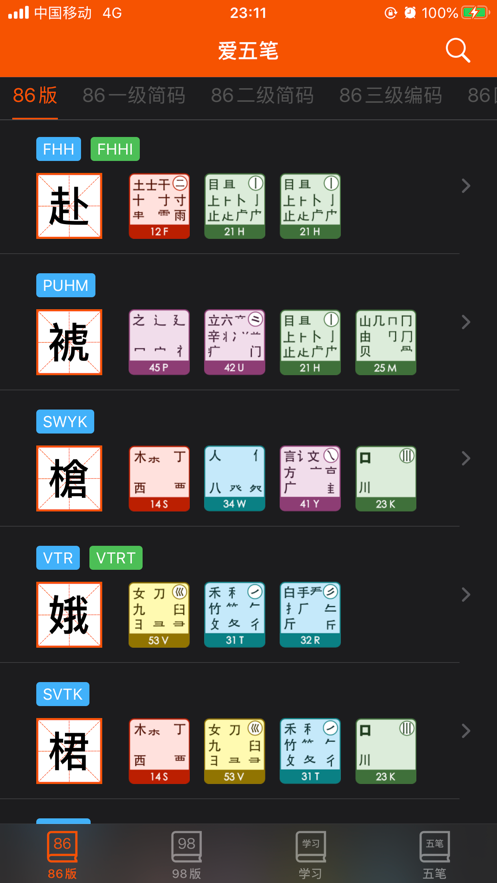
Supports 86 Edition, 98 Edition, and New Century Edition of五笔. With over 30,000 entries covering single characters and phrases, it can display simplified and traditional Chinese, and handle character lookup, word lookup, and lookup of abbreviated codes all in one App.
【Pinyin Learning and Conversion】
Character lookup supports prefix search by pinyin. Pure letter input can switch between encoding and pinyin modes. You can find characters just by thinking of their pronunciation. Tone-marked pinyin can be globally displayed, being clear at a glance in the list, quiz, wrong-question notebook, character details, and shared long picture. An internal pinyin converter is provided, supporting multiple pinyin formats and can simultaneously mark the五笔 encoding, for copying or generating a long picture for sharing. The settings page has been reorganized, making the application settings and text conversion tool partition clearer.
【Brand-new Typing Practice】
An independent typing Tab with three modes: typing full codes by looking at characters, practicing abbreviated codes specifically, and giving priority to abbreviated codes. There are 14 built-in introductory and advanced articles, supporting pasting custom text, randomly selecting characters, generating character tables by level, and also making special breakthroughs from favorites and wrong-question notebooks. The articles can display pinyin for auxiliary memory, with paragraph highlighting and visualization of root character decomposition. An optional root character virtual keyboard is available, supporting temporary hiding and one-key restoration within the practice; when the root character keyboard is shown, the system keyboard does not pop up, and after hiding, you can switch to the system keyboard or an external keyboard. The bottom navigation is immersed and hidden on the practice page, and the progress and statistics support iCloud synchronization.
【8 Widgets, Learn with a Wrist Raise】
Covering the home screen and lock screen with "Word of the Day", "Selected Abbreviated Codes", "Daily Quiz", "Typing Overview", "Favorites", "Wrong-Question Notebook", "Recently Viewed", and "Learning Progress". The favorites and wrong-question widgets support grid preview and come with the五笔 encoding. The widget background can follow the App theme.
【Complete Learning Loop】
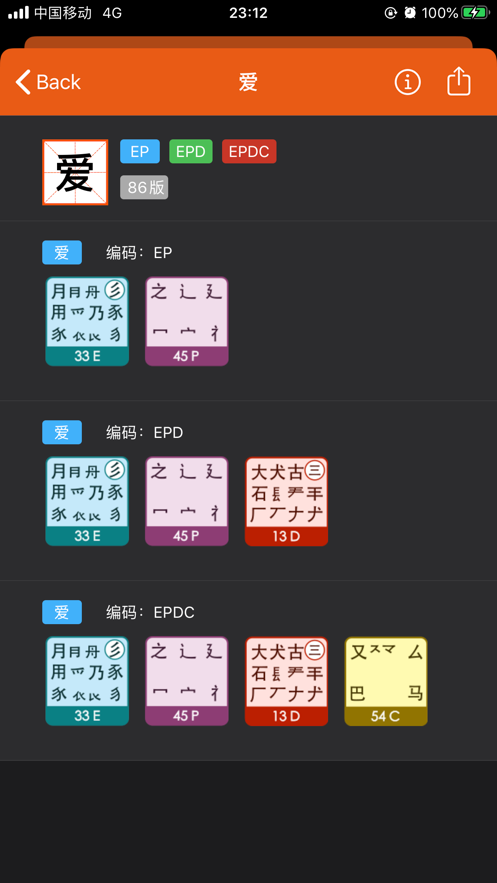
Daily quizzes consolidate memory, the wrong-question notebook automatically collects error-prone words and characters, the learning status is marked in four levels, and the learning statistics are clear at a glance. The tutorial root character diagram supports long-press sharing for easy saving and forwarding. iCloud synchronizes favorites, progress, wrong questions, quiz records, and typing statistics, ensuring no data loss when changing devices.
【More Professional Character Lookup】
Phrases are automatically synthesized into abbreviated codes, and the upper limit of the search results for letter encoding is increased to 1000 entries. The character details display color coding and key position root character diagrams, and the embedded Apple system dictionary can be directly used to view the definitions, also supporting Chinese朗读 and long picture sharing.
【Abbreviated Codes and Tutorials】
Browsing of abbreviated codes from level 1 to level 4 is hierarchical, and you can freely switch between list and grid views. The root character tables and concise tutorials of 86, 98, and New Century editions are complete, providing materials from beginner to advanced levels.
【Good-looking and Useful】
16 sets of themes and custom color schemes, 8 sets of alternative icons, with options for简体中文,繁体中文, and English interfaces. It is natively adapted for iPhone and iPad, providing a more comfortable browsing experience on large screens.
【Full iCloud Synchronization】
Favorites, learning status, wrong-question notebook, quiz scores, consecutive wins, typing statistics, and article progress are all synchronized across devices, and can be freely turned on or off in the settings.
【More Considerate Features】
Chinese TTS朗读. One-click generation of long pictures for sharing of words and characters and search results. Long-pressing the icon on the home screen can customize 4 quick operations, allowing quick access to functions like quick character lookup, daily quiz, favorites, wrong-question notebook, etc.
【Keyboard Shortcuts】
Applicable to iPad and devices connected to an external keyboard:
Command + F: Open character lookup and


 +100宝石


 分享
分享














用户评价
立即分享产品体验
你的真实体验,为其他用户提供宝贵参考
💎 分享获得宝石
【分享体验 · 获得宝石 · 增加抽奖机会】
将你的产品体验分享给更多人,获得更多宝石奖励!
💎 宝石奖励
每当有用户点击你分享的体验链接并点赞"对我有用",你将获得:
🔗 如何分享
复制下方专属链接,分享到社交媒体、群聊或好友:
💡 小贴士
分享时可以添加你的个人推荐语,让更多人了解这款产品的优点!
示例分享文案:
"推荐一款我最近体验过的应用,界面设计很精美,功能也很实用。有兴趣的朋友可以看看我的详细体验评价~"
关注 Mergeek 公众号
领奖遇到问题?联系小门助手