Hide your photos and videos behind military-grade encryption. No accounts, no cloud, no data collection. Pay once, no subscription.
If you forget your password, your photos are gone. There is no reset, no recovery email, no way for anyone, including us, to get them back. If a vault app can recover your password, your photos were never truly secure. This is what makes your privacy real.
ZERO DATA COLLECTION
No analytics. No telemetry. No internet connection required. Everything runs entirely on your device. We cannot see your photos and we cannot see how you use the app. Obscura itself does not collect installation, usage, or analytics data.
HIDDEN VAULTS
Obscura keeps 10 encrypted vault slots in place at all times. Only your password unlocks a real vault. If you want extra protection in case someone asks to see your photos, create a second vault and fill it with photos you are comfortable sharing. When asked, you can unlock that one instead, and that person sees a real, functional vault with real content. Inside the app there is no vault list, no count, and no way to browse between vaults, regardless of how many you create. In your phone's storage, active and unused vault slots are built the same way and use independently randomized padding, so even someone with direct offline access to your app files would have a hard time telling which is which.
ENCRYPTION THAT DOES NOT CUT CORNERS
Every photo, video, and database is protected with AES-256, a widely adopted encryption standard used across security-sensitive systems. Passwords go through 600,000 rounds of key derivation to resist brute-force attacks. Videos are decrypted in memory during playback and not stored unencrypted in Obscura's managed storage. Face ID and Touch ID are supported, with credentials secured through iOS Keychain and biometric access controls. Auto-lock and progressive rate limiting help protect against unauthorized access.
For the full technical specification, threat model, and design rationale, read Obscura's security paper at https://obscura-vault.com/security
MORE THAN A VAULT
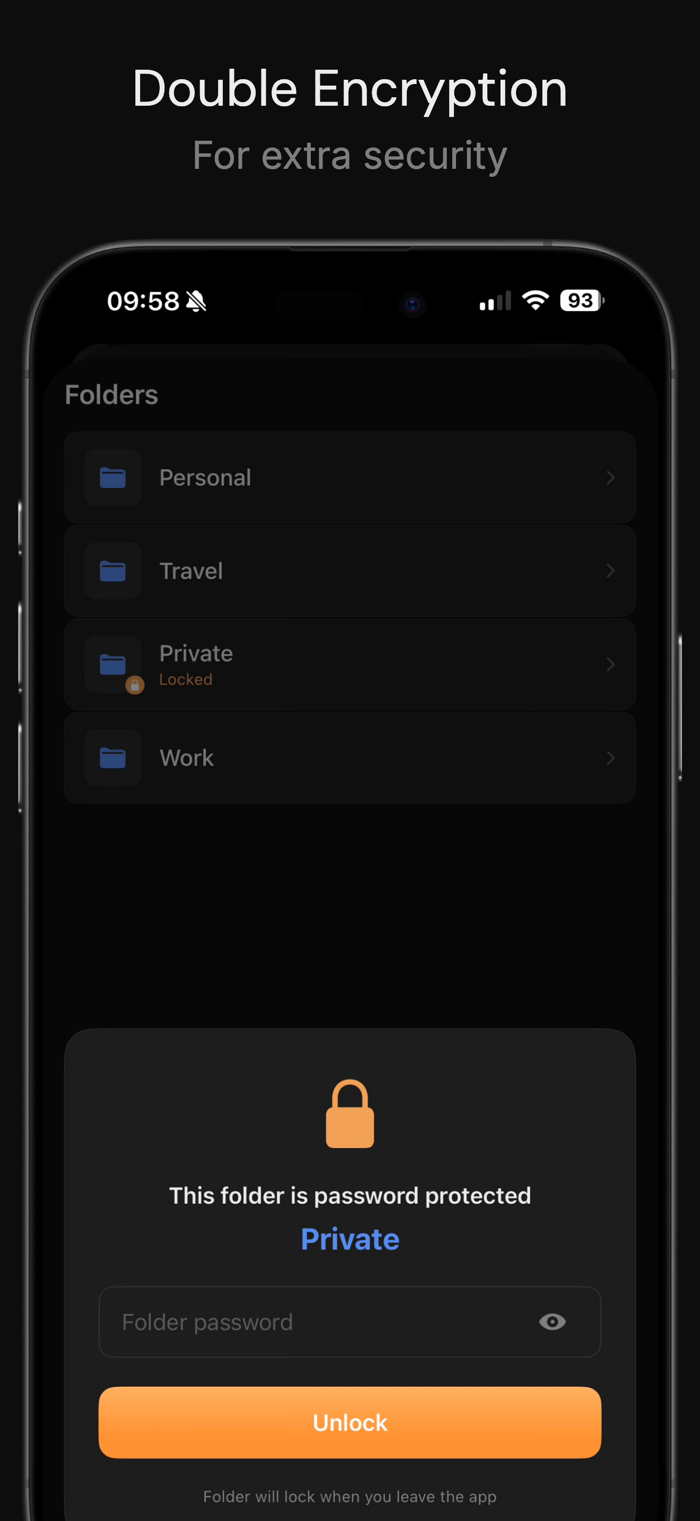
Folders with optional second-layer password protection keep sensitive content separated even inside your vault. Crop, rotate, and flip your photos without leaving the app. Create collages with multiple layouts and aspect ratios. Find and clean up duplicate photos in batches. Extract frames from Live Photos. Reorder manually or sort by date. Mark favorites for quick access.
BACKUP AND TRANSFER
Export your entire vault as an encrypted .obscura file protected with the same AES-256 encryption and 600,000 rounds of key derivation as your vault itself. Store it anywhere, even in cloud storage, because without your password it is unreadable. Import your backups on any device with Obscura Photo Vault installed. Transfer between iPhones through Files, AirDrop, or any file sharing method. Your photos stay encrypted during every step.
FEATURES AT A GLANCE
• AES-256 encryption on all photos, videos, and databases
• Calculator Mode
• Face ID and Touch ID unlock
• Auto-lock with configurable timeout
• Automatic local backups with snapshot history
• Photo editing: crop, rotate, flip
• Collage creator
• Duplicate photo detection
• Recently Deleted
• Live Photo frame extraction
• Drag to reorder and date sorting
• Favorites / Tags
• iOS system iCloud backup
• Unlimited photos (Pro)
• Hidden Vaults for extra privacy (Pro)
• Folder passwords for double encryption
• Vault export and import
FREE TO START
Store up to 50 photos in one vault with full encryption. Upgrade to Pro once for unlimited photos, unlimited vaults. One price. No subscription.


 +100宝石











用户评价
立即分享产品体验
你的真实体验,为其他用户提供宝贵参考
💎 分享获得宝石
【分享体验 · 获得宝石 · 增加抽奖机会】
将你的产品体验分享给更多人,获得更多宝石奖励!
💎 宝石奖励
每当有用户点击你分享的体验链接并点赞"对我有用",你将获得:
🔗 如何分享
复制下方专属链接,分享到社交媒体、群聊或好友:
💡 小贴士
分享时可以添加你的个人推荐语,让更多人了解这款产品的优点!
示例分享文案:
"推荐一款我最近体验过的应用,界面设计很精美,功能也很实用。有兴趣的朋友可以看看我的详细体验评价~"
关注 Mergeek 公众号
领奖遇到问题?联系小门助手