


 +100宝石


产品功能
Looking to add sound effects to your videos to create movies? Try this amazing sound editing app for videos - “Sound in Motion” that allows you to add foley and sound effects to videos with absolute ease. Adding sounds to videos using the “Sound in Motion” app is extremely fun and you can try adding multiple kind of sounds to your videos. You can choose between any existing sound effects or add your own recorded sound to videos. The app becomes extremely useful when you want to add narration to your video films.
“Sound in Motion” app has a beautiful user interface that makes sound and video integration really fun and simple. Anyone who is a beginner at video or sound editing can also use the app to add sound to videos. With the Freestyle Wave Editor, you can record Foley sounds on the go. You can also import your current Foley & SFX Library into your movie project, and use AudioCopy to import music and sounds from other apps!
The app also allows you to play with unique soundboards to quickly add sound to your film -
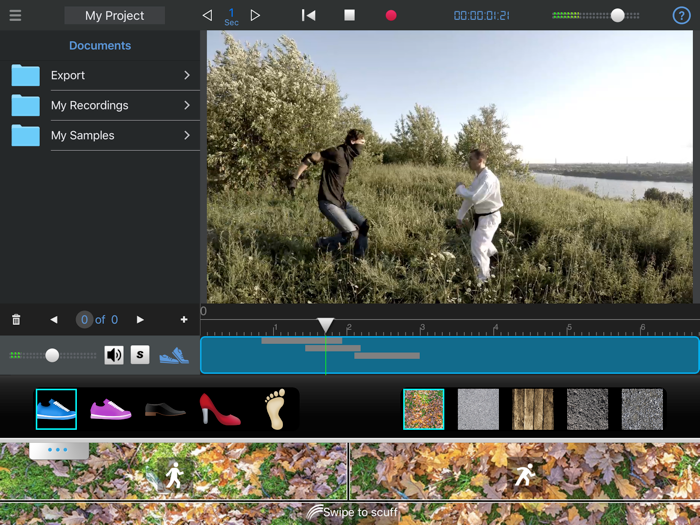
1. Footstep - Choose any type of Floor and shoe, add Footsteps; Running, Walking, upstairs, downstairs, scuff.
2. Swords - Add Swishes and impact sounds of swords.
3. Break Stuff - Wood, Plastic, Metal and Glass falling, cracking and breaking.
4. Fight - Add punches, kicks, body hits and swishes to your videos.
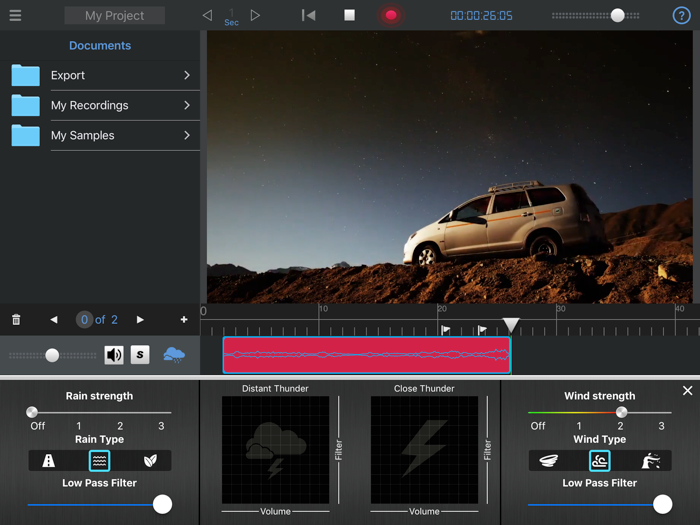
5. Rainstorm - Use our unique Wind and Rain Generator along with our smart Thunder maker to add sounds to a rainy scene in your film.
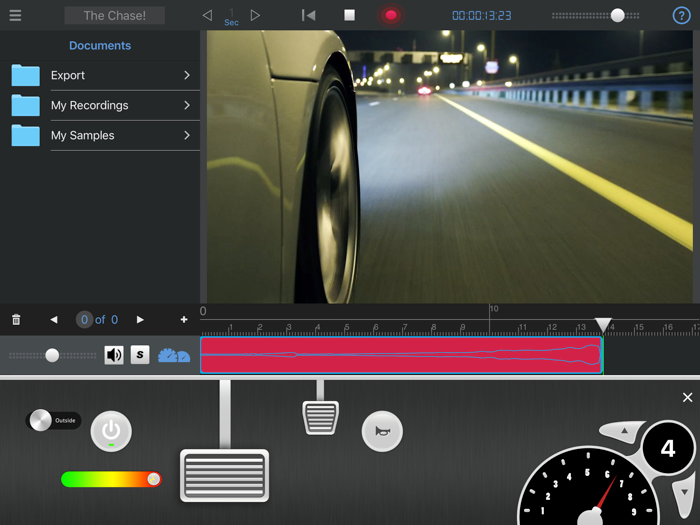
6. Vehicles - Add various car sounds and gas pedal & gear sounds using a cool and Fun interface.
You can also record Audio Tracks using iPad microphone or an external microphone. Then, you can add your own sound library, trim and edit sounds and add them to your videos.
The app also includes powerful editing tools - Trim, move and split any audio region. The app also allows using Soundrange regions for easy manipulation of audio after initial recording.
The app also allows you to share your video to YouTube or Facebook. You can also export the entire video to the iPad's Camera roll or to your computer. The app also allows exporting any audio track as a separate file. You can also export a mixdown of the project as a stereo audio file (MP3 or Wav).
Download the app now and have fun adding sounds to your videos. The app is perfect for all sound and video makers. Whether you are a beginner at sound and video editing or an expert, you will love adding sounds to your videos using the unique “Sound in Motion” app.
***********************
SAY HELLO
***********************
We are constantly working hard on making this “Sound in Motion” app better and more useful for you. Please feel free to email us for any queries/suggestions/problems or if you just want to say hello. If you have enjoyed any feature of the “Sound in Motion” app, do rate us on app store and share among your friends. The app has been built by those who love sounds and videos.
分享「」体验,参与「」抽奖!
分享 1~3 张你对这个产品最满意的截图或效果图
分享「」体验,参与「」抽奖!
用你的故事点亮社区✨!你的真实体验,将会永久展示在 官方主页 📌,为其他朋友提供宝贵参考 💡。立即分享吧!🚀
请为产品评分
请选择问题回答,为大家提供宝贵参考
选择要回答的问题
温馨提示
你尚未上传产品截图。
上传截图可立即获得宝石积分奖励!
如果你赶时间,也可稍后修改评论,补上截图领取宝石。
温馨提醒
你尚未添加产品截图
⚠️ 不添加截图将降低抽奖权重

感谢参加,你已成功参加!
为了确保你能及时收到审核结果和领奖码通知

扫描二维码关注 Mergeek 公众号
在后台回复 「获奖通知」
完成上述操作,即可保障奖励发放成功





用户评价
立即分享产品体验
你的真实体验,为其他用户提供宝贵参考
💎 分享获得宝石
【分享体验 · 获得宝石 · 增加抽奖机会】
将你的产品体验分享给更多人,获得更多宝石奖励!
💎 宝石奖励
每当有用户点击你分享的体验链接并点赞"对我有用",你将获得:
🔗 如何分享
复制下方专属链接,分享到社交媒体、群聊或好友:
💡 小贴士
分享时可以添加你的个人推荐语,让更多人了解这款产品的优点!
示例分享文案:
"推荐一款我最近体验过的应用,界面设计很精美,功能也很实用。有兴趣的朋友可以看看我的详细体验评价~"
关注 Mergeek 公众号
领奖遇到问题?联系小门助手