



 +100宝石




产品功能
Teni Note is a note-taking app that can be used to record all kinds of amazing notes on mobile phones and tablets.
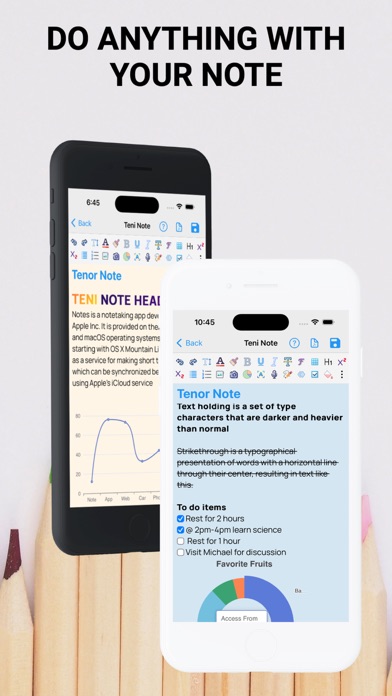
You can add a real-time representation of the note by adding text animations, charts, etc. This makes it a unique note editor suitable for everyone.
Main Features
- Undo, Redo, Bold, Italic, Strike-through, Font Size, Font Style,
- Underline, Insert pictures from the gallery, Insert pictures from the camera,
- Text Color, Text Highlight, Subscript, Superscript, Announcement
- Number Announcement
- Interactive and Responsive Tables
- Voice/Voice-to-Text
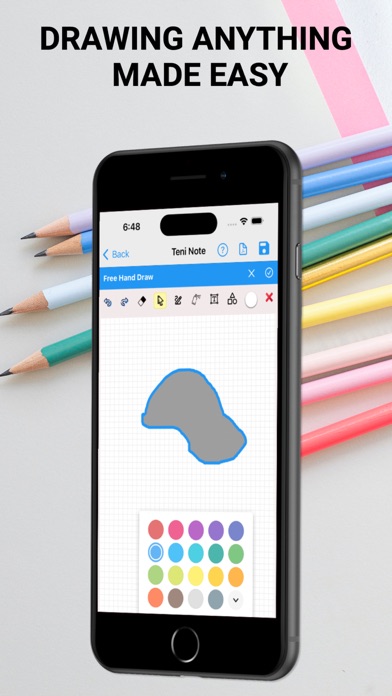
- Hand-draw with drawing tools
- To-do Lists
- Charts: Pie Chart, Doughnut Chart, Area Chart, Line Chart, Bar Chart, Gauge, Scatter Chart for data analysis
- Text Animation
- Optical Character Recognition
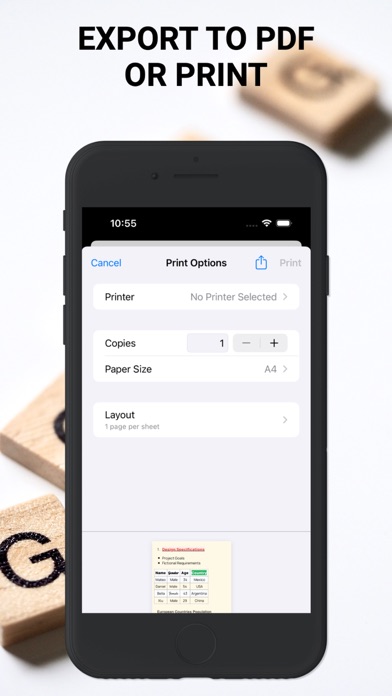
- Export as pdf / Print
TENI Note provides basic tools such as:
Undo and Redo can restore changes backward and forward, Bold makes the text heavier,
Italic makes the text slanted, Strike-through cancels the text, Font Size increases the text size, Font Style changes
the font design, Underline adds an underline to the text, Add pictures to be annotated through the camera or gallery, Text Color to change the color
of the text, Text Highlight to highlight the text, Subscript and Superscript make the text smaller than normal in the lower or upper part
respectively of the rest of the text. Announcement and Number Announcement express key points in a clear and block form.
And advanced tools:
- Tables: Teni Note tables are used to represent data sets in tabular form. Teni Note can
organize detailed or complex data for easy viewing of results. It can also be used to distinguish different items.
You can access the help page to see how to add tables, rows, columns, and delete rows and columns.
- OCR: OCR stands for Optical Character Recognition and can be used to capture text on images and add it to your notes.
- Charts: The first note-taking mobile app to introduce charts in notes. You can add Pie Chart, Doughnut Chart, Area Chart,
Line Chart, Bar Chart, Gauge, Scatter Chart for data analysis. Also, visit the help page in the app
for details
- Text Animation: You can also add animations to your notes to make them real-time documents.
- Sync: Note sync ensures the security of notes and prevents accidental loss.
It also syncs to multiple devices at the same time
- Notes can be exported as pdf or printed from a printer
In-App Subscriptions
When using the free plan, you can only create 1 note. To continue creating an unlimited number of notes, access advanced features, and protect your notes by syncing cloud storage and multiple devices, an auto-renewal is required.
Syncing to cloud storage and multiple devices requires auto-renewal
In-App Subscriptions are available in
∙ Monthly Premium Subscription and
∙ Annual Premium Subscription
- When the purchase is confirmed, the payment will be deducted from the iTunes account.
- The subscription will automatically renew unless the auto-renewal feature is turned off at least 24 hours before the end of the current period.
- The renewal fee will be deducted from the account within 24 hours before the end of the current period, and the renewal fee will be noted.
- Users can manage their subscriptions and also turn off auto-renewal in the user's "Account Settings" after purchase.
- Canceling the current subscription is not allowed during the active subscription period
For more information, please visit our privacy policy https://tenisoft.com/privacies/note.html and terms of service https://www.apple.com/legal/internet-services/itunes/dev/stdeula/
分享「」体验,参与「」抽奖!
分享 1~3 张你对这个产品最满意的截图或效果图
分享「」体验,参与「」抽奖!
用你的故事点亮社区✨!你的真实体验,将会永久展示在 官方主页 📌,为其他朋友提供宝贵参考 💡。立即分享吧!🚀
请为产品评分
请选择问题回答,为大家提供宝贵参考
选择要回答的问题
温馨提示
你尚未上传产品截图。
上传截图可立即获得宝石积分奖励!
如果你赶时间,也可稍后修改评论,补上截图领取宝石。
温馨提醒
你尚未添加产品截图
⚠️ 不添加截图将降低抽奖权重

感谢参加,你已成功参加!
为了确保你能及时收到审核结果和领奖码通知

扫描二维码关注 Mergeek 公众号
在后台回复 「获奖通知」
完成上述操作,即可保障奖励发放成功









用户评价
立即分享产品体验
你的真实体验,为其他用户提供宝贵参考
💎 分享获得宝石
【分享体验 · 获得宝石 · 增加抽奖机会】
将你的产品体验分享给更多人,获得更多宝石奖励!
💎 宝石奖励
每当有用户点击你分享的体验链接并点赞"对我有用",你将获得:
🔗 如何分享
复制下方专属链接,分享到社交媒体、群聊或好友:
💡 小贴士
分享时可以添加你的个人推荐语,让更多人了解这款产品的优点!
示例分享文案:
"推荐一款我最近体验过的应用,界面设计很精美,功能也很实用。有兴趣的朋友可以看看我的详细体验评价~"
关注 Mergeek 公众号
领奖遇到问题?联系小门助手