Calendar by 44

Calendar by 44

效率

创作者
Fortyfour AB
平台
iOS
效率工具APP

Calendar by 44 focuses on speed and clarity, providing you with a collection of months that scroll seamlessly, tightly integrating a to-do manager with an intuitive event creation process. Just tap or drag the plus button to any date to start creating an event. A preview schedule is displayed as you type, helping you easily select the best time slot. Scroll to preview and set the start time, and drag to set the duration, without menu operations or manual time entry. With a simple design and convenient operation, it's all right below the screen.
COMMUNITY PERKSMergeek 社区专属福利
独家限免 NEW每天发现一份惊喜
PRODUCT SCREENS / 4

点击查看界面细节

Calendar by 44 产品截图 1Calendar by 44 产品截图 2Calendar by 44 产品截图 3Calendar by 44 产品截图 4

Calendar by 44 is all about two things; speed and clarity. To clearly see what your schedule looks like, and to quickly add events to it. It's based on a seamlessly scrolling collection of months, tightly integrated with a daily list and a new kind of intuitive flow for creating events. It’s small, there are no view switchers and is operated completely from the lower part of the screen.
Read on to learn more or download for free to try it before you buy it.

SUPER QUICK INPUT.
::::::::::::::::::::::::::::::::::::::::::::::::::::::::::::::
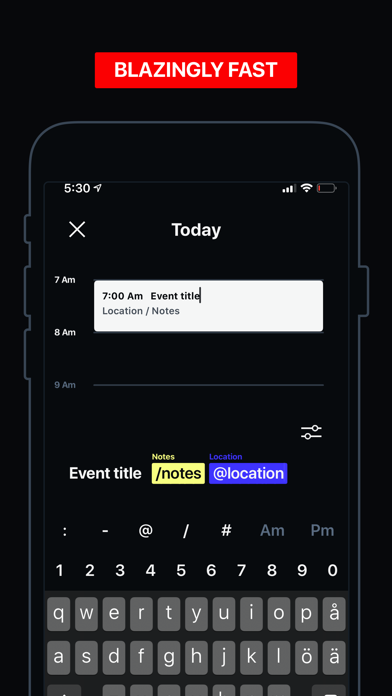
Tap or grab the plus button and drop it on any date to start creating an item. As you begin to type, a preview schedule is shown for the current date. That way you can see what time works best, even while creating.
Scroll the preview to set start time. Drag it to set duration. No need to pick through menus or manually type out the time, though that’s supported too.
Shortcuts lets you select a calendar, a color tag, location and enter notes by typing hotkeys. For example “/” + [notes] or “#” + [color]. This is the fastest and smoothest calendar creation flow we have seen.

MONTHLY DISPLAY.
::::::::::::::::::::::::::::::::::::::::::::::::::::::::::::::
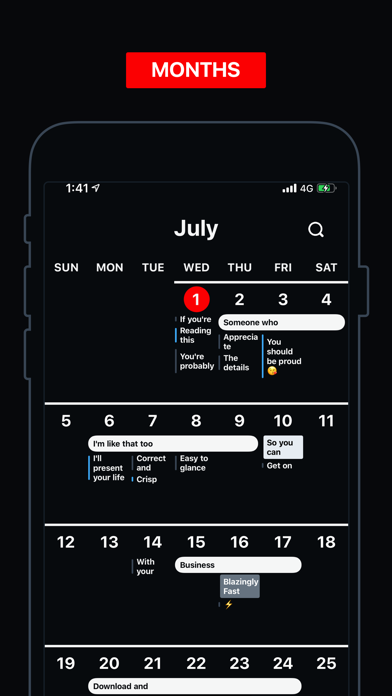
The design is based on a seamless, infinitely scrolling monthly view that highlights multiple-day events, includes to-dos, fades out past events, supports highlight by color tag and presents your events in up to three lines to avoid clipping.
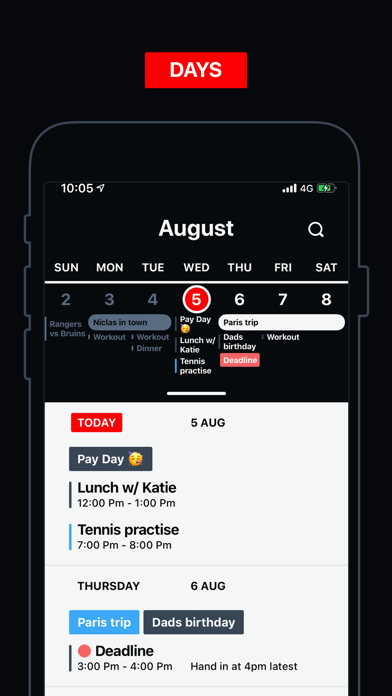
Tap any date to open a daily list.

DAILY LIST.
::::::::::::::::::::::::::::::::::::::::::::::::::::::::::::::
The daily list shows calendar events right along side scheduled to-dos. It supports quick swipe-actions that let you delete, copy, set color tags and complete to-dos.

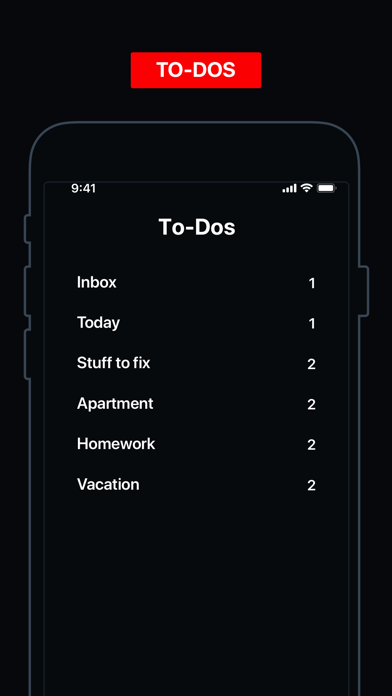
TO-DOS.
::::::::::::::::::::::::::::::::::::::::::::::::::::::::::::::
Any good calendar should let you organize through simple lists and to-do items. Calendar by 44 does this in style.

Other than that we support most of what you would expect, create, edit and delete calendars, create advance…

Fortyfour AB
版本

1.3.0

Calendar 44 will now find meeting links in your events and put them in to the event details for one-tap-join to video meeting.

This version also fixes an issue with notifications not being sent if you had enabled the setting to show date as a badge on the app icon.

查看完整更新记录 ↗

你的真实体验,为其他用户提供宝贵参考,获得宝石奖励

REWARD MARKET100 宝石可兑换什么?

还没有公开评论,欢迎分享你的体验。

广告
广告

提交反馈

每一个想法,都让 Mergeek 更好一点。