
 Cal Countdown




App Introduction
App 介绍
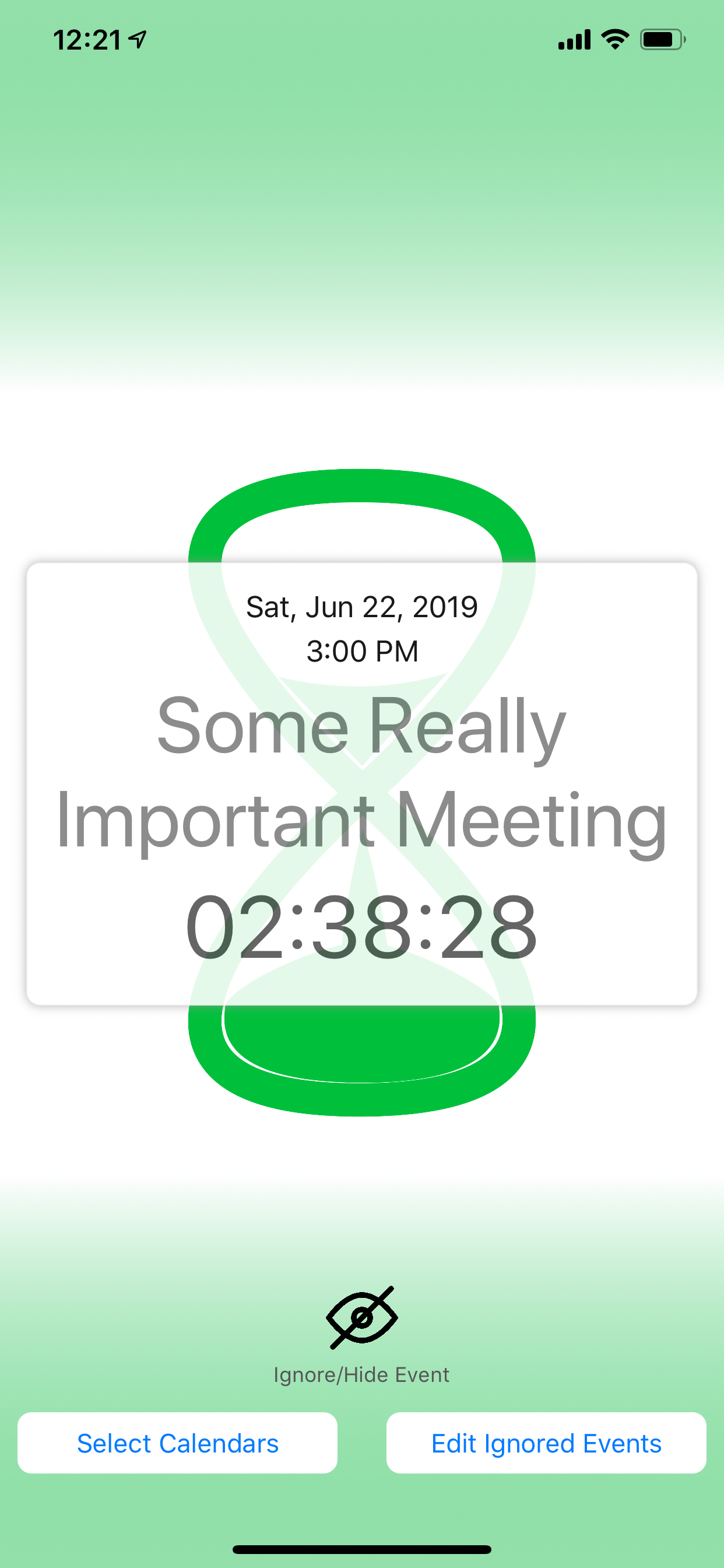
"Cal Countdown" is a free, simple iOS & Apple Watch app that automatically creates a color-coded countdown to the next event on your calendar and displays it on your Apple Watch face and/or your "Today" screen. The app is primarily intended to be used as a complication on your Apple Watch or as a widget. If your days are anything like ours, packed with various meetings scattered throughout the day, every time you check your calendar, you're trying to figure out one thing: How much time do I have until my next appointment? So, you glance at your watch, note the start time of your next appointment, and calculate the difference between the current time and your next event. We got tired of doing this mental calculation many times a day, but much to our surprise, we could not find an existing iOS application that would do this chore for us. So we decided to build it ourselves. Now, every time we glance at our watch, it immediately tells us what we want to know: How much time do I have until my next appointment? The app's color changes from blue to green to yellow to orange to red as you approach the start of your next event. (6+ hours = Blue, 2-6 hours = Green, 1-2 = Yellow, 30-60 mins = Orange, 0-30 mins = Red) Cal Countdown supports all the different Apple Watch complications. All Apple Watch complications that support multi-color will be color-coded (but not all watch complications support multiple colors.) Using "Cal Countdown" is as easy as it gets. It uses the calendar data already on your phone; no signing in; no entering any usernames or passwords. The app lets you select the calendars you want to include or not in your calendar countdowns. Don't have an Apple Watch? You can still use Cal Countdown on your phone as an iPhone/iPad app with a "Today" widget. Cal Countdown does not require an account. It does not even require an internet connection. The app uses the calendar data already on your iPhone. It's completely secure. Your calendar data remains completely private, and never leaves your phone. Cal Countdown also has the ability to ignore or skip certain events on your calendar. This feature is especially useful if you have shared calendars with your family, friends, or colleagues. We often have events on our calendars that we need to know about, but may not be attending ourselves. If you want Cal Countdown to ignore or skip these events and start counting down to the following event on your calendar, just tap the "Ignore" button, and Cal Countdown will immediately start a countdown to the following event.
"Cal Countdown" is a free, simple iOS & Apple Watch app that automatically creates a color-coded countdown to the next event on your calendar and displays it on your Apple Watch face and/or your "Today" screen. The app is primarily intended to be used as a complication on your Apple Watch or as a widget. If your days are anything like ours, packed with various meetings scattered throughout the day, every time you check your calendar, you're trying to figure out one thing: How much time do I have until my next appointment? So, you glance at your watch, note the start time of your next appointment, and calculate the difference between the current time and your next event. We got tired of doing this mental calculation many times a day, but much to our surprise, we could not find an existing iOS application that would do this chore for us. So we decided to build it ourselves. Now, every time we glance at our watch, it immediately tells us what we want to know: How much time do I have until my next appointment? The app's color changes from blue to green to yellow to orange to red as you approach the start of your next event. (6+ hours = Blue, 2-6 hours = Green, 1-2 = Yellow, 30-60 mins = Orange, 0-30 mins = Red) Cal Countdown supports all the different Apple Watch complications. All Apple Watch complications that support multi-color will be color-coded (but not all watch complications support multiple colors.) Using "Cal Countdown" is as easy as it gets. It uses the calendar data already on your phone; no signing in; no entering any usernames or passwords. The app lets you select the calendars you want to include or not in your calendar countdowns. Don't have an Apple Watch? You can still use Cal Countdown on your phone as an iPhone/iPad app with a "Today" widget. Cal Countdown does not require an account. It does not even require an internet connection. The app uses the calendar data already on your iPhone. It's completely secure. Your calendar data remains completely private, and never leaves your phone. Cal Countdown also has the ability to ignore or skip certain events on your calendar. This feature is especially useful if you have shared calendars with your family, friends, or colleagues. We often have events on our calendars that we need to know about, but may not be attending ourselves. If you want Cal Countdown to ignore or skip these events and start counting down to the following event on your calendar, just tap the "Ignore" button, and Cal Countdown will immediately start a countdown to the following event.

第一时间掌握精选限免应用/游戏信息
自定义喜欢的应用/游戏的价格变动
了解内购应用/游戏的限免或降价活动
查看应用/游戏价格历史等待合适时机再出手
第一时间收到价格通知不错过省钱机会


扫码下载 Follow
更多极客玩法


 梦幻绘图
梦幻绘图
梦幻工坊,是一款支持文生图,图生图,图生文的AI绘图工具,不需要魔法就可以使用各种 AI 工具,也不...

 枝页iBleaf
基于金字塔原理重塑笔记组织方式,让碎片化知识形成清晰有序的 结构,更有 AI 助力高效记录灵感、一键...
 黑马简历
黑马简历
黑马简历是一款专为职场人士和求职者设计的智能简历助手,旨在帮助用户快速打造专业、高效的求职简历。通过...
Geek Stories
极客玩法
更多极客玩法
Selected Solutions
精选产品
 56
56



梦幻工坊,是一款支持文生图,图生图,图生文的AI绘图工具,不需要魔法就可以使用各种 AI 工具,也不...
15


基于金字塔原理重塑笔记组织方式,让碎片化知识形成清晰有序的 结构,更有 AI 助力高效记录灵感、一键...
54

黑马简历是一款专为职场人士和求职者设计的智能简历助手,旨在帮助用户快速打造专业、高效的求职简历。通过...
天天发现优质应用
 到主屏幕
到主屏幕






你成为这个产品的发现者啦,说说你的推荐语吧!