



 TVAirScreen


App Introduction
App 介绍
 4.2
4.2
Pass the remote, not the phone.
Stop crowding around one tiny screen. TVAirScreen puts your photos on your Apple TV in seconds, so the whole room can enjoy them together — big, bright and easy to browse with the Siri Remote.
NO SETUP. NO ACCOUNTS. NO APPLE ID.
Your iPhone and Apple TV connect directly. There's no AirPlay to configure, no Apple ID to share and nothing to sign up for. Guests can put their own photos on your TV without touching your settings.
A CODE FOR NEW PHONES
Your TV shows a 4-digit code. A new phone enters it once and is remembered from then on. Phones that already use your TV keep working.
WHY YOU'LL LOVE IT
• Send a whole album in one go — photos arrive in the order you picked them
• Press Play/Pause on the Siri Remote for an instant, looping slideshow
• Swipe left and right to browse on the big screen
• Share straight from Photos, Files or Safari with the TVAirScreen share button
• Send PDFs — every page becomes a slide. Perfect for sheet music, lessons and presentations
• Pick from Photos or Files, or take a new photo with the camera
• Your iPhone stays awake while connected, so the show keeps going
• View photos and PDFs full screen on your iPhone, with pinch-to-zoom
MADE FOR MOMENTS LIKE
• Holiday photos with the grandparents on the couch
• Parties, weddings and reunions — every guest can add their shots
• Travel slideshows the evening you get home
• Classrooms, meetings and presentations
• Choir, band and church rehearsals with the music on the big screen
• Holiday rentals — let your guests share to the TV
FREE TO START. PRO IS YOURS FOREVER.
Send up to 5 photos at a time for free, with no account. Unlock Pro once — no subscription — for unlimited batches and PDFs. Bought TVAirScreen before it became free? Pro is already yours.
GET STARTED
1. Install TVAirScreen on your Apple TV, or scan the QR code it shows.
2. Open TVAirScreen on your iPhone and tap “Connect to Apple TV”.
3. Enter the code from the TV the first time, choose your photos, and watch them appear.
Requires the TVAirScreen app on your Apple TV.
Pass the remote, not the phone.
Stop crowding around one tiny screen. TVAirScreen puts your photos on your Apple TV in seconds, so the whole room can enjoy them together — big, bright and easy to browse with the Siri Remote.
NO SETUP. NO ACCOUNTS. NO APPLE ID.
Your iPhone and Apple TV connect directly. There's no AirPlay to configure, no Apple ID to share and nothing to sign up for. Guests can put their own photos on your TV without touching your settings.
A CODE FOR NEW PHONES
Your TV shows a 4-digit code. A new phone enters it once and is remembered from then on. Phones that already use your TV keep working.
WHY YOU'LL LOVE IT
• Send a whole album in one go — photos arrive in the order you picked them
• Press Play/Pause on the Siri Remote for an instant, looping slideshow
• Swipe left and right to browse on the big screen
• Share straight from Photos, Files or Safari with the TVAirScreen share button
• Send PDFs — every page becomes a slide. Perfect for sheet music, lessons and presentations
• Pick from Photos or Files, or take a new photo with the camera
• Your iPhone stays awake while connected, so the show keeps going
• View photos and PDFs full screen on your iPhone, with pinch-to-zoom
MADE FOR MOMENTS LIKE
• Holiday photos with the grandparents on the couch
• Parties, weddings and reunions — every guest can add their shots
• Travel slideshows the evening you get home
• Classrooms, meetings and presentations
• Choir, band and church rehearsals with the music on the big screen
• Holiday rentals — let your guests share to the TV
FREE TO START. PRO IS YOURS FOREVER.
Send up to 5 photos at a time for free, with no account. Unlock Pro once — no subscription — for unlimited batches and PDFs. Bought TVAirScreen before it became free? Pro is already yours.
GET STARTED
1. Install TVAirScreen on your Apple TV, or scan the QR code it shows.
2. Open TVAirScreen on your iPhone and tap “Connect to Apple TV”.
3. Enter the code from the TV the first time, choose your photos, and watch them appear.
Requires the TVAirScreen app on your Apple TV.

第一时间掌握精选限免应用/游戏信息
自定义喜欢的应用/游戏的价格变动
了解内购应用/游戏的限免或降价活动
查看应用/游戏价格历史等待合适时机再出手
第一时间收到价格通知不错过省钱机会


扫码下载 Follow
更多极客玩法


 iPlayer
iPlayer 是一款强大的本地音乐播放器,兼容 iPhone、iPad 和 Mac,提供跨平台无缝...

 轻备忘
轻备忘
「保持简单」是轻备忘的生活态度。拒绝繁重与复杂,致力于快速记录与回顾,打造如轻风拂面、水过无痕的使用...
 星清单:要事先行
星清单,一款简洁强大的个人任务管理神器,已支持iOS、macOS、iPadOS,标配数据同步权益。 ...
Geek Stories
极客玩法
更多极客玩法
Selected Solutions
精选产品
 62
62
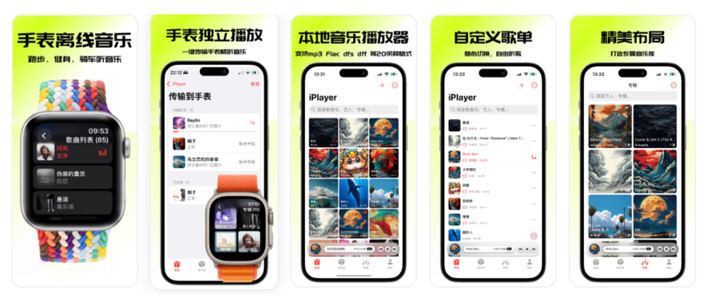


iPlayer 是一款强大的本地音乐播放器,兼容 iPhone、iPad 和 Mac,提供跨平台无缝...
5

「保持简单」是轻备忘的生活态度。拒绝繁重与复杂,致力于快速记录与回顾,打造如轻风拂面、水过无痕的使用...
9


星清单,一款简洁强大的个人任务管理神器,已支持iOS、macOS、iPadOS,标配数据同步权益。 ...
天天发现优质应用
 到主屏幕
到主屏幕






你成为这个产品的发现者啦,说说你的推荐语吧!