95 Lofi writes complete tracks. Press write and you get 52 bars — an intro,
three main sections, two lifts, a breakdown and an outro — played by a
dusty-keys synthesizer and a soft drum kit, then recorded onto tape. Keys, bass,
a melody line, a pad, the kit, and the record surface underneath it all.
Nothing is sampled. There are no audio files in this app at all — the Rhodes,
the kit and the vinyl crackle are all synthesised as they play, which is why the
whole thing is a few hundred kilobytes.
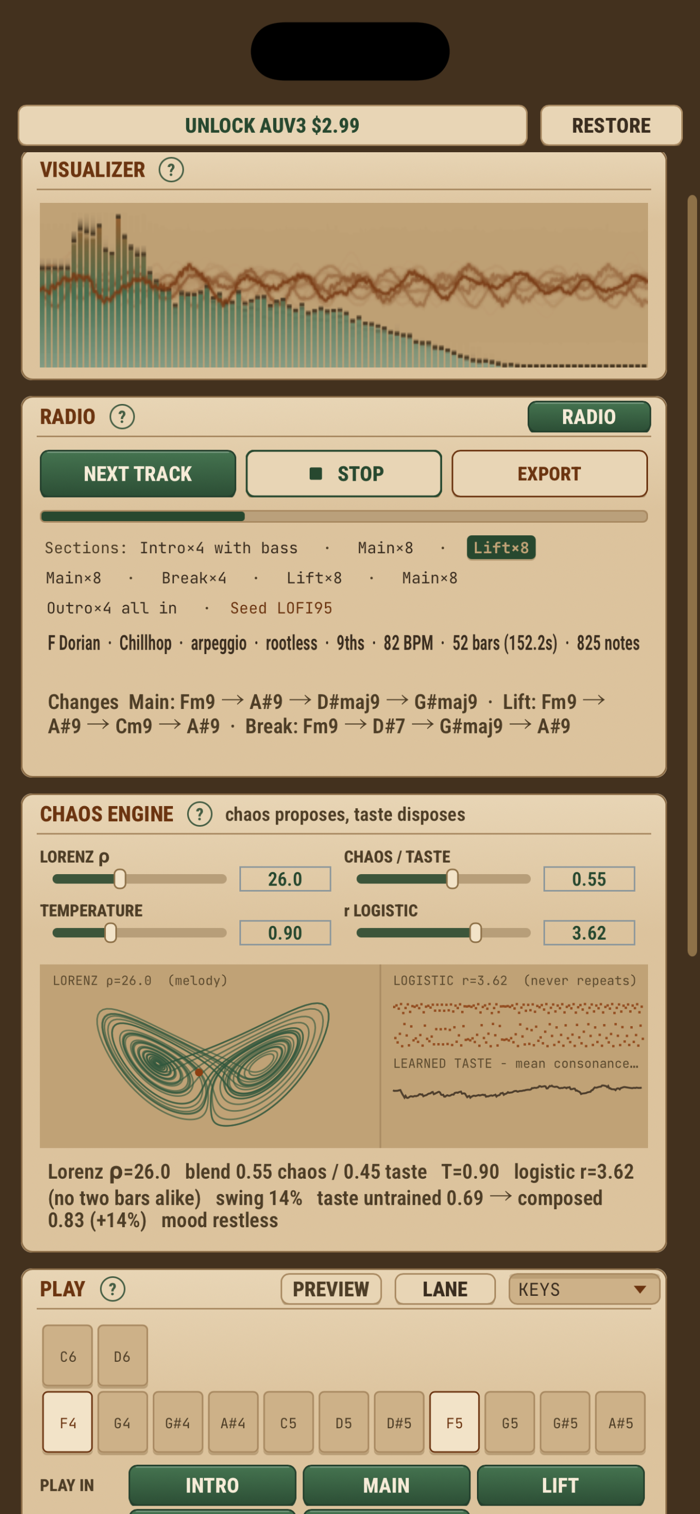
The music comes from chaos maths. Three Lorenz attractors shape the melody, the
rhythm and the mood. Two logistic maps run underneath the drums and the bass so
they wander independently of each other: turn the logistic control down and the
hats repeat every bar, turn it up and they never do.
Chaos on its own is noise, so a small model filters it. It is rewarded for
consonant intervals and rehearses over the changes before writing. The CHAOS /
TASTE slider decides how much say each one gets.
Nine styles, and they are properly different. Chillhop and Jazzhop sit where you
expect. Boom Bap hits harder and drier. Study Beats takes almost everything away.
Drift slows to a crawl. Lo-Fi House pushes past 106. Celtic and Medieval are not
jokes — modal progressions, different cadences, nothing else on the shelf sounds
like them.
The tape deck is the other half of the sound: a wow-and-flutter transport that
never quite runs true, vinyl crackle with real pops and decaying tails, hiss, bit
crush and saturation. The crackle is seeded, so the scratch lands in the same
place on every play and every export.
Every track is built from its seed. Write the seed down and you can have that
exact track again, note for note, whenever you want it. A seed from the browser
version rebuilds the same track here.
You can play over it, too. The pads are the notes of the track's key rather than
a piano keyboard, so nothing you touch is wrong, and the sixteen-step lane runs
in time with the track and follows your host. Both play any part you like — keys,
bass, melody or pad — through that part's sound and out on its MIDI channel.
Choose which sections the lane plays in, just the breakdown say, and preview it
without starting the track.
Turn on RADIO and it keeps playing, picking a new key, mode, style, sound kit
and tempo for each track.
You also get:
• 9 styles, 8 modes, 12 keys, tempo, swing, density and humanise
• A three-layer voice: an FM tine, one or two detuned bodies, and a sub
• 16 presets and 9 sound kits, from Tape Deck to Music Box, plus random patch
• Six-part mixer, chorus, a long dark reverb, synced delay and sidechain pump
• A tape deck: tone, wow and flutter, crackle, hiss, bit crush and drive
• MIDI in, so your keyboard plays whichever part you have selected
• Export a MIDI file, a WAV mix, or stems — one WAV per part plus the record
surface on its own (in the app; in a host you record the audio there)
• A note and a MIDI channel for every drum, not one channel for the whole kit
• UI scale, so the panel is not tiny on a big iPad
• Live spectrum and waveform, and the chaos engine drawn as it runs
Two Audio Units, an instrument and a MIDI processor. Each part sends on its own
MIDI channel and every drum has a note and a channel of its own, so one instance
can drive a rack of them. The MIDI version passes your keyboard through instead
of swallowing it. Both follow your host's tempo and transport, and one install
registers both.
The app is free and nothing in it is held back. Using the Audio Units inside
other apps is a one-time purchase, and each AUv3 session plays for two minutes
first so you can try them properly.
No account, no ads, no subscription. Works offline.


 +100宝石

 分享
分享









用户评价
立即分享产品体验
你的真实体验,为其他用户提供宝贵参考
💎 分享获得宝石
【分享体验 · 获得宝石 · 增加抽奖机会】
将你的产品体验分享给更多人,获得更多宝石奖励!
💎 宝石奖励
每当有用户点击你分享的体验链接并点赞"对我有用",你将获得:
🔗 如何分享
复制下方专属链接,分享到社交媒体、群聊或好友:
💡 小贴士
分享时可以添加你的个人推荐语,让更多人了解这款产品的优点!
示例分享文案:
"推荐一款我最近体验过的应用,界面设计很精美,功能也很实用。有兴趣的朋友可以看看我的详细体验评价~"
关注 Mergeek 公众号
领奖遇到问题?联系小门助手