产品功能

应用市场介绍

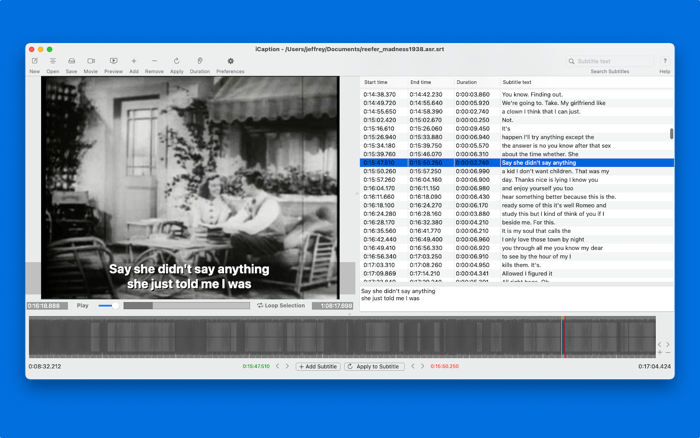
iCaption is a soft subtitle editor, utilizing timeline based editing. The file formats currently supported are SubRip (SRT) and YouTube.
What are soft subtitles? Soft subs are external files stored separately from the video file. They are called soft, because they are not hard-encoded into each video frame; they are rendered in real-time. Most modern video players support soft subs and can manage multiple files for quick and easy swapping of languages.
What iCaption is not
- It does not support any audio/video file formats that aren't natively supported on macOS.
- It does not hard-encode your subtitles into video frames, nor save videos; it creates subtitle files.
- Any features outside the SRT format, such as subtitle position, font or colour, are not supported.
- If you're looking for more than an SRT editor, then iCaption is not for you.
Features and Capabilities
- A user interface with side-by-side video and subtitles.
- Timeline-based editing, with or without a reference video loaded.
- Waveform visualization and subtitle visualization in the same timeline view.
- Transfer subtitle times from the reference video or the timeline selection.
- Automatically determine the subtitle duration via configurable word-counting.
- Real-time checking and visualization for overlapping subtitle times.
- Easily adjust all subtitle times with one edit.
- Search subtitles allows you to filter the subtitle list.
- Previewing allows you to test subtitles without an external viewer.
- Create, edit, open and save YouTube (.sbv) files.
- Create, edit, open and save SubRip (.srt) files.
- Convert SubRip to YouTube format and vice versa.
- Complete abstraction from the subtitle file formats.

收起

用户评价

立即分享产品体验

你的真实体验,为其他用户提供宝贵参考

宝石
评论可得 100 宝石
宝石随心兑换应用高级会员,每周更新 前往查看 >>
活动动态 0 人参加
查看更多评论