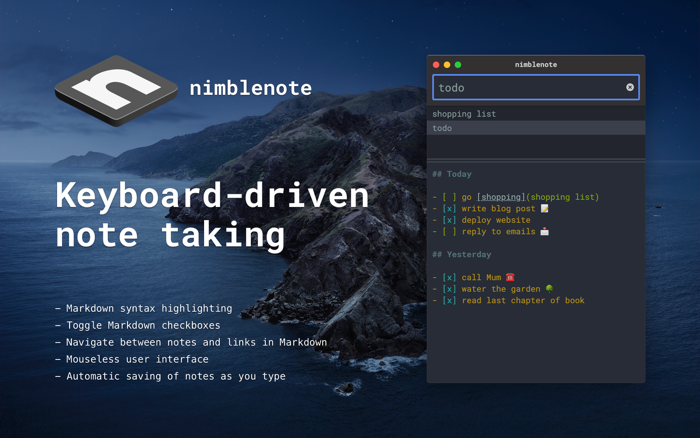
nimblenote's primary feature is being able to quickly take notes with a keyboard-driven interface, without needing a mouse.
nimblenote supports Markdown, and features Markdown actions, where you can toggle checkbox items, visit links or even navigate between your notes; the potential to create your very own personal wiki of notes!
When you first launch nimblenote, the focus of the keyboard will be within the search input. Start typing the name of a new note.
Hit enter and your note will be created with the name you chose. The focus of your keyboard will automatically change to the note editor.
With every change to your note, it is saved automatically.
Hit ESC when you've finished editing. Keyboard focus will switch back to the search input. You're now ready to create or search notes again!
nimblenote uses fuzzy searching. So you only have to start typing a few letters of the name of a note for it to begin matching with notes.
The file list is used to display matching results. You can use the up or down arrow keys to move between files.
If you get lost, type in ? into the search input to display help information.
nimblenote was inspired by Notational Velocity which unfortunately hasn't seen a release since 2011.

 +100宝石


 分享
分享














用户评价
立即分享产品体验
你的真实体验,为其他用户提供宝贵参考
💎 分享获得宝石
【分享体验 · 获得宝石 · 增加抽奖机会】
将你的产品体验分享给更多人,获得更多宝石奖励!
💎 宝石奖励
每当有用户点击你分享的体验链接并点赞"对我有用",你将获得:
🔗 如何分享
复制下方专属链接,分享到社交媒体、群聊或好友:
💡 小贴士
分享时可以添加你的个人推荐语,让更多人了解这款产品的优点!
示例分享文案:
"推荐一款我最近体验过的应用,界面设计很精美,功能也很实用。有兴趣的朋友可以看看我的详细体验评价~"
关注 Mergeek 公众号
领奖遇到问题?联系小门助手