The teleprompter that listens to your voice. VoicePrompter auto-scrolls your script as you speak, so you can record polished videos, go live, and create content with confidence, right from your iPhone and iPad.
Float it on top of Instagram, TikTok, Snapchat, YouTube, Facebook, or any other app and read your script while you film. Or record yourself directly in the app in stunning 4K.
Used by creators, podcasters, YouTubers, coaches, founders, and anyone who speaks on camera.
Download and try it for free, no account required.
HOW IT WORKS
1. Start any script in 1 click
2. Speak naturally and your script scrolls with your voice
3. Tap any word to jump to that section instantly
4. Record in 4K, or float the prompter over any app while you film
PERFECT FOR
- Instagram Reels, Stories, and Lives
- TikTok videos and Lives
- Snapchat content and Spotlight
- YouTube videos, Shorts, and live streams
- Facebook Reels and Lives
- Twitch and live streaming
- Talking-head videos, product demos, and tutorials
- Online course and lesson recording
- Voiceovers, narration, and audiobook recording
KEY FEATURES
Read While You Film in Any App
Tap the floating button in the dock and VoicePrompter transforms into a small window that stays on top of everything else. Read your script while filming a Reel in Instagram, a video in TikTok, or in Snapchat, YouTube, Facebook, and any other app. Use it while going live, or while recording in your favorite camera app with all your filters and effects. Because these apps capture from your camera, your script stays off camera, only you can see it.
Record Yourself in 4K
Switch to Video mode and the camera turns on right behind your script. Record in up to 4K, choose your lens, and even capture in 10-bit HDR, all while the text scrolls with your voice.
Voice Scrolling with Speech Recognition
VoicePrompter listens to what you actually say, not just to sound. Powered by on-device speech recognition, it scrolls any text automatically, following your voice word by word. Go off-script and it patiently waits for you.
Three Ways to Scroll
- Voice Scrolling: follows your speech precisely, word by word
- Sound Scrolling: scrolls whenever your mic picks up audio, pauses when you go silent. No speech recognition, works in any language
- Constant Speed: steady automatic scrolling at your chosen pace. No microphone needed, just set your speed and read
60+ Languages, Auto-Detected
Tap to Jump
Lost your place or skipped ahead? Tap any word and the prompter syncs instantly and continues from there.
Mirroring Mode
Flip the display for use with any beam-splitter teleprompter rig (Elgato, Neewer, Glide Gear, Desview).
Fully Customizable Display
Adjust font design (SF Rounded, SF Pro, Serif, Monospaced), font size, text and background color, line and paragraph spacing, side margins, active line position, and text direction (left-to-right or right-to-left) to match your setup.
Setting Presets
Save your favorite setups and switch between them with a single tap.
Scripts Library with Search
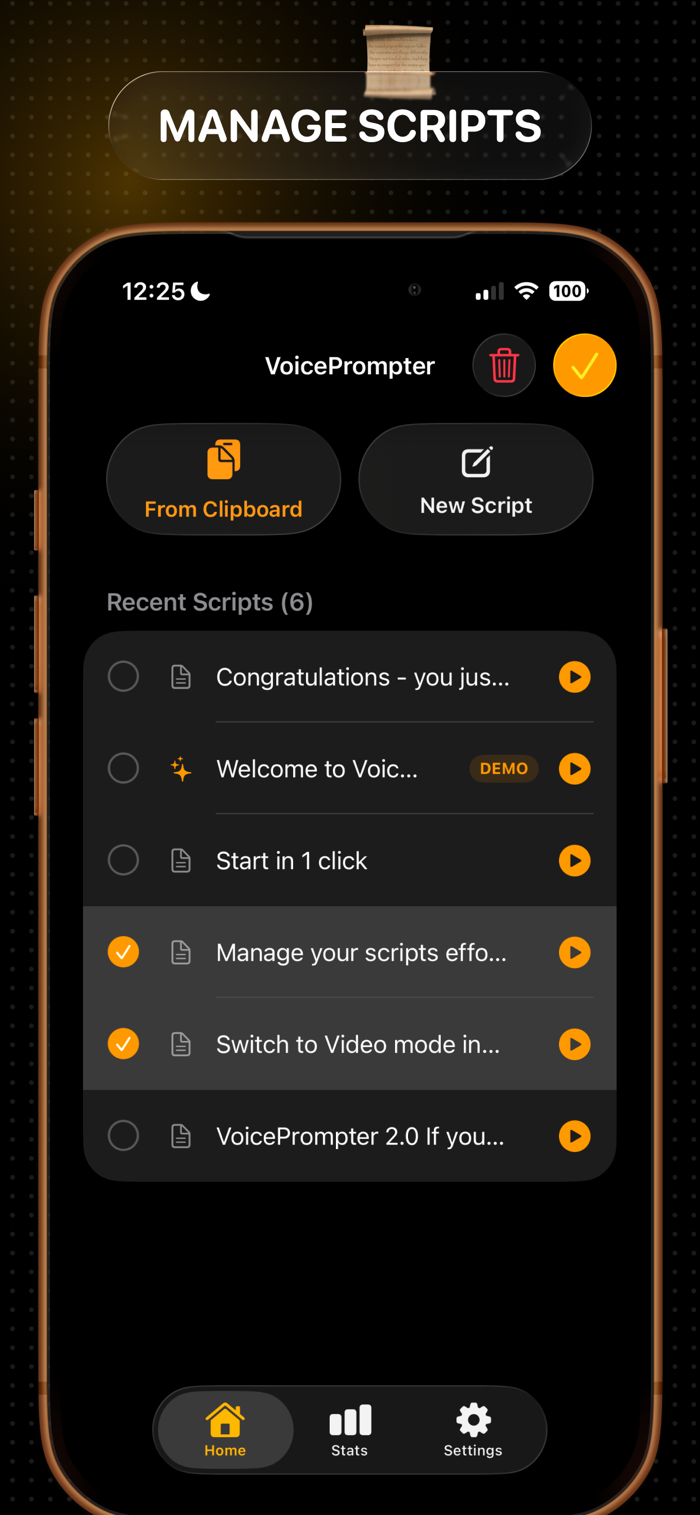
Your last 100 scripts are saved privately on your device. Search, launch, edit, copy, or delete any script from the Home tab, and reuse a previous script in one tap.
Privacy First, 100% On Device
All speech recognition happens locally on your device using Apple's native APIs. No audio is sent to servers, no account is required, and it works fully offline.
Progress Tracking and Stats
See how much you have practiced with a live word count, milestone celebrations, and a lifetime total of every word you have spoken through VoicePrompter.
Works on iPhone, iPad, and Mac
One purchase unlocks Pro everywhere through Universal Purchase. Buy on iPhone and you are unlocked on iPad and Mac too.
Terms of Use: https://www.apple.com/legal/internet-services/itunes/dev/stdeula/


 +100宝石

 分享
分享












用户评价
立即分享产品体验
你的真实体验,为其他用户提供宝贵参考
💎 分享获得宝石
【分享体验 · 获得宝石 · 增加抽奖机会】
将你的产品体验分享给更多人,获得更多宝石奖励!
💎 宝石奖励
每当有用户点击你分享的体验链接并点赞"对我有用",你将获得:
🔗 如何分享
复制下方专属链接,分享到社交媒体、群聊或好友:
💡 小贴士
分享时可以添加你的个人推荐语,让更多人了解这款产品的优点!
示例分享文案:
"推荐一款我最近体验过的应用,界面设计很精美,功能也很实用。有兴趣的朋友可以看看我的详细体验评价~"
关注 Mergeek 公众号
领奖遇到问题?联系小门助手