
















 App Store






加入 Mergeek 福利群
扫码添加小助手,精彩福利不错过!
若不方便扫码,请在 Mergeek 公众号,回复 群 即可加入
- 精品限免
- 早鸟优惠
- 众测送码
 Word Counter Pro
Word Counter Pro is the ultimate writing statistics tool for Mac. Whether you’re a student, author, editor, translator, or legal professional, this app gives you immediate access to detailed counts of words, characters, sentences, paragraphs, and more.
Just paste your text or open a file and have Word Counter Pro watch it to report live changes. It’s fast, lightweight, and beautifully designed to integrate seamlessly into your workflow. You can also get stats for your selected text in practically any app using the "Get Stats from Word Counter Pro" macOS Service.
Key Features:
•Live word, character, sentence, paragraph, and line counts
•Analyze multiple files in a single operation
•Export stats for documents to separate files on disk
•Supports plain text, rtf, docx, and other common formats
•Ideal for writers, students, professionals, and teams
Word Counter Pro also allows you to apply custom settings. Some of the custom settings you can specify include:
-Setting a custom page size for measuring line count. For accuracy, Word Counter Pro calculates the line count by measuring against a particular page size.
-Changing the left and right margin of the custom page size, which also will impact the line count.
-Enforcing a minimum number of sentences required for paragraph count. Most word processing software will incorrectly count titles and lines of text in headers as paragraphs, even though they are not part of the body of your document. Requiring a certain number of sentences per paragraph can result in a more accurate paragraph count, since dangling words are not counted as paragraphs.
Word Counter Pro allows you to view stats in six different ways:
1. You can type or paste text in the window.
2. You can drag and drop a supported text file to the window.
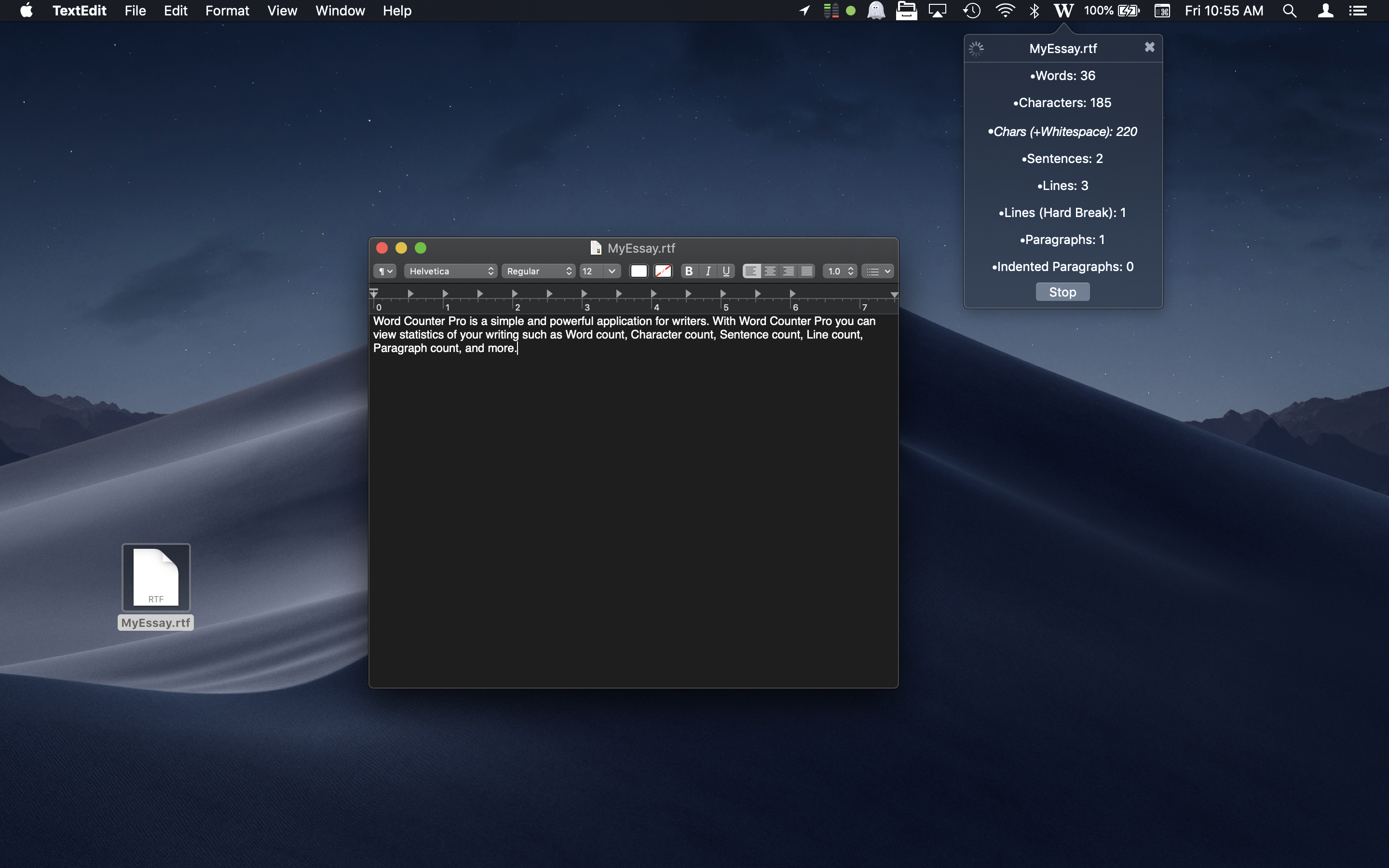
3. You can have Word Counter Pro watch a supported text file as you edit it in another application. When Word Counter Pro is watching a text file, a popover will appear in the menubar displaying stats that will be updated as you write.
4. Use the Word Counter Pro Action Extension. You can use the Word Counter Pro Action Extension to get stats of selected text in any app that supports Action Extensions (like Safari).
5. Select the “Get stats from Word Counter Pro” menu item from the Services menu on your selected text in practically any app on macOS.
6. Select a rtf, rtfd, txt, or docx file in Finder and choose the “Watch in Word Counter Pro” menu item from the Services menu.
Word Counter Pro is the ultimate writing statistics tool for Mac. Whether you’re a student, author, editor, translator, or legal professional, this app gives you immediate access to detailed counts of words, characters, sentences, paragraphs, and more.
Just paste your text or open a file and have Word Counter Pro watch it to report live changes. It’s fast, lightweight, and beautifully designed to integrate seamlessly into your workflow. You can also get stats for your selected text in practically any app using the "Get Stats from Word Counter Pro" macOS Service.
Key Features:
•Live word, character, sentence, paragraph, and line counts
•Analyze multiple files in a single operation
•Export stats for documents to separate files on disk
•Supports plain text, rtf, docx, and other common formats
•Ideal for writers, students, professionals, and teams
Word Counter Pro also allows you to apply custom settings. Some of the custom settings you can specify include:
-Setting a custom page size for measuring line count. For accuracy, Word Counter Pro calculates the line count by measuring against a particular page size.
-Changing the left and right margin of the custom page size, which also will impact the line count.
-Enforcing a minimum number of sentences required for paragraph count. Most word processing software will incorrectly count titles and lines of text in headers as paragraphs, even though they are not part of the body of your document. Requiring a certain number of sentences per paragraph can result in a more accurate paragraph count, since dangling words are not counted as paragraphs.
Word Counter Pro allows you to view stats in six different ways:
1. You can type or paste text in the window.
2. You can drag and drop a supported text file to the window.
3. You can have Word Counter Pro watch a supported text file as you edit it in another application. When Word Counter Pro is watching a text file, a popover will appear in the menubar displaying stats that will be updated as you write.
4. Use the Word Counter Pro Action Extension. You can use the Word Counter Pro Action Extension to get stats of selected text in any app that supports Action Extensions (like Safari).
5. Select the “Get stats from Word Counter Pro” menu item from the Services menu on your selected text in practically any app on macOS.
6. Select a rtf, rtfd, txt, or docx file in Finder and choose the “Watch in Word Counter Pro” menu item from the Services menu.
第一时间掌握精选限免应用/游戏信息
自定义喜欢的应用/游戏的价格变动
了解内购应用/游戏的限免或降价活动
查看应用/游戏价格历史等待合适时机再出手
第一时间收到价格通知不错过省钱机会

扫码下载 Follow
 酵母君
酵母君
这款多功能 APP 集成了电子书阅读、音乐播放、互动卡片、漫画阅读、3D 模型预览及个性相册六大核心...

 Mini记账
现在有各种各样的记账工具,有人喜欢简洁的,有人喜欢功能强大的,也有人喜欢设计精美的,这款 APP 是...
 Hi Moss
HiMoss,自主研发的大语言模型与高清虚拟数字人技术,重塑英语口语教学的未来。 我们的 AI 虚拟...
 6
6


这款多功能 APP 集成了电子书阅读、音乐播放、互动卡片、漫画阅读、3D 模型预览及个性相册六大核心...
41

现在有各种各样的记账工具,有人喜欢简洁的,有人喜欢功能强大的,也有人喜欢设计精美的,这款 APP 是...
39

HiMoss,自主研发的大语言模型与高清虚拟数字人技术,重塑英语口语教学的未来。 我们的 AI 虚拟...
天天发现优质应用
 到主屏幕
到主屏幕


产品名
这项是必须填的哦~可用平台
产品链接
这项是必须填的哦~产品一句话介绍
这项是必须填的哦~开发者邮箱
你也可以发送更多的产品故事到 hi@mergeek.com
我们会让你的产品被更多用户看到!
产品名
这项是必须填的哦~可用平台
产品链接
这项是必须填的哦~产品一句话介绍
这项是必须填的哦~开发者邮箱
你也可以发送更多的产品故事到 hi@mergeek.com
我们会让你的产品被更多用户看到!
已经成功发送到你的邮箱了,请注意查收
你成为这个产品的发现者啦,说说你的推荐语吧!