









加入 Mergeek 福利群
扫码添加小助手,精彩福利不错过!
若不方便扫码,请在 Mergeek 公众号,回复 群 即可加入
- 精品限免
- 早鸟优惠
- 众测送码
 ClipControl - AI Video Clipper
Clip Controller turns long business recordings into review-ready short clips without forcing sensitive media into a browser workflow. This version turns Clip Controller into a much tighter production system for creators who need to move from long recordings to useful clips quickly. The biggest upgrade is the new Command Center. Instead of separate tools scattered across the workspace, the app now gives you one clear control surface for the whole loop: drop recordings, choose the brief, run autopilot, review the best moments, and ship clips. Live production metrics show sources, transcript progress, candidate clips, and queued exports at a glance, so you always know what the system is doing and what needs your attention next. Batch work is now a first-class part of the experience. You can stage multiple recordings, track them in the Production Queue, and keep the workflow moving across source files instead of treating every video or audio file as a one-off job. This is especially useful for podcasters, livestream editors, webinar teams, interview workflows, course creators, agencies, and content teams processing long-form backlogs. Autopilot mode is easier to understand and easier to trust. Clip Controller can keep the queue moving through the core production path: prepare the source, transcribe locally, surface clip candidates, queue the best moments, export, and advance to the next item. The interface now makes that loop visible, so automation feels like a machine you can supervise instead of a black box. The app has also been renamed in the user-facing experience from ClipControl to Clip Controller. That new name now appears across the app, onboarding, plan names, generated project documents, permission prompts, navigation, and status messages. Internal project identifiers remain stable where needed, but the product now presents itself consistently and memorably. The creator workflow has been sharpened around four simple steps: Load, Control, Autopilot, and Ship. Load your recordings. Control the brief and clip style. Let on-device intelligence rank the strongest moments. Then export clips, build handoff packages, or archive the whole project for later. The updated "THE CLIP MACHINE" presentation is designed to make the product feel more focused, capable, and easy to explain at a glance. On-device intelligence remains the center of the product. Clip Controller is built around private local transcription, transcript-aware review, clip ranking, caption timing, and workflow decisions that help creators avoid scrubbing through entire recordings by hand. The app is designed to keep long-form content moving while still giving you final control over what gets selected and shipped. Project and delivery flows have also been tightened. Saved project briefs and handoff packages now use the Clip Controller name, review guidance is clearer, export readiness is easier to understand, and workspace state better reflects when a project can be resumed, when a source needs relinking, and when export ranges need attention. Those details matter when you are working with real creator projects and need the system to feel dependable. This release also improves the feeling of momentum across the whole workspace. Import guidance is clearer, queue states are easier to read, export readiness is more direct, and the app does a better job explaining when it is waiting for AI setup, source relinking, transcript generation, clip approval, or delivery. Behind the scenes, more clipping workflow logic is moving into package-level services and dedicated session objects so the root view can become less crowded over time. That gives Clip Controller a cleaner path for more advanced on-device automation, smarter batch decisions, creator memory, and richer export intelligence. AI Auto Clipper https://sites.google.com/view/spaceplantcorporationeula/home https://sites.google.com/view/spaceplantcorporationapps/home
Clip Controller turns long business recordings into review-ready short clips without forcing sensitive media into a browser workflow. This version turns Clip Controller into a much tighter production system for creators who need to move from long recordings to useful clips quickly. The biggest upgrade is the new Command Center. Instead of separate tools scattered across the workspace, the app now gives you one clear control surface for the whole loop: drop recordings, choose the brief, run autopilot, review the best moments, and ship clips. Live production metrics show sources, transcript progress, candidate clips, and queued exports at a glance, so you always know what the system is doing and what needs your attention next. Batch work is now a first-class part of the experience. You can stage multiple recordings, track them in the Production Queue, and keep the workflow moving across source files instead of treating every video or audio file as a one-off job. This is especially useful for podcasters, livestream editors, webinar teams, interview workflows, course creators, agencies, and content teams processing long-form backlogs. Autopilot mode is easier to understand and easier to trust. Clip Controller can keep the queue moving through the core production path: prepare the source, transcribe locally, surface clip candidates, queue the best moments, export, and advance to the next item. The interface now makes that loop visible, so automation feels like a machine you can supervise instead of a black box. The app has also been renamed in the user-facing experience from ClipControl to Clip Controller. That new name now appears across the app, onboarding, plan names, generated project documents, permission prompts, navigation, and status messages. Internal project identifiers remain stable where needed, but the product now presents itself consistently and memorably. The creator workflow has been sharpened around four simple steps: Load, Control, Autopilot, and Ship. Load your recordings. Control the brief and clip style. Let on-device intelligence rank the strongest moments. Then export clips, build handoff packages, or archive the whole project for later. The updated "THE CLIP MACHINE" presentation is designed to make the product feel more focused, capable, and easy to explain at a glance. On-device intelligence remains the center of the product. Clip Controller is built around private local transcription, transcript-aware review, clip ranking, caption timing, and workflow decisions that help creators avoid scrubbing through entire recordings by hand. The app is designed to keep long-form content moving while still giving you final control over what gets selected and shipped. Project and delivery flows have also been tightened. Saved project briefs and handoff packages now use the Clip Controller name, review guidance is clearer, export readiness is easier to understand, and workspace state better reflects when a project can be resumed, when a source needs relinking, and when export ranges need attention. Those details matter when you are working with real creator projects and need the system to feel dependable. This release also improves the feeling of momentum across the whole workspace. Import guidance is clearer, queue states are easier to read, export readiness is more direct, and the app does a better job explaining when it is waiting for AI setup, source relinking, transcript generation, clip approval, or delivery. Behind the scenes, more clipping workflow logic is moving into package-level services and dedicated session objects so the root view can become less crowded over time. That gives Clip Controller a cleaner path for more advanced on-device automation, smarter batch decisions, creator memory, and richer export intelligence. AI Auto Clipper https://sites.google.com/view/spaceplantcorporationeula/home https://sites.google.com/view/spaceplantcorporationapps/home
第一时间掌握精选限免应用/游戏信息
自定义喜欢的应用/游戏的价格变动
了解内购应用/游戏的限免或降价活动
查看应用/游戏价格历史等待合适时机再出手
第一时间收到价格通知不错过省钱机会

扫码下载 Follow
 英语读书
英语读书
「英语读书」是一个拥有海量原版双语书籍资源的平台,双语、中英任意切换,边听也可以边看,科学分级,多个...

 Teak浏览器
支持用户脚本,去广告,同时兼容 Adguard 和 Adblock 的规则,自定义多种搜索引擎的移动...
 喝水种花
喝水种花
强迫自己养成某种习惯,往往枯燥、困难,甚至痛苦。而喝水种花旨在通过种花这种游戏的方式,让您在养成喝水...
 55
55



「英语读书」是一个拥有海量原版双语书籍资源的平台,双语、中英任意切换,边听也可以边看,科学分级,多个...
100
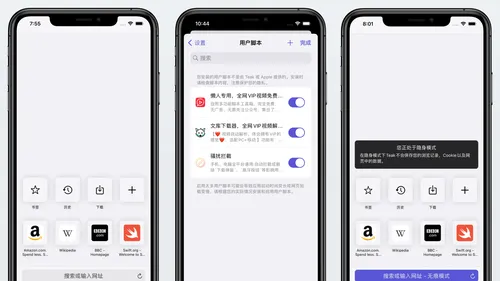
支持用户脚本,去广告,同时兼容 Adguard 和 Adblock 的规则,自定义多种搜索引擎的移动...
91
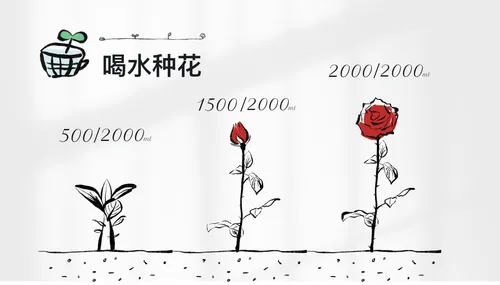
强迫自己养成某种习惯,往往枯燥、困难,甚至痛苦。而喝水种花旨在通过种花这种游戏的方式,让您在养成喝水...
天天发现优质应用
 到主屏幕
到主屏幕


产品名
这项是必须填的哦~可用平台
产品链接
这项是必须填的哦~产品一句话介绍
这项是必须填的哦~开发者邮箱
你也可以发送更多的产品故事到 hi@mergeek.com
我们会让你的产品被更多用户看到!
产品名
这项是必须填的哦~可用平台
产品链接
这项是必须填的哦~产品一句话介绍
这项是必须填的哦~开发者邮箱
你也可以发送更多的产品故事到 hi@mergeek.com
我们会让你的产品被更多用户看到!
已经成功发送到你的邮箱了,请注意查收
你成为这个产品的发现者啦,说说你的推荐语吧!