














加入 Mergeek 福利群
扫码添加小助手,精彩福利不错过!
若不方便扫码,请在 Mergeek 公众号,回复 群 即可加入
- 精品限免
- 早鸟优惠
- 众测送码
 AR Drawing Projector: Draw Art
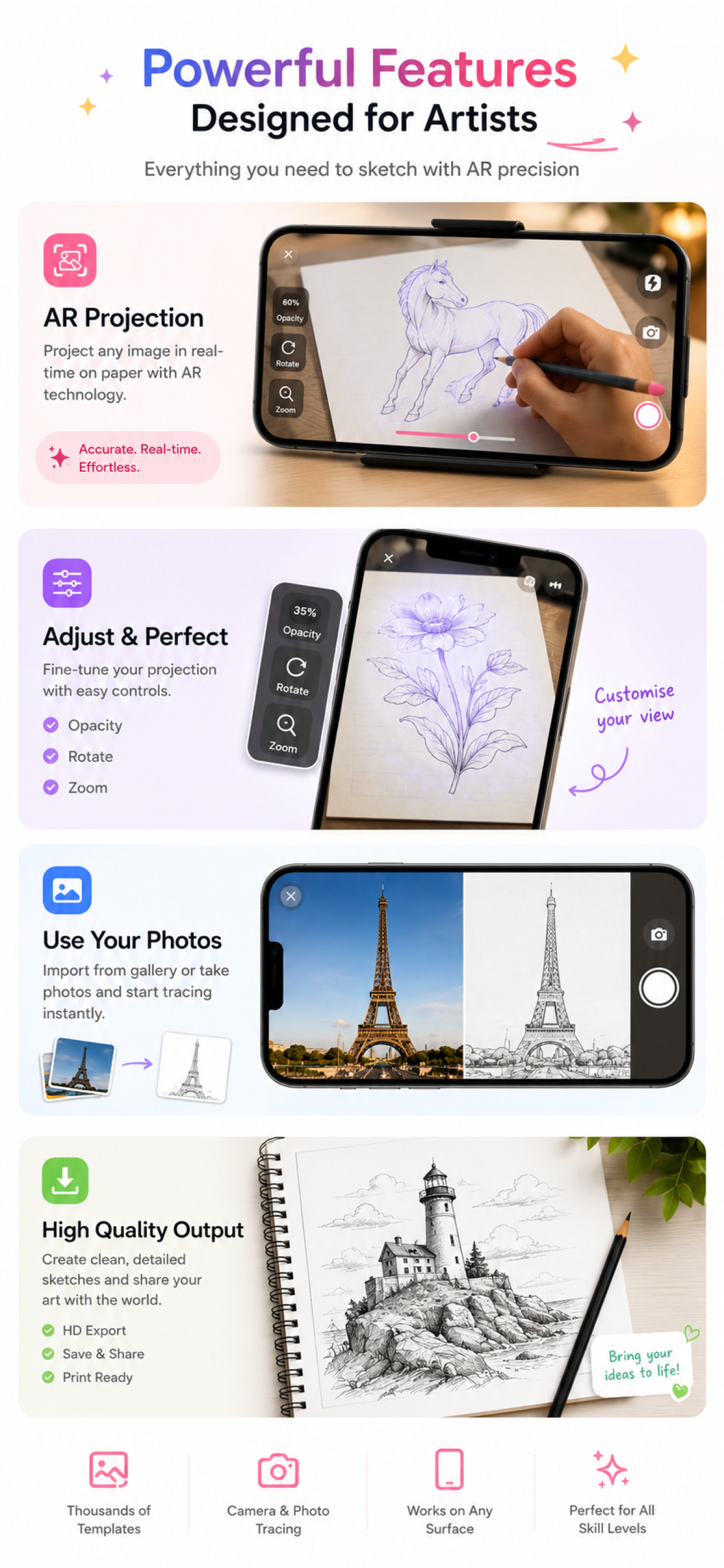
Turn your smartphone into an art projector and learn how to draw anything with ease! Whether you are a beginner looking to improve your sketching skills or an experienced artist wanting to trace complex outlines, this app uses state-of-the-art Augmented Reality (AR) technology to guide your hands on any surface. Just project a template image onto paper, trace the lines, and bring your art to life! HOW IT WORKS: 1. Place your phone on a stand or cup parallel to your drawing surface. 2. Open the app and select your favorite template or upload your own photo. 3. Lock the screen and adjust image opacity. 4. Look through your phone screen and start tracing outlines on paper! KEY FEATURES: AR Camera Projector: Projects outlines directly onto your paper. Lock, rotate, scale, or adjust opacity with simple touch controls. Diverse Template Library: Access 100+ easy-to-draw categories including Anime, Animals, Chibi, Nature, Cars, Food, Mandalas, and more! Draw with Screen (Light Box Mode): Don't have a stand? Turn your screen brightness to max, place paper over your screen, and trace directly. Built-In Flashlight Support:** Keep drawing comfortably even in low-light environments. Unleash your creativity and master proportions, shapes, and shading with every trace. Download the app today and start creating your own masterpiece! Privacy Policy: https://iosarsketch.blogspot.com/2026/05/privacy-policy.html Terms of Service: https://www.apple.com/legal/internet-services/itunes/dev/stdeula/
Turn your smartphone into an art projector and learn how to draw anything with ease! Whether you are a beginner looking to improve your sketching skills or an experienced artist wanting to trace complex outlines, this app uses state-of-the-art Augmented Reality (AR) technology to guide your hands on any surface. Just project a template image onto paper, trace the lines, and bring your art to life! HOW IT WORKS: 1. Place your phone on a stand or cup parallel to your drawing surface. 2. Open the app and select your favorite template or upload your own photo. 3. Lock the screen and adjust image opacity. 4. Look through your phone screen and start tracing outlines on paper! KEY FEATURES: AR Camera Projector: Projects outlines directly onto your paper. Lock, rotate, scale, or adjust opacity with simple touch controls. Diverse Template Library: Access 100+ easy-to-draw categories including Anime, Animals, Chibi, Nature, Cars, Food, Mandalas, and more! Draw with Screen (Light Box Mode): Don't have a stand? Turn your screen brightness to max, place paper over your screen, and trace directly. Built-In Flashlight Support:** Keep drawing comfortably even in low-light environments. Unleash your creativity and master proportions, shapes, and shading with every trace. Download the app today and start creating your own masterpiece! Privacy Policy: https://iosarsketch.blogspot.com/2026/05/privacy-policy.html Terms of Service: https://www.apple.com/legal/internet-services/itunes/dev/stdeula/
第一时间掌握精选限免应用/游戏信息
自定义喜欢的应用/游戏的价格变动
了解内购应用/游戏的限免或降价活动
查看应用/游戏价格历史等待合适时机再出手
第一时间收到价格通知不错过省钱机会

扫码下载 Follow
 Hi Moss
HiMoss,自主研发的大语言模型与高清虚拟数字人技术,重塑英语口语教学的未来。 我们的 AI 虚拟...

 睡眠岛
睡眠岛
睡眠岛 — 听着入睡,醒来看报告。 海量助眠音视频,入睡后自动停播;同时自动记录睡眠阶段、鼾声与梦话...
 小素典
小素典
一个 App = 汉语大词典 + 国语辞典 + 成语词典 + 康熙字典 + 说文解字 + 六书通 +...
 39
39




HiMoss,自主研发的大语言模型与高清虚拟数字人技术,重塑英语口语教学的未来。 我们的 AI 虚拟...
4

睡眠岛 — 听着入睡,醒来看报告。 海量助眠音视频,入睡后自动停播;同时自动记录睡眠阶段、鼾声与梦话...
15

一个 App = 汉语大词典 + 国语辞典 + 成语词典 + 康熙字典 + 说文解字 + 六书通 +...
天天发现优质应用
 到主屏幕
到主屏幕


产品名
这项是必须填的哦~可用平台
产品链接
这项是必须填的哦~产品一句话介绍
这项是必须填的哦~开发者邮箱
你也可以发送更多的产品故事到 hi@mergeek.com
我们会让你的产品被更多用户看到!
产品名
这项是必须填的哦~可用平台
产品链接
这项是必须填的哦~产品一句话介绍
这项是必须填的哦~开发者邮箱
你也可以发送更多的产品故事到 hi@mergeek.com
我们会让你的产品被更多用户看到!
已经成功发送到你的邮箱了,请注意查收
你成为这个产品的发现者啦,说说你的推荐语吧!