











加入 Mergeek 福利群
扫码添加小助手,精彩福利不错过!
若不方便扫码,请在 Mergeek 公众号,回复 群 即可加入
- 精品限免
- 早鸟优惠
- 众测送码
 EMDR - Bilateral Stimulation
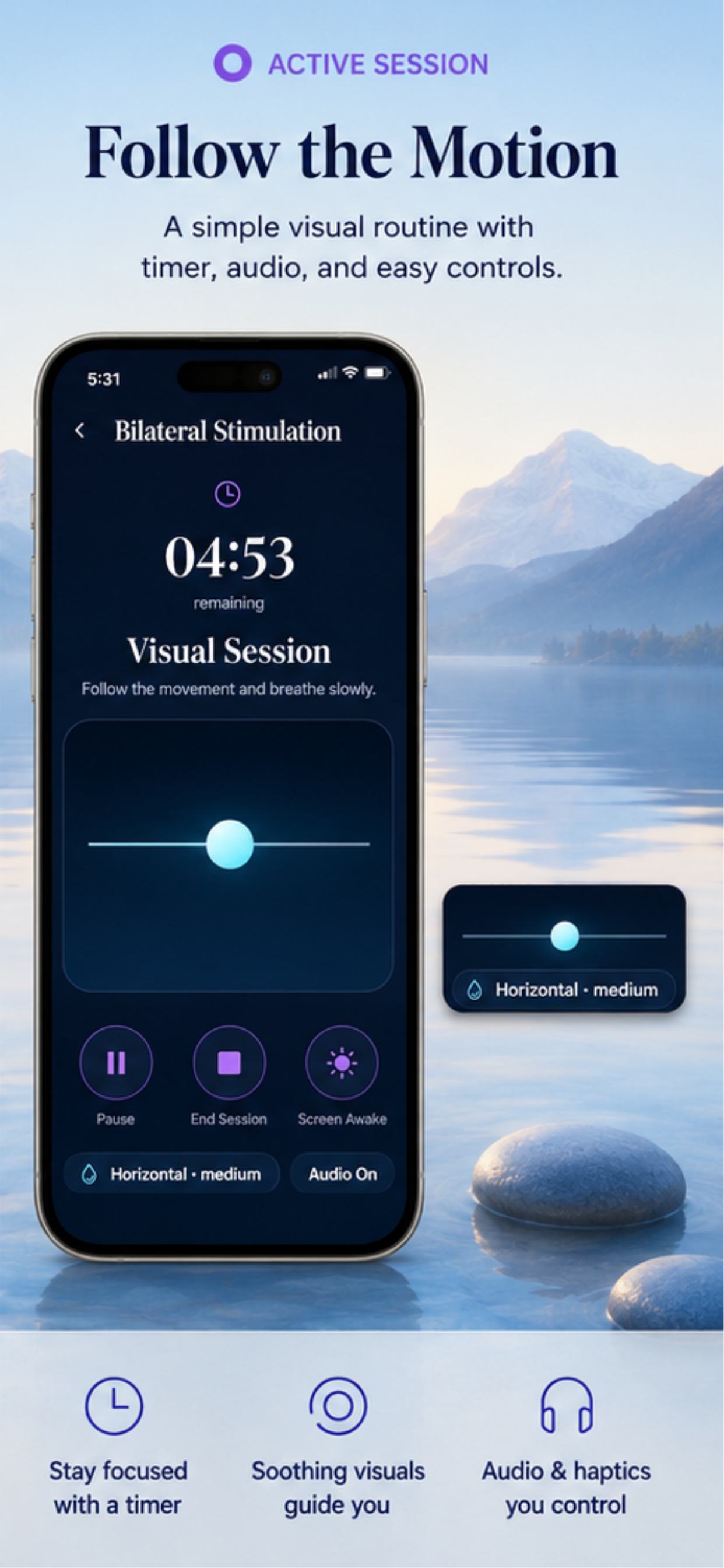
EMDR Therapy App provides a private and flexible set of bilateral stimulation tools for personal wellness and use alongside professional guidance. Create personalized visual, audio, and haptic sessions, adjust the movement and pacing, save your favorite configurations, and track your routine locally on your device. CREATE YOUR ROUTINE Choose sessions from 5 to 20 minutes and customize the speed, movement pattern, visual object, size, color, and background. Available movement patterns include horizontal, vertical, diagonal, figure-eight, and circular movement. A live preview lets you see your configuration before starting. During a session, you can pause, resume, enable or disable audio, control haptic feedback, keep the screen awake, or end the session at any time. STEREO AUDIO AND HAPTICS Choose from five built-in stereo tone pairs, including Soft Chime, Gentle Tap, Soft Bell, Warm Tone, and Neutral Click. Adjust the volume and alternation pace to create a comfortable experience. Optional timed vibration pulses provide an additional rhythmic stimulus. All sounds are included with the app and do not require streaming or an internet connection. Headphones are recommended for the intended left and right stereo experience. BREATHE AT YOUR OWN PACE Use the visual breathing timer whenever you want a quiet pause. Choose Balanced Breathing, Long Exhale, or Box Breathing and select a duration of 2, 5, or 10 minutes. The animated visual guide displays the current breathing phase, remaining time, completed cycles, and overall progress. Optional haptic cues can indicate each phase change. TRACK YOUR ROUTINE Review completed sessions, daily minutes, current streaks, and activity from the last seven days. Save personalized session configurations as presets and return to your favorite routines whenever you need them. After each session, you can optionally record how you feel, select an intensity level, and write a private reflection. Session details and reflections remain available in your local history. PERSONALIZED EXPERIENCE The Home screen changes automatically for morning, afternoon, and evening, providing a different visual atmosphere throughout the day. Choose between Light and Dark appearance and use Reduce Motion when you prefer a less animated experience. Configure your default duration, speed, audio, visual mode, and haptic preferences from Settings. IMPORTANT NOTICE EMDR Therapy App is a personal wellness utility that generates visual, auditory, and timed haptic stimulation. The app does not diagnose, treat, cure, or prevent any disease or condition. It does not provide psychotherapy, medical treatment, or individualized health recommendations. This app is not a substitute for advice, diagnosis, or treatment from a licensed mental health or medical professional. If you intend to use bilateral stimulation in connection with EMDR, trauma, or distressing memories, seek guidance from a properly trained professional and do not attempt to process traumatic memories alone. Stop immediately if you experience discomfort, dizziness, distress, disorientation, or other unwanted effects. Do not use the app while driving, operating equipment, or in any situation that requires your full attention. Further information EMDR Institute Inc. (Emdr.com) Eye Movement Desensitization and Reprocessing (Wikipedia.org) What is EMDR Therapy? (Emdria.org) Terms of Use: https://www.apple.com/legal/internet-services/itunes/dev/stdeula/ Privacy Policy: https://deisyapp.appmakerpro.website/privacypolicy.html
EMDR Therapy App provides a private and flexible set of bilateral stimulation tools for personal wellness and use alongside professional guidance. Create personalized visual, audio, and haptic sessions, adjust the movement and pacing, save your favorite configurations, and track your routine locally on your device. CREATE YOUR ROUTINE Choose sessions from 5 to 20 minutes and customize the speed, movement pattern, visual object, size, color, and background. Available movement patterns include horizontal, vertical, diagonal, figure-eight, and circular movement. A live preview lets you see your configuration before starting. During a session, you can pause, resume, enable or disable audio, control haptic feedback, keep the screen awake, or end the session at any time. STEREO AUDIO AND HAPTICS Choose from five built-in stereo tone pairs, including Soft Chime, Gentle Tap, Soft Bell, Warm Tone, and Neutral Click. Adjust the volume and alternation pace to create a comfortable experience. Optional timed vibration pulses provide an additional rhythmic stimulus. All sounds are included with the app and do not require streaming or an internet connection. Headphones are recommended for the intended left and right stereo experience. BREATHE AT YOUR OWN PACE Use the visual breathing timer whenever you want a quiet pause. Choose Balanced Breathing, Long Exhale, or Box Breathing and select a duration of 2, 5, or 10 minutes. The animated visual guide displays the current breathing phase, remaining time, completed cycles, and overall progress. Optional haptic cues can indicate each phase change. TRACK YOUR ROUTINE Review completed sessions, daily minutes, current streaks, and activity from the last seven days. Save personalized session configurations as presets and return to your favorite routines whenever you need them. After each session, you can optionally record how you feel, select an intensity level, and write a private reflection. Session details and reflections remain available in your local history. PERSONALIZED EXPERIENCE The Home screen changes automatically for morning, afternoon, and evening, providing a different visual atmosphere throughout the day. Choose between Light and Dark appearance and use Reduce Motion when you prefer a less animated experience. Configure your default duration, speed, audio, visual mode, and haptic preferences from Settings. IMPORTANT NOTICE EMDR Therapy App is a personal wellness utility that generates visual, auditory, and timed haptic stimulation. The app does not diagnose, treat, cure, or prevent any disease or condition. It does not provide psychotherapy, medical treatment, or individualized health recommendations. This app is not a substitute for advice, diagnosis, or treatment from a licensed mental health or medical professional. If you intend to use bilateral stimulation in connection with EMDR, trauma, or distressing memories, seek guidance from a properly trained professional and do not attempt to process traumatic memories alone. Stop immediately if you experience discomfort, dizziness, distress, disorientation, or other unwanted effects. Do not use the app while driving, operating equipment, or in any situation that requires your full attention. Further information EMDR Institute Inc. (Emdr.com) Eye Movement Desensitization and Reprocessing (Wikipedia.org) What is EMDR Therapy? (Emdria.org) Terms of Use: https://www.apple.com/legal/internet-services/itunes/dev/stdeula/ Privacy Policy: https://deisyapp.appmakerpro.website/privacypolicy.html
第一时间掌握精选限免应用/游戏信息
自定义喜欢的应用/游戏的价格变动
了解内购应用/游戏的限免或降价活动
查看应用/游戏价格历史等待合适时机再出手
第一时间收到价格通知不错过省钱机会

扫码下载 Follow
 Vibeknow
VibeKnow 是全球首个 AI 知识视频创作平台,主打”一键把文档变视频”。无需剪辑技能、无需出...

 Cardify - AI错题本
拍下错题,Cardify 会帮你生成可追溯的错题记录,保留原题、作答、解析和知识点,方便复盘每一次失...
 Emote AI 生活管理笔记
Emote 笔记重置版已上线,带来多重全新体验:笔记架构全面升级,融合笔记、AI 与日程管理,打造高...
 84
84


VibeKnow 是全球首个 AI 知识视频创作平台,主打”一键把文档变视频”。无需剪辑技能、无需出...
98


拍下错题,Cardify 会帮你生成可追溯的错题记录,保留原题、作答、解析和知识点,方便复盘每一次失...
45


Emote 笔记重置版已上线,带来多重全新体验:笔记架构全面升级,融合笔记、AI 与日程管理,打造高...
天天发现优质应用
 到主屏幕
到主屏幕


产品名
这项是必须填的哦~可用平台
产品链接
这项是必须填的哦~产品一句话介绍
这项是必须填的哦~开发者邮箱
你也可以发送更多的产品故事到 hi@mergeek.com
我们会让你的产品被更多用户看到!
产品名
这项是必须填的哦~可用平台
产品链接
这项是必须填的哦~产品一句话介绍
这项是必须填的哦~开发者邮箱
你也可以发送更多的产品故事到 hi@mergeek.com
我们会让你的产品被更多用户看到!
已经成功发送到你的邮箱了,请注意查收
你成为这个产品的发现者啦,说说你的推荐语吧!