Most productivity apps assume you think in straight lines. Flint doesn't.
Flint is a daily planner built specifically for ADHD brains — the kind that get overwhelmed by too many options, struggle to start even when the task is small, and need to know what to do right now, not just someday.
It works out of the box. No system to design. No complicated setup. Open it, check in, and get moving.
HOW ARE YOU TODAY?
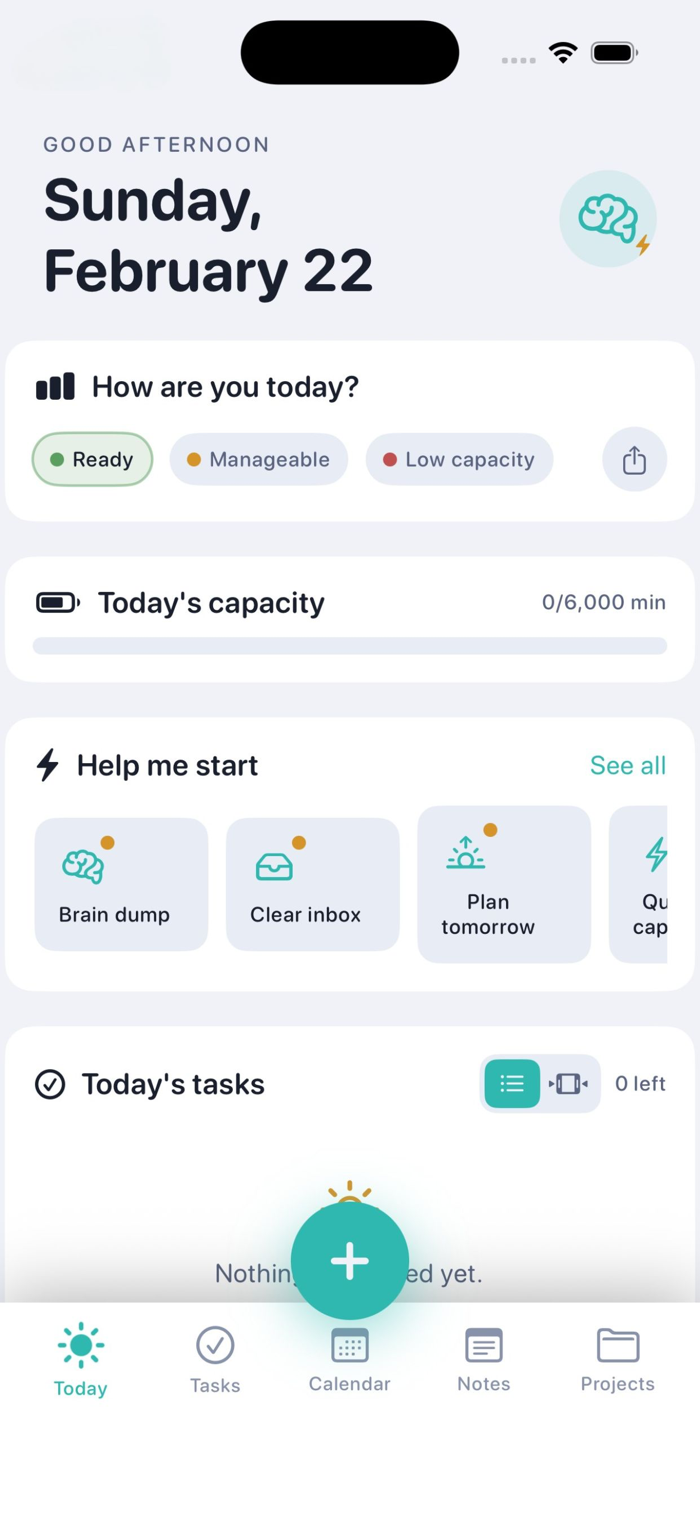
Every morning starts with a stoplight check-in. Green, yellow, or red — one tap tells Flint how much you have to give. Your day adjusts around that. Not the other way around.
A visual capacity bar shows you how full your day is before you've even started stressing about it. When tasks overflow, they don't disappear — they wait in your Overflow Tray, guilt-free, ready when you are.
YOUR DAY, YOUR WAY
See tasks as a list or flip to Timeline view — a scrollable hourly schedule that shows exactly what lands where in your day. Colour-coded by priority. Annotated with energy levels so you can match your hardest tasks to your sharpest hours.
HELP ME START
Starting is the hardest part. Flint's built-in routines — Brain Dump, Clear Inbox, Plan Tomorrow, Quick Capture, Plan a Project, Weekly Review — walk you through each step and link directly into the right part of the app. You never have to figure out what to do first.
CAPTURE ANYTHING, INSTANTLY
Think of something? Tap the brain button. Type it, speak it, or write it in a note.
Voice capture listens to how you describe a task and automatically sets the priority and schedule. Say "urgent" or "tomorrow" and Flint handles the rest.
Drop a brain dump into Notes and tap Extract Tasks — Flint's AI reads your note and pulls out the action items for you to review and add in one tap.
TASKS THAT UNDERSTAND YOU
Every task can carry an energy level — low, medium, or high focus. Match your work to your actual capacity, not your ideal capacity. Set priorities, estimated times, subtasks, reminders, and due dates. Assign everything to a project.
Tasks with reminders use native iOS notifications. No account required. Everything lives on your device.
PROJECTS AND NOTES
Organise work into projects with custom colours and icons. See progress at a glance. Link notes to projects. Pin the ones that matter. Everything connected, nothing buried.
PRIVATE BY DEFAULT
Flint stores everything locally on your device. No account. No subscription required to access core features. No data sent to anyone.
Flint won't fix your ADHD. Nothing will. But it will give you a calm, clear place to land when your brain needs a starting point — and that's often all you need.

 +100宝石

 分享
分享
















用户评价
立即分享产品体验
你的真实体验,为其他用户提供宝贵参考
💎 分享获得宝石
【分享体验 · 获得宝石 · 增加抽奖机会】
将你的产品体验分享给更多人,获得更多宝石奖励!
💎 宝石奖励
每当有用户点击你分享的体验链接并点赞"对我有用",你将获得:
🔗 如何分享
复制下方专属链接,分享到社交媒体、群聊或好友:
💡 小贴士
分享时可以添加你的个人推荐语,让更多人了解这款产品的优点!
示例分享文案:
"推荐一款我最近体验过的应用,界面设计很精美,功能也很实用。有兴趣的朋友可以看看我的详细体验评价~"
关注 Mergeek 公众号
领奖遇到问题?联系小门助手