Mavis Camera is built from the ground up to provide you with the professional tools needed for content creation in the next decade. Whether you are a streamer building a channel, an industry veteran looking for new ways of working, or a creator passionate about filmmaking, Mavis Camera can meet your needs.
Main Features
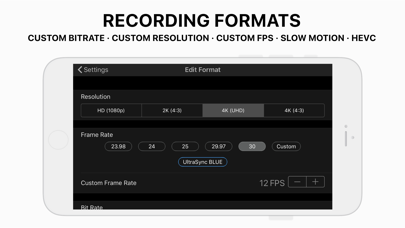
• Support recording in multiple resolutions, frame rates, and encoding formats, including H264, HEVC, HEVC 10bit, and ProRes encoding
• Monitoring tools, including focus peaking, zebras, false color, magnified focus, framing guides, and flip
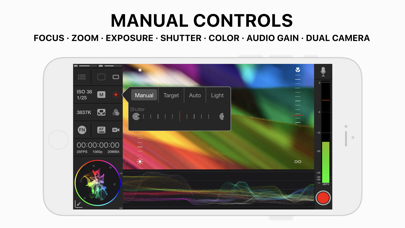
• Manual camera control, including focus, exposure, shutter, and color temperature adjustment
• HDR video processing
• Direct upload to Adobe Frame.io cloud for images
• Support live streaming on multiple platforms, including YouTube, Twitch, Instagram, and Facebook
• Customize RTMP and SRT (TX Caller) live streaming
• Mavis C2C supports GV Framelight X, MediaSilo, Sony Ci, and Amazon S3
• Mavis Cloud Hub can remotely configure Mavis C2C and live streaming settings
• Customizable audio input
• Audio mixer, including gain, pan, and solo controls for individual channels
• Real-time audio monitoring, supporting headphone monitoring
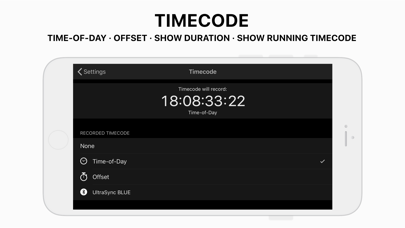
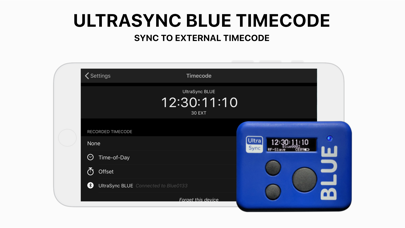
• Timecode, including clock time, offset, and from UltraSync BLUE
• Landscape and portrait recording and live streaming
Seamless Workflow
Adobe Frame.io
• By directly integrating the Adobe Frame.io cloud camera direct upload function, you can manage video assets more quickly and deliver high-quality content
• Support progressive upload during recording
• Selective upload of video files
• Support batch upload of video files
Live Streaming
• Support portrait and landscape live streaming
• Support simultaneous recording and live streaming
• Support customizing RTMP and SRT Caller live streaming addresses
Mavis C2C
• Support integration with GV Framelight X, MediaSilo, Sony Ci, and Amazon S3
• Support progressive upload during recording
• Provide an unlimited number of target presets
• Secure transfer and handover through Mavis Cloud Hub
Mavis Cloud Hub
• Manage your devices through hub.mavis.cloud
• Support pairing an unlimited number of devices for live streaming
• Support remotely configuring live streaming settings
• Support remotely configuring custom RTMP and SRT addresses
• Support remotely configuring Mavis C2C
Camera Control
Provide manual control options, including:
• Focus
• Exposure
• ISO
• Shutter speed
• Color temperature
• Shutter lock
• Custom frame rate
• Multiple resolutions and bitrates
• Support ProRes encoding
Monitoring Tools
Features
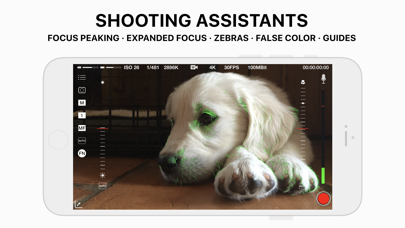
• Focus peaking and magnified focus functions to help you get clear and precise images
• Zebra indicator to help you ensure the image is not overexposed
• False color function to ensure your shot is not overexposed or underexposed
• Framing guides to help you compose and position the image
• Aspect ratio overlay to let you preview the image in different aspect ratios
• Anamorphic lens correction to restore the image for anamorphic lenses
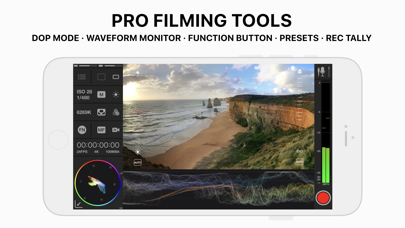
• Waveform monitor to assist in optimizing the dynamic range
• Vector scope to ensure color accuracy and maintain white balance consistency
Notable Settings
• Customize false color gradient, range, and blue channel
• Adjust focus peaking color and sensitivity
• Flip: horizontal, vertical, or rotate
• Multiple framing guides: rule of thirds, portrait safe area, and square reference lines
• Aspect ratio overlay: set center line, protection area, and transparency
• Zebra indicator, color, and sensitivity range adjustment
Audio Tools
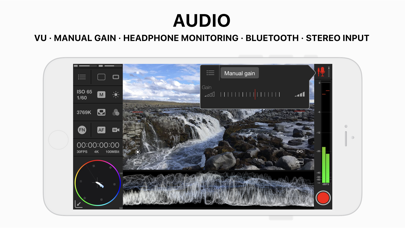
• Built-in audio mixer, supporting stereo output
• Gain and pan controls for each input channel
• Support external microphone input
• Built-in microphone selection
• Multi-track recording function
• Support Bluetooth headset monitoring
• Volume indication
User Interface
• Support portrait and landscape operation
• DSLR-style design, providing a familiar operation experience
• Monitor toolbar
• Camera control wheel
• Shutter can be switched to display as angle or speed
• Custom function (FN) button
Please note: There may be limitations to the device functions, and some functions need to be unlocked through in-app purchases or subscriptions. For detailed information, please visit the support page: support.mavis.cloud
Mavis Camera is developed by a team of people who love creation. We hope you can enjoy using it as much as we do!

 +100宝石


 分享
分享



















用户评价
立即分享产品体验
你的真实体验,为其他用户提供宝贵参考
💎 分享获得宝石
【分享体验 · 获得宝石 · 增加抽奖机会】
将你的产品体验分享给更多人,获得更多宝石奖励!
💎 宝石奖励
每当有用户点击你分享的体验链接并点赞"对我有用",你将获得:
🔗 如何分享
复制下方专属链接,分享到社交媒体、群聊或好友:
💡 小贴士
分享时可以添加你的个人推荐语,让更多人了解这款产品的优点!
示例分享文案:
"推荐一款我最近体验过的应用,界面设计很精美,功能也很实用。有兴趣的朋友可以看看我的详细体验评价~"
领取结果