Vues gives you 10 focused image tools that work entirely on your device — no account, no sign-up, no waiting.
Whether you're cleaning up product photos, protecting someone's privacy, or preparing images for print, every tool in Vues is built to save you time and get out of your way.
HERO TOOLS
BACKGROUND ERASER
Remove backgrounds with precision — fast.
AI auto-erase detects and removes backgrounds in one tap
Manual erase and restore brushes let you clean up edges exactly the way you want
Magic Wand removes a single color with one touch — great for flat or studio backgrounds
Precise cropping tools to frame your cutout perfectly
Add a colored border around your cutout to make it pop
Apply a drop shadow for a natural, layered look
Edge refinement smooths out hair, fur, and fine details automatically
Whether you're cutting out products, people, or logos — this tool handles it cleanly.
PRIVACY BLUR
Protect faces and sensitive details before you share.
Auto face detection finds and blurs faces in your photo instantly
Manual brush lets you blur or unblur any area you choose
Four blur styles to match your needs:
Standard blur for a smooth, clean look
Pixelate for a classic privacy effect
Motion blur for a directional, cinematic feel
Zoom blur for a radial, high-impact style
Your photos never leave your phone. No cloud processing, ever.
BATCH IMAGE RESIZER
Resize dozens of images in one go — no repetition.
Set a target width, height, or quality percentage
Resize to a specific file size when you need to hit an upload limit
Background fill options keep your aspect ratio intact:
Stretch to fill the frame
Solid color padding for a clean look
Blur fill for a seamless, professional finish
Perfect for social media batches, e-commerce listings, or client deliverables.
ESSENTIAL TOOLS
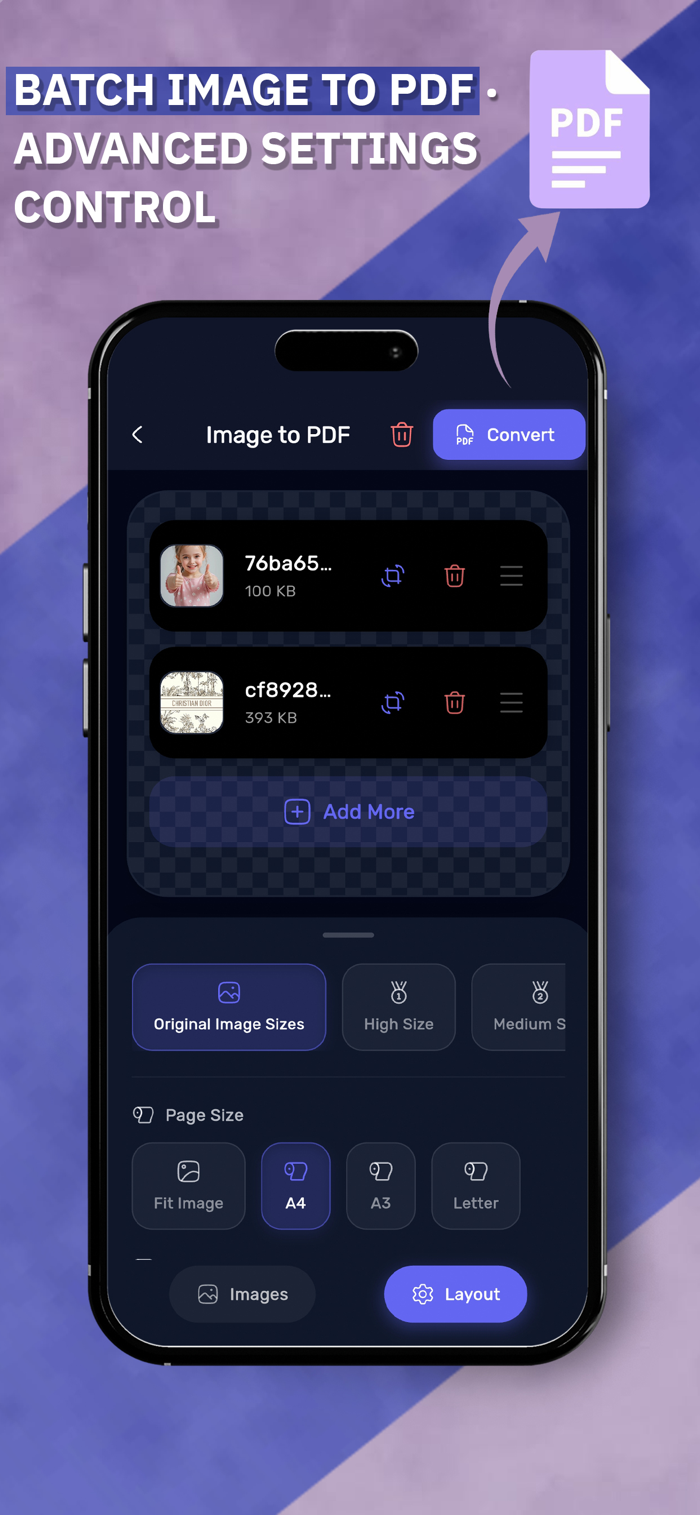
IMAGES TO PDF
Turn a stack of photos into a clean, shareable PDF.
Select, rotate, and reorder your images before converting
Choose from A3, A4, Letter, or original image size page formats
Apply High, Medium, or Low compression to control the final file size
BATCH WATERMARK
Protect your work across hundreds of images at once.
Add text or image watermarks to multiple photos simultaneously
Full control over position, rotation, and opacity
Consistent results across your entire batch in seconds
COLLAGE MAKER
Build photo collages your way, with full creative control.
Flexible layouts with per-image adjustments — resize, zoom, and flip each photo independently
Customize border radius and border color for each cell
Set any background color to match your style
PICTURE IN PICTURE
Layer photos freely on top of a background image.
Choose any photo as your base background
Drop, drag, and resize multiple photos on top of it freely
Build compositions, comparisons, or creative edits without limits
BATCH IMAGE COMPRESSOR
Shrink file sizes fast, without doing it one by one.
Process multiple images simultaneously
Set a target quality level or a specific file size per image
Great for clearing storage, speeding up uploads, or meeting platform requirements
FORMAT CONVERTER
Switch image formats without the hassle.
Convert between PNG, JPG, GIF, and more
Batch convert your whole library in a few taps
You control the output settings — no quality surprises
METADATA ANONYMIZER
Share photos without sharing hidden data.
Strips all EXIF metadata from your images instantly
Removes location data, device info, timestamps, and more
Your images look the same. The hidden data is gone.
WHY VUES?
Everything runs on your device — nothing is sent to any server
No account required, no login, no sign-up
All 10 tools in one place — no switching between apps
Vues is for photographers, small business owners, content creators, and anyone who handles images regularly and needs tools that simply work.
Your photos stay yours. Always.
Privacy Policy: https://haithmmek.com/vues_privacy
Terms of Service (EULA): https://www.apple.com/legal/internet-services/itunes/dev/stdeula/


 +100宝石


 分享
分享













用户评价
立即分享产品体验
你的真实体验,为其他用户提供宝贵参考
💎 分享获得宝石
【分享体验 · 获得宝石 · 增加抽奖机会】
将你的产品体验分享给更多人,获得更多宝石奖励!
💎 宝石奖励
每当有用户点击你分享的体验链接并点赞"对我有用",你将获得:
🔗 如何分享
复制下方专属链接,分享到社交媒体、群聊或好友:
💡 小贴士
分享时可以添加你的个人推荐语,让更多人了解这款产品的优点!
示例分享文案:
"推荐一款我最近体验过的应用,界面设计很精美,功能也很实用。有兴趣的朋友可以看看我的详细体验评价~"
关注 Mergeek 公众号
领奖遇到问题?联系小门助手